Identity & Access ManagementEnterprise Directory & SSOSearchable Audit Logs
The right people, the right sites, every action on record.
Give local teams, regional managers, and contractors the exact scope their job requires, and verify every request in one searchable audit trail.
Identity & Access Management (IAM) controls who can open which modules across your facilities, regions, and organisation, while Audit Logs record every request made by people, API keys, MCP clients, and Agents. Sign in out of the box with Google, Microsoft, Slack, Apple, or email and two-step verification, or talk to sales to connect Active Directory and other enterprise directory integrations.
- Active Directory & Enterprise SSO (POA)
- Maintained Role Templates & Custom Roles
- Facility · Region · Organisation Scopes
- Dual-Admin Bulk Approvals
- Attributed Web, API, MCP & Agent Logs
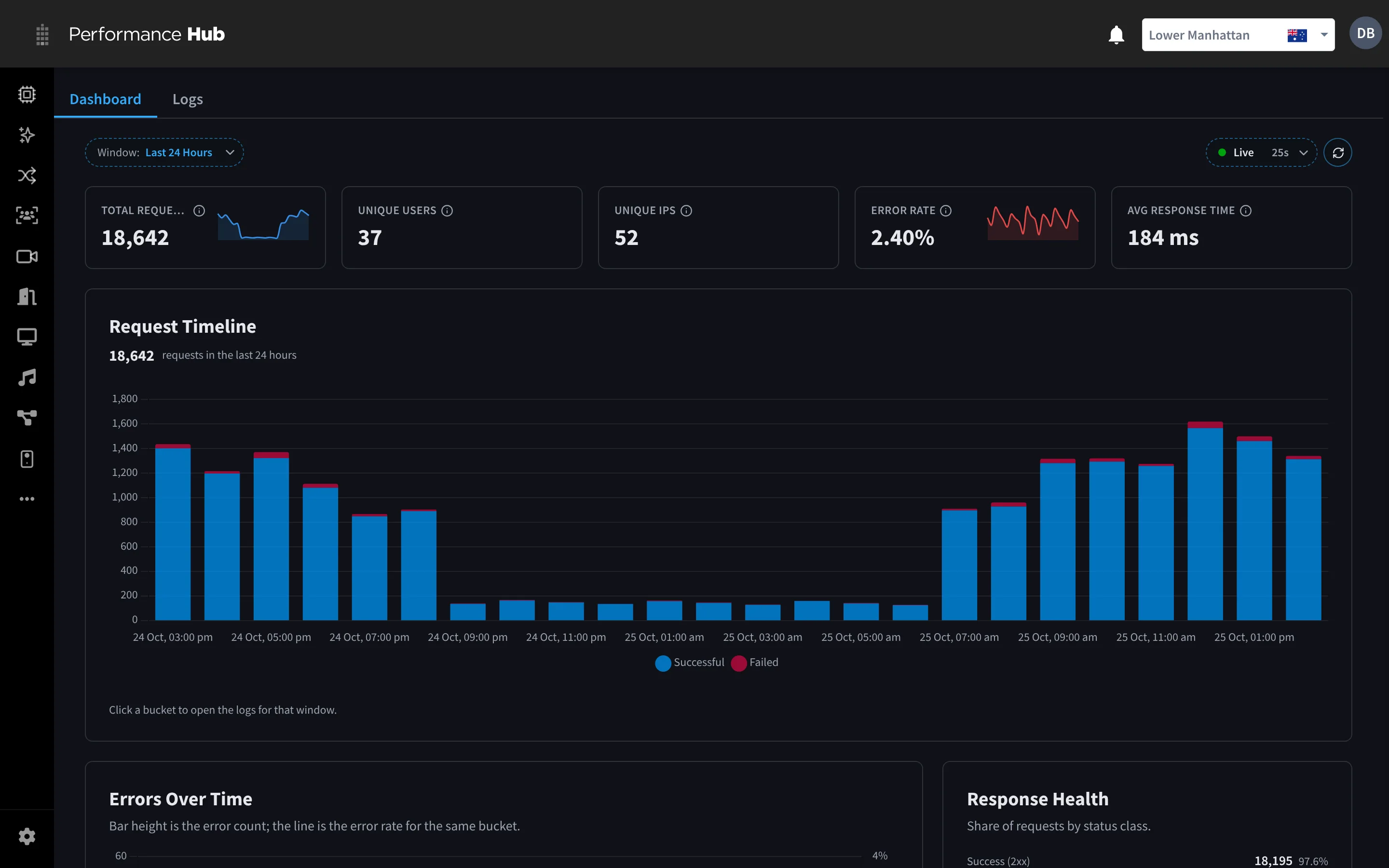
Settings · Audit Logs · Live Organisation Dashboard
Web · API · MCP · Agent AttributionAuthenticationTwo-Factor VerificationActive Directory & Enterprise SSO
Sign in out of the box, or connect Active Directory and your enterprise directory.
There is no public self-sign-up in Performance Hub: every user is invited by an administrator or provisioned through your organisation. Start immediately with built-in sign-in providers and role-enforced verification codes, or deploy Active Directory and enterprise directory integrations with our engineering team.
Built-In Sign-In & Two-Factor Verification
Included on Every AccountFederated sign-in, email login, and mandatory role verification codes.
Invite staff, contractors, or regional managers by email and let them sign in immediately using the workplace accounts they already have.
- Single sign-on out of the box: Sign in with Google, Microsoft, Slack, or Apple, or with email and password.
- Force 2-Step Authentication per role: Turn on Force 2-Step Authentication on any high-privilege role (such as Organisation Administrators, security staff, or roles that can unlock doors remotely) so holders must enter a verification code sent to their mobile number or email on every sign-in.
- Multi-organisation accounts: A single Performance Hub account can hold roles in more than one organisation and switch between them without separate logins.
Active Directory & Enterprise Directory Integrations
Enterprise · POAConnect Active Directory and enterprise identity providers to Performance Hub.
For organisations that centralise identity, access lifecycle, and conditional-access policies in a corporate directory, Performance Hub supports Active Directory and other enterprise directory integrations alongside custom SAML / OIDC Single Sign-On.
- Active Directory & enterprise directories: Integrate Active Directory (including Microsoft Entra ID / Azure AD), Okta, Google Workspace, and other enterprise directory and identity providers.
- Centralised corporate governance: Keep authentication aligned with your corporate identity policies, multi-factor enforcement, and joiner/mover/leaver workflows across every site.
- Guided enterprise deployment (POA): Configured and maintained with our team as an Enterprise feature, priced on application (POA). Contact sales to scope your directory integration.
Identity & Access ManagementRole TemplatesFour Access ScopesModule Access
Give someone the keys to their job without giving them the keys to everything.
Match permissions to how your teams actually work: a front-desk coordinator at one clinic, a store manager for a single retail branch, a campus IT lead across an entire state, or a group operations director across the whole organisation.
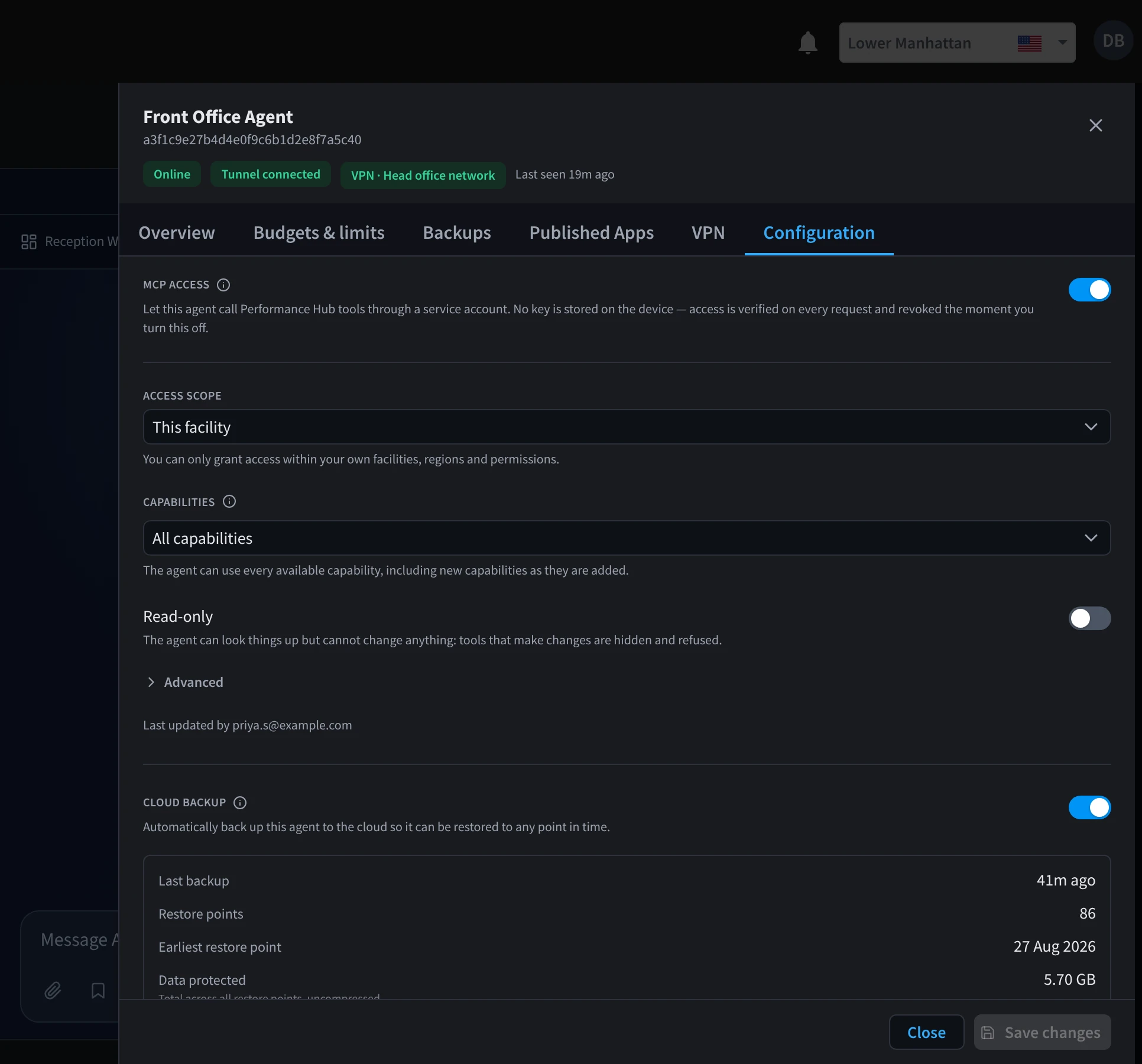
Identity & Access Management · Scope & Module Access
Facility · Region · Org ScopesChosen per user
Reusable across sitesDefine one Store Manager or Venue Duty Manager role and pick the specific facility or region each time you assign the role to a person.
Facilities
Fixed site listBind a role to a specific set of locations, such as a Clinic Coordinator covering two neighbouring medical practices.
Regions
Grows with your estateCover every facility in selected states or countries, automatically including new facilities added to those regions later.
Organisation
Group-wideGrant access across every facility and region in the organisation for executive, compliance, and central operations leads.
Maintained Role Templates vs. Custom Roles.
Roles TabPerformance Hub role templates are ready-made roles kept up to date automatically as new modules are released. Use them as they are, click Customise to clone a copy your organisation owns, Hide templates you do not use, or create custom roles from scratch.
Module Access: Only selected vs. All except.
Least PrivilegeChoose Only selected modules for focused front-of-house roles (so new modules stay hidden until approved) or All modules except for site managers who should receive new operational modules automatically while remaining blocked from Billing or Audit Logs.
User Permissions table, filters & CSV export.
Directory ViewSee everyone in your organisation with their assigned roles, facility or region scopes, tags, login providers, last active timestamp, and date added. Filter by Role, Facility, Region, or Login Provider, hold Shift to range-select users, or export the list to CSV.
Dual-admin Bulk Requests & Approvals.
Two-Person RuleLarge user removals are hard to undo, so removing a large batch of people from your organisation at once requires a second Organisation Administrator to review the affected users and approve the request before any change takes effect.
Audit LogsLive DashboardRequest InspectorAI Error SummaryCSV Export
Every human, API key, MCP client, and Agent request attributed and searchable.
Whether you are investigating who unlocked a loading-bay door after hours, why a permission check returned 403 Forbidden, or what an external integration sent, Audit Logs gives you both high-level anomaly charts and request-by-request evidence.
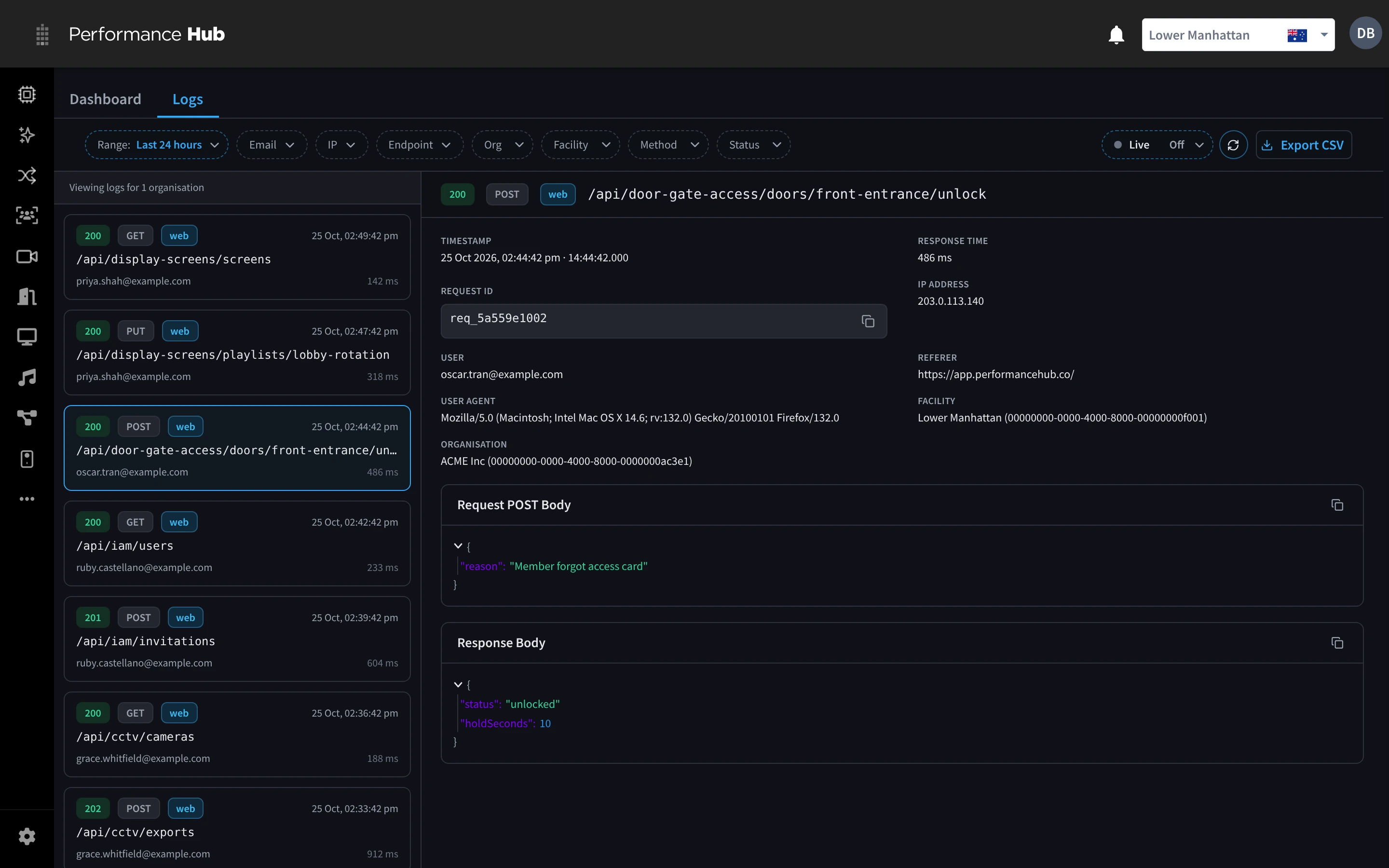
Settings · Audit Logs · Logs Tab & Request Payload Inspector
Search · Filter · Inspect · CSV ExportLive Dashboard with one-click drill-down.
Dashboard TabView Total Requests, Unique Users, Unique IPs, Error Rate, and Avg Response Time with live countdown refresh. Click any time bucket on Request Timeline or Errors Over Time, or click any row in Top Endpoints or Top Users, to open the matching requests on the Logs tab.
Source badges across people, APIs, MCP & Agents.
Complete AttributionEvery log entry records the user email, source IP, user agent, facility, organisation, HTTP method, endpoint, status code (2xx, 3xx, 4xx, 5xx), and millisecond response time, tagged by source (web, api-key, mcp, model-router, websocket, or guest-token).
Request & response payload inspection.
Payload EvidenceOpen any log entry to inspect its unique Request ID, Request POST Body (such as the reason entered for a door unlock or the updated hours saved for a site), Response Body, and Query Parameters, with one-click section copy for support or security reviews.
Plain-language AI Error Summary & CSV export.
Fast TriageOn any failed request (400 or above), click Generate summary in the AI Error Summary panel to get a plain-English explanation of why the request failed and what to check next. Share filtered log views by link or download loaded rows to CSV.
Single Sign-On · Active Directory (Enterprise) · Audited MCP Clients
Sign in with the identity providers you trust. Audit every client that connects.
Sign in with Google, Microsoft, Slack, or Apple out of the box, connect Active Directory (Microsoft Entra ID / Azure AD), Okta, and enterprise SAML/OIDC directories (Enterprise, POA), and inspect every web, API key, and MCP client request in Audit Logs.
 Microsoft Entra ID / Active Directory
 Google Workspace
 Slack
 Apple
 Model Context Protocol (MCP)
 Cursor
 Microsoft Copilot Studio
 1Password
 Cloudflare
Separation of DutiesPlatform IAM vs. Physical Doors vs. Restricted Agents
Clear security boundaries across console admin, physical entry, and private Agents.
Performance Hub separates administrative console access from physical building entry and confidential executive or clinical Agent workspaces so granting one never accidentally grants the others.
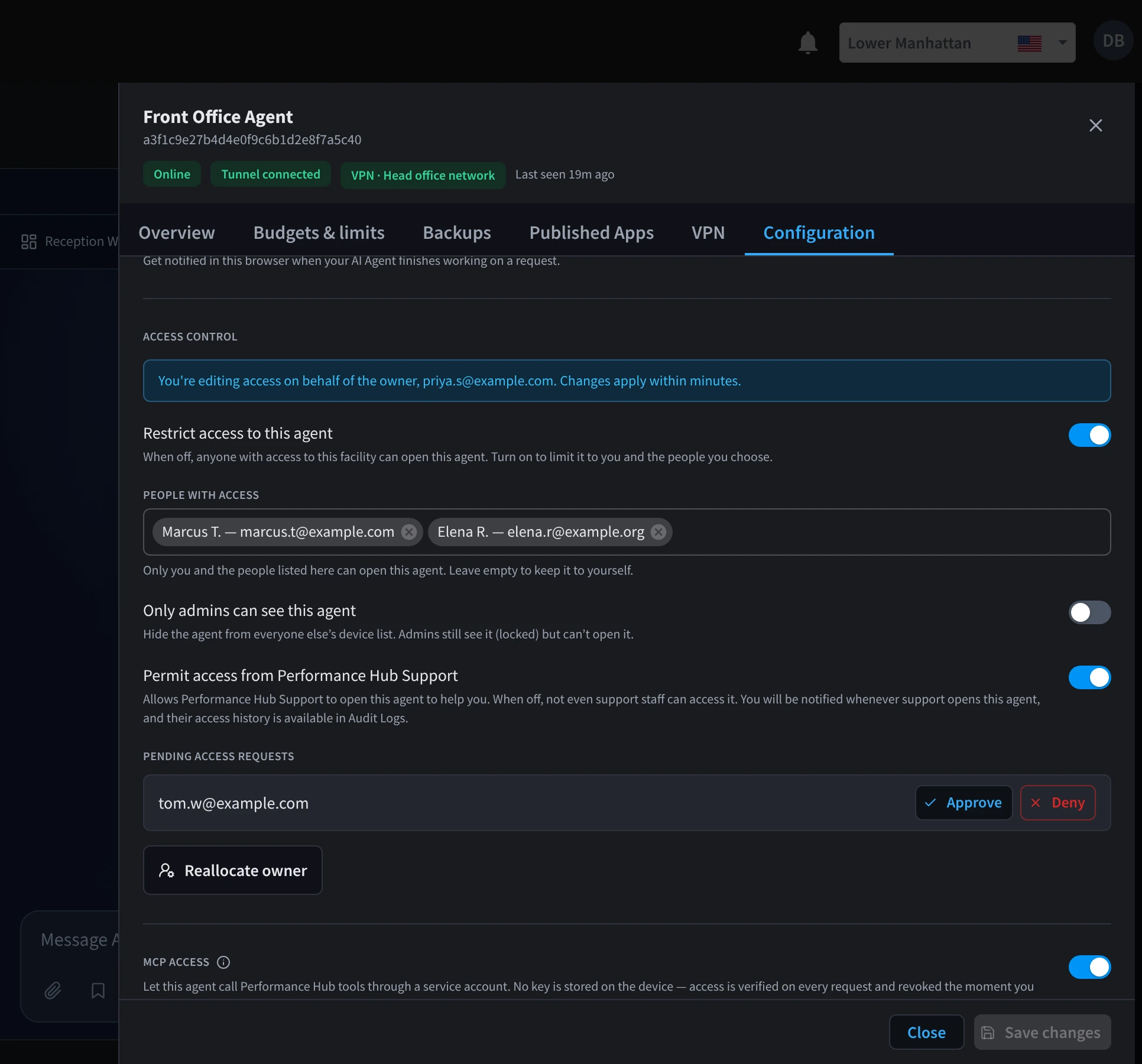
Agent Access Control · Private Allowlist & Support Kill Switch
Strict Privacy BoundaryGrant attenuation enforced on every call.
Zero Privilege EscalationNo administrator can grant another user, API key, Published App, or Agent more facility or module scope than they hold themselves. Every request is verified centrally against the facility-to-brand-to-organisation hierarchy.
Separate from physical Door & Gate Access policies.
Physical Entry BoundaryIAM roles govern who can sign in and administer Performance Hub modules. Physical door, gate, and turnstile entry is governed independently by Door & Gate Access policies, time windows, and brand staff-access rules.
Private Agent allowlists & Support kill switch.
Confidential WorkspacesIn the Agent module, turning on Restrict access to this agent isolates chats, files, skills, and backups to the Owner and a named allowlist (non-listed admins see only a Backup health card), with an independent Permit access from Performance Hub Support toggle.
Restricted Audit Logs visibility.
Auditor Role ControlBecause Audit Logs display user email addresses, IP addresses, and request payloads, the module is only visible to roles granted both Audit Logs and Identity & Access Management (included on the Organisation Administrator template and excluded from standard site roles by default).
Common QuestionsIdentity, Roles, Active Directory & Audit Logs
Common questions.
Answers on Active Directory and enterprise SSO, role templates and access scopes, Audit Logs inspection, and security boundaries.
Does Performance Hub support Active Directory and enterprise SSO?
Yes. Out of the box, every account supports signing in with Google, Microsoft, Slack, Apple, or email and password with two-factor authentication. Connecting Active Directory (such as Microsoft Entra ID / Azure AD), Okta, Google Workspace, and other enterprise directory and SAML / OIDC integrations is an Enterprise feature, priced on application (POA). Talk to sales to scope and configure it for your organisation.
How do Role Templates and the four Access Scopes work?
Performance Hub role templates are ready-made roles maintained by Performance Hub (including automatic access to new modules as they release). You can assign them directly, clone one into a customised copy your organisation owns, or build custom roles from scratch. Every role sets its Access Scope (Chosen per user, Facilities, Regions, or Organisation) and its Module Access (Only selected modules or All modules except).
Can we require two-factor authentication for specific roles, or dual approval for bulk removals?
Yes. Enabling Force 2-Step Authentication on any role requires every holder of that role to enter a 6-digit verification code sent by SMS or email at every sign-in. In addition, removing a large batch of users from your organisation at once triggers Bulk requests & approvals, requiring a second Organisation Administrator to review and approve the request before any change runs.
What do Audit Logs record across users, APIs, MCP clients, and Agents?
Audit Logs record requests made to Performance Hub by people in the browser or apps (web), Partner and platform API keys (api-key), external AI tools and facility Agents connected over MCP (mcp), and the Model Router (model-router). Each entry captures who made the request, source IP, user agent, facility, HTTP method, endpoint, status code, millisecond latency, and request/response payloads, plus an on-demand AI Error Summary for failed requests.