Music that follows your opening hours.
Audio Control lets you manage music playback across your facility's Sonos speakers directly from Performance Hub. See what is playing, switch Sonos Favourites, and automate start/stop times, playlists, and volume levels around your staffed and extended operating hours.
Guided setup included: our team configures your first site, schedules, and hardware with you.
Direct Sonos playback & Favourites
View active tracks, play/pause, adjust volume, and launch any saved Sonos Favourite across your speakers without leaving Performance Hub.
Driven by facility operating hours
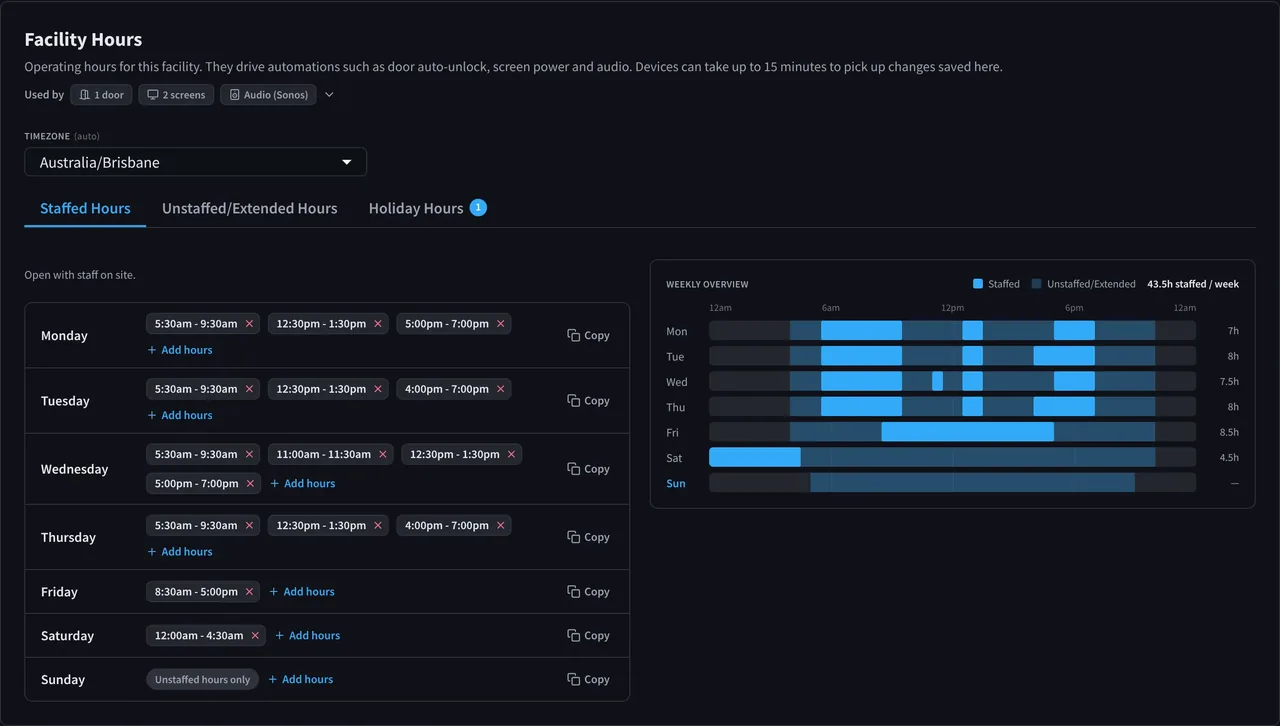
Start music before opening, stop after closing, and wake audio automatically when someone checks in during unstaffed/extended hours.
Dead Air Detection & volume schedules
Automatically resume playback if music stops unexpectedly, and schedule distinct volume curves and playlists across each day of the week.
Set the soundtrack once. Let the building run it.
01
Hours-linked start, stop & check-in wake
Start music automatically before your doors open and stop after closing. During unstaffed or extended hours, wake playback the moment someone checks in at the door and pause automatically once the space is quiet again.
Explore Operating Hours02
Dead Air Detection
If playback stops unexpectedly during operating hours, Dead Air Detection automatically resumes the current playlist or loads your default music source.
See hospitality audio03
Staffed vs. Extended volume & time-block schedules
Set separate target volumes for busy staffed hours and quieter extended hours, or schedule day-parted volume curves across the day, with a simple one-click override whenever front-of-house staff need a temporary adjustment.
See retail audio04
Weekly Music Source Schedule
Schedule your saved Sonos Favourites to transition automatically across the week, from morning acoustic to midday upbeat and evening lounge, with proactive alerts if a scheduled playlist ever changes in Sonos.
Explore Display ScreensSonos Integration · Sonos Favourites · Local LAN Controller · AirPlay
Built natively for the Sonos speakers in your ceiling and on your walls.
Audio Control dispatches commands to your facility's Sonos speakers over the local network through a paired Display Screen Player, syncing your saved Sonos Favourites automatically with zero extra audio hardware.
 AirPlay (Apple)
 Spotify
 SoundCloud
Connect your speakers in four steps.
01
Pair a Display Screen Player
A Display Screen Player on the same local network acts as the bridge to your facility's Sonos speakers.
02
Save Sonos Favourites
Playlists, stations, and tracks saved in your Sonos app sync automatically into the Audio Control Favourites list.
03
Link to facility hours
Configure start/stop offsets, extended-hours check-in wake, Dead Air Detection, and speaker grouping exclusions.
04
Set volume & source schedules
Define staffed and extended volume levels and weekly playlist schedules, or override volume until end of day when needed.
Hybrid SaaS · AI Native · Plug-and-Play Hardware
One hybrid, AI-native architecture across every site.
Every module shares the same cloud control plane, operating hours, IAM roles, and outbound-only appliance architecture, and can be driven by Enterprise Grade Hermes or any MCP client.
Hybrid SaaS control plane
Set Staffed, Unstaffed/Extended, and Holiday Hours once in the cloud while pre-configured on-site appliances execute locally over outbound-only connections.
Platform & operating hoursAI-native over MCP & Agent
Drive every feature over MCP (`https://app.performancehub.co/mcp`) under your own permissions, or ask Enterprise Grade Hermes to publish live apps so teams talk to their data.
Turnkey on-site hardware
Pair processors, controllers, display players, and duress buttons in minutes by QR or pairing code, and manage your fleet from one cloud inventory.
The rest of the platform.
Also on the platform
Common questions.
Does Audio Control require separate audio hardware?
Audio Control works with your existing Sonos speakers and sends commands through a paired Display Screen Player on the same local network.
What happens if we change our facility's opening hours?
Music start and stop times and operating-period volumes follow your facility's Staffed, Unstaffed/Extended, and Holiday Hours automatically as soon as your schedule is updated.