Published Apps & Public SitesBuilt & Hosted by Your Agent
Describe the app or website you need. Launch it in minutes.
Replace one-off software subscriptions and agency builds with custom internal tools, live Smart Displays, and customer-facing Public Sites built from a single chat.
Built directly on the Agent you already run, Published Apps turns a plain-language conversation into a live web application hosted on your Physical Agent or Cloud Agent, with no separate server or deploy pipeline to manage. Open it from the Performance Hub side menu, on desktop and Mobile, on in-venue Display Screens, or on the public internet with its own secure subdomain from us or your own custom domains.
- Built & hosted on your Agent
- Performance Hub side menu
- Desktop, Mobile & Display Screens
- Secure subdomain & custom domains
- Zero visitor AI credit spend
Replace point subscriptions and agency builds. Stop paying recurring fees or waiting on external developers for booking pages, visitor boards, room schedules, stock lookups, and multi-site dashboards your Agent can build on the spot.
One app reaching staff, screens, and customers. Publish to the Performance Hub side menu for signed-in staff, open in the desktop app and Mobile, push to in-venue Display Screens, or launch on the web as an HTTPS Public Site.
Always current, with changes in plain English. Ask for a wider chart, a seasonal menu, or a new booking field in the same chat and watch the live app update beside the conversation, backed by automatic health checks and self-repair.
Business OutcomesBuilt on Your AgentNo Extra Servers or Subscriptions
Stop buying another subscription for every tool and microsite.
Every physical operation ends up juggling single-purpose SaaS subscriptions, disconnected spreadsheets, and agency-built microsites that go stale the week they launch. Because Published Apps is built on the Agent you already run, your team can launch tailored software in minutes, connect it to live facility data over MCP, and deliver branded experiences at every location.
Consolidate Software Spend
Replace one-off subscriptions and agency builds.
Retire standalone vendor tools for visitor sign-in, room availability, stock lookups, promotional landing pages, and regional trackers. Build and host the exact workflow your operation needs directly on your Agent.
Idea to Live in Minutes
Launch a customer site or internal tool from a chat.
Describe what the app should show and who it is for. Your Agent builds the application, starts it on its own Physical or Cloud Agent, and docks a live preview right beside the conversation.
Zero Developer Bottlenecks
Make changes anytime without a developer.
Need a bigger clock, a new form field, or a layout tweak? Ask in the same chat ("give the chart a wider layout", "add tomorrow's room bookings") and your menu, screens, and Public Site serve the update immediately.
Live Operational Context
Keep content always current from live site data.
Unlike static templates or manually exported slides, apps on your Agent can query live Performance Hub modules and Connected Apps over MCP so occupancy, wait times, menus, and dashboards stay accurate automatically.
Multi-Site Consistency
Branded experiences at every location.
Give every clinic, office lobby, hotel, retail store, or regional hub a polished, on-brand digital experience tailored to its local operating hours, rooms, and promotions.
Always-On Reliability
One app reaching staff, customers, and screens.
Every published app runs with Health checks & auto-repair on by default. Your Agent monitors the app around the clock, restarts or repairs it if needed, and serves staff, Display Screens, and web visitors from one place.
Multi-Industry App ShowcaseBuilt From a Chat Across Every Sector
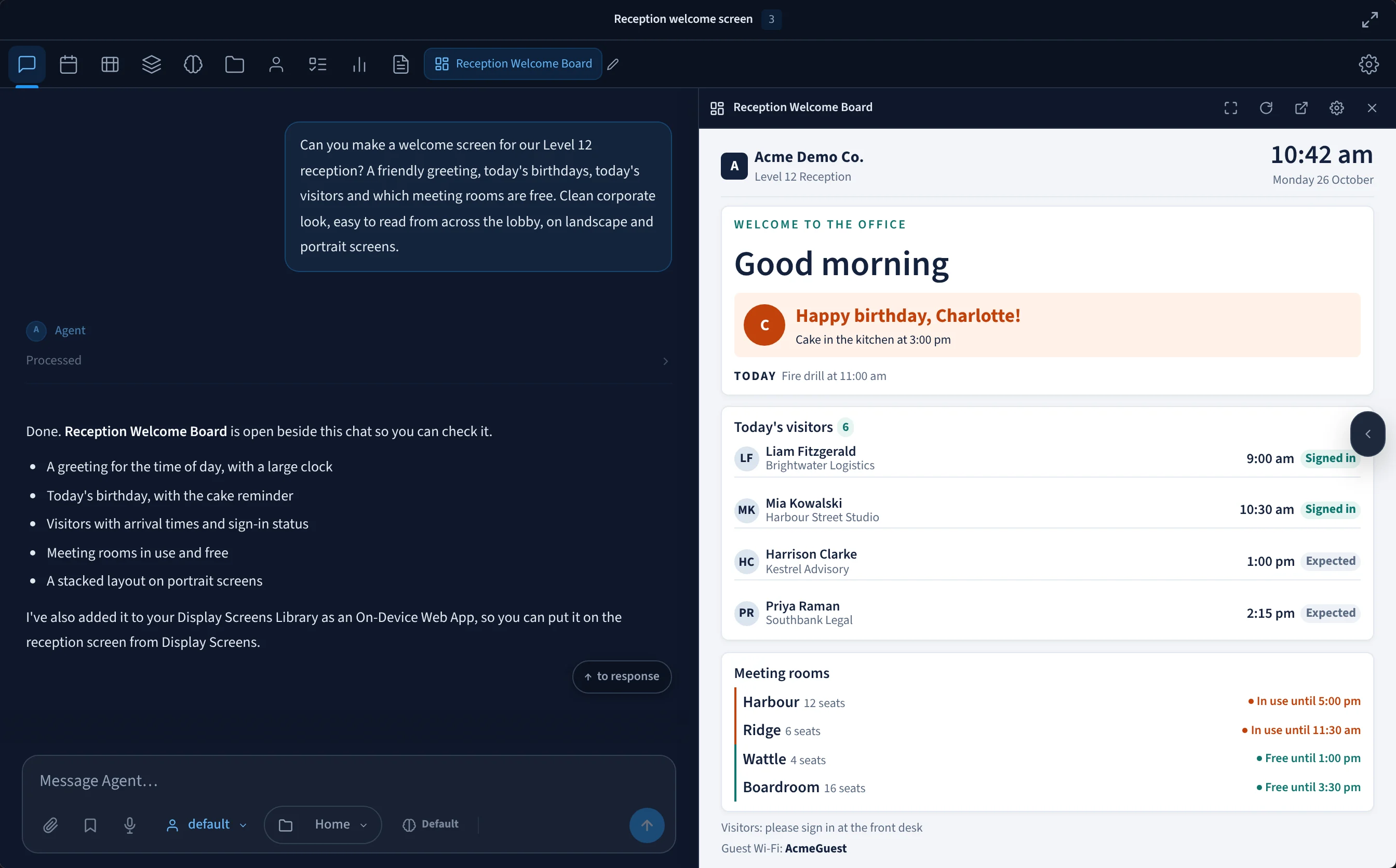
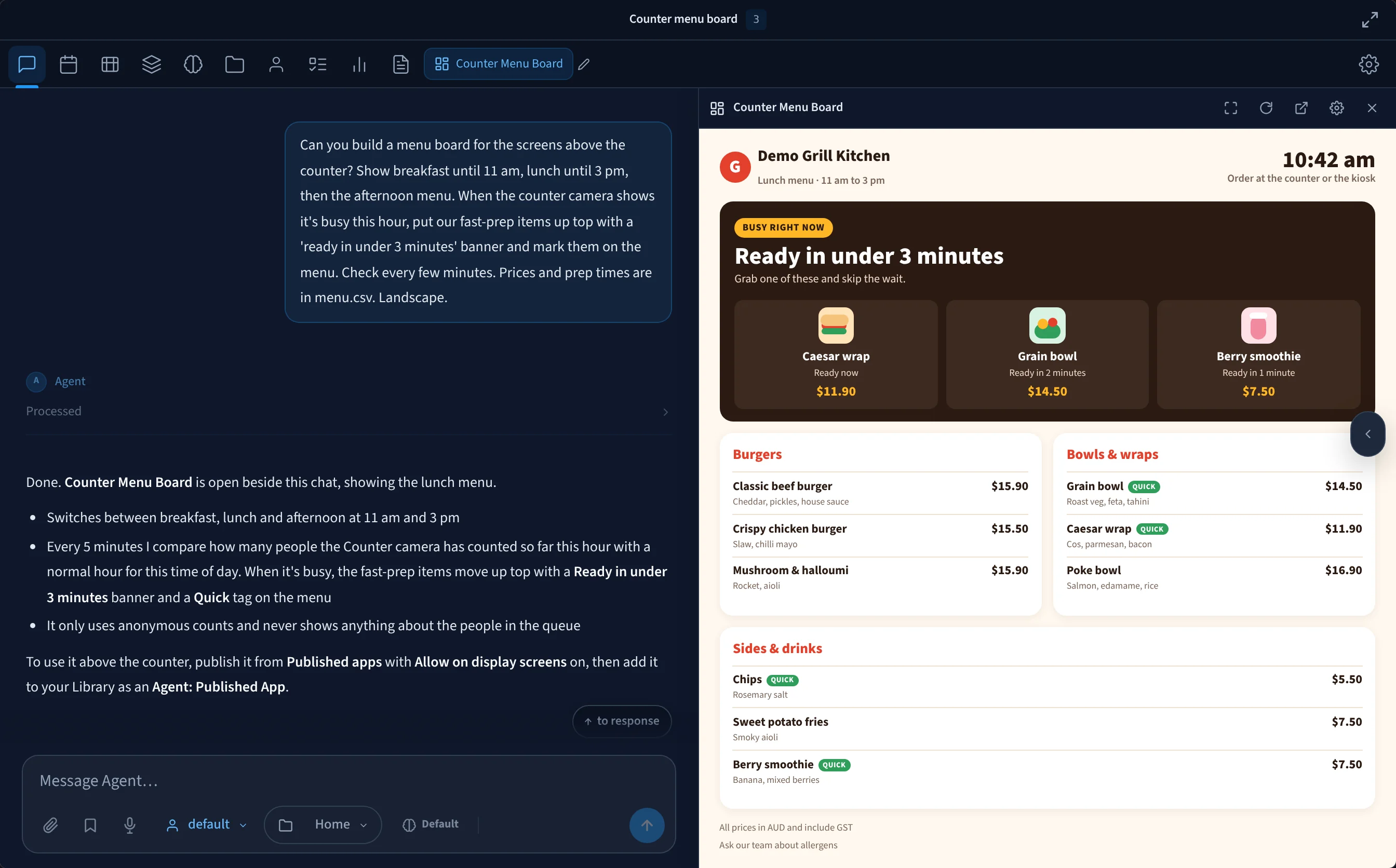
Built from a chat across offices, hospitality, healthcare, retail, and multi-site operations.
Describe what the application should display and how it should behave. Your Agent builds it, opens a live preview beside the conversation, and keeps it running.
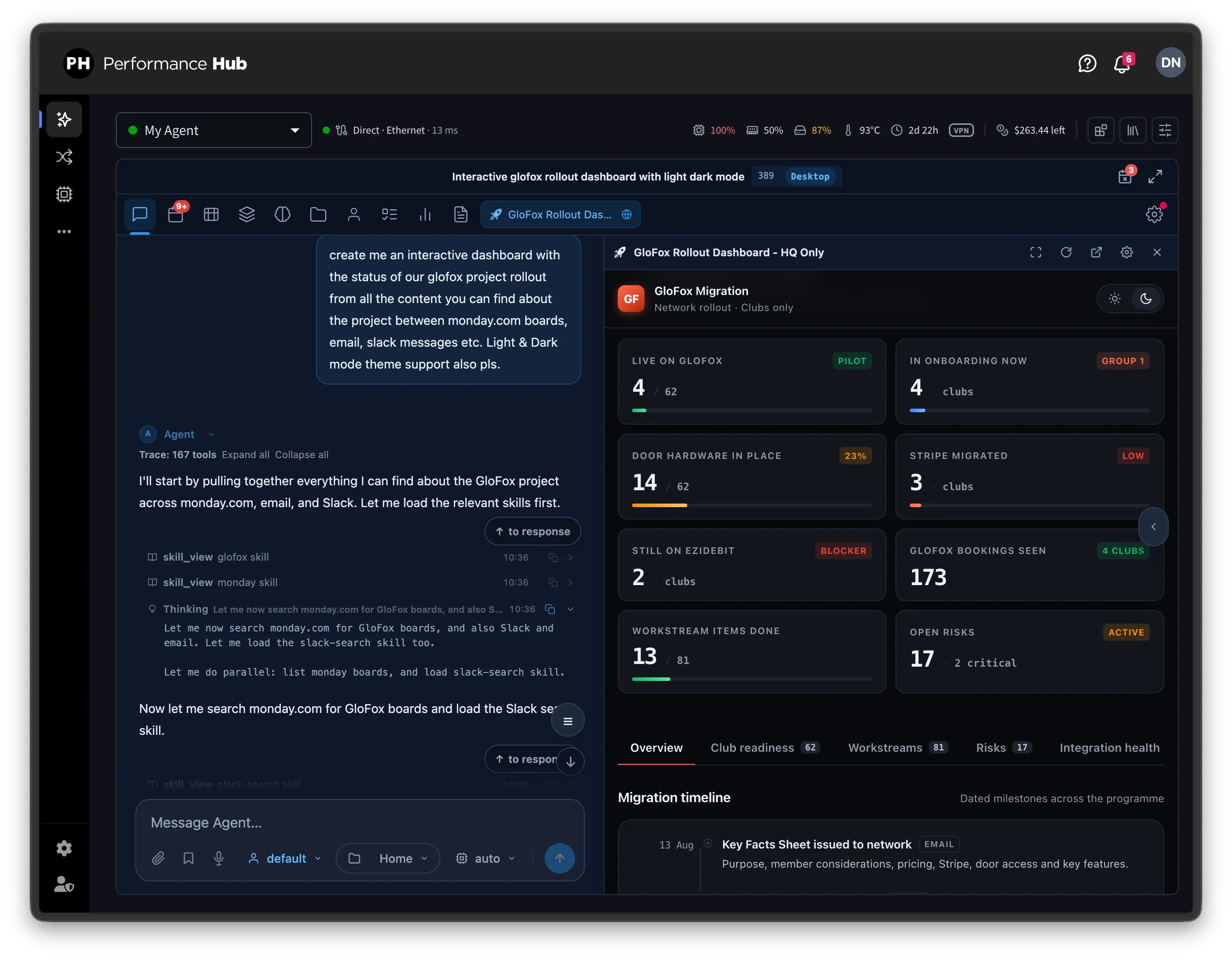
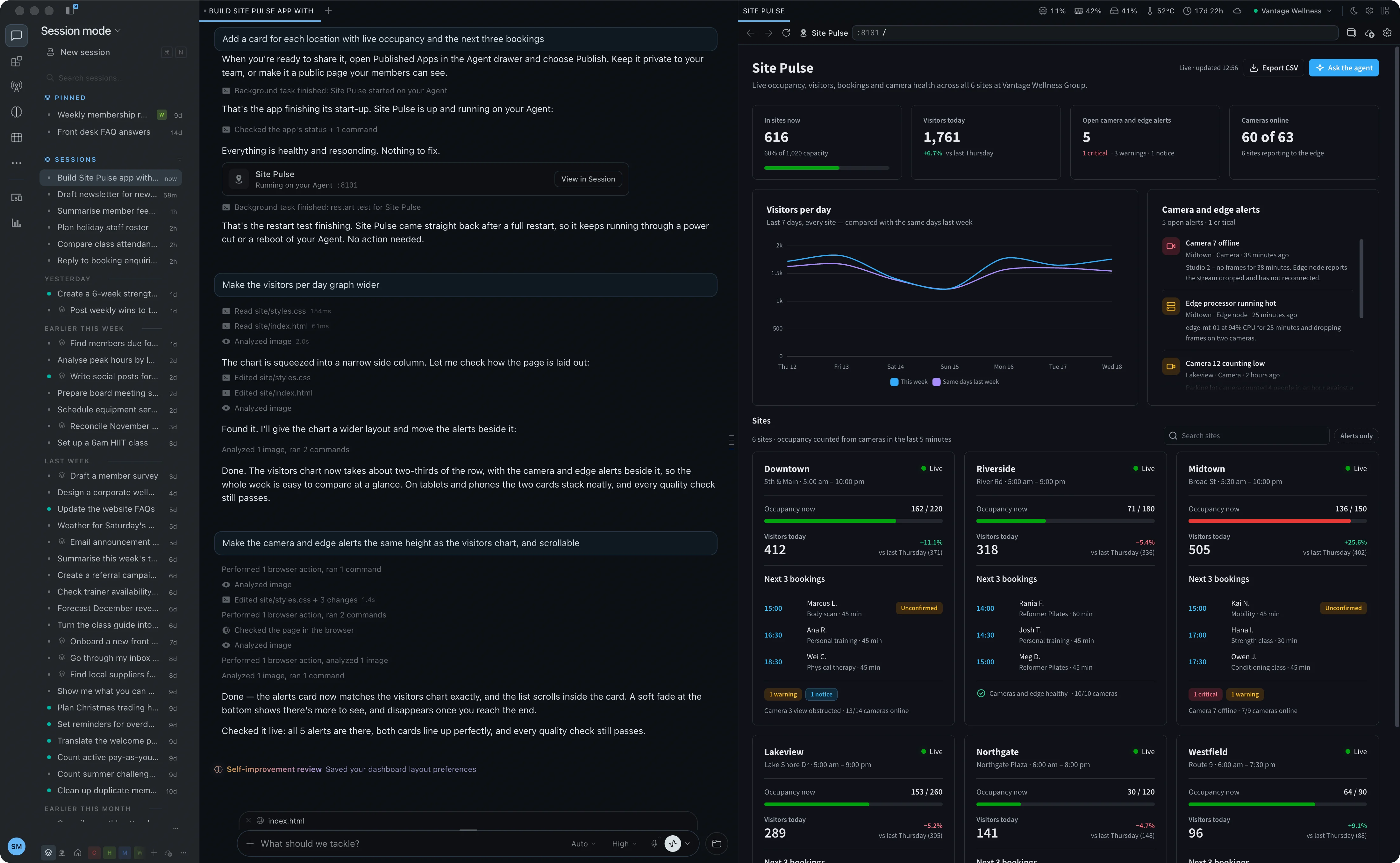
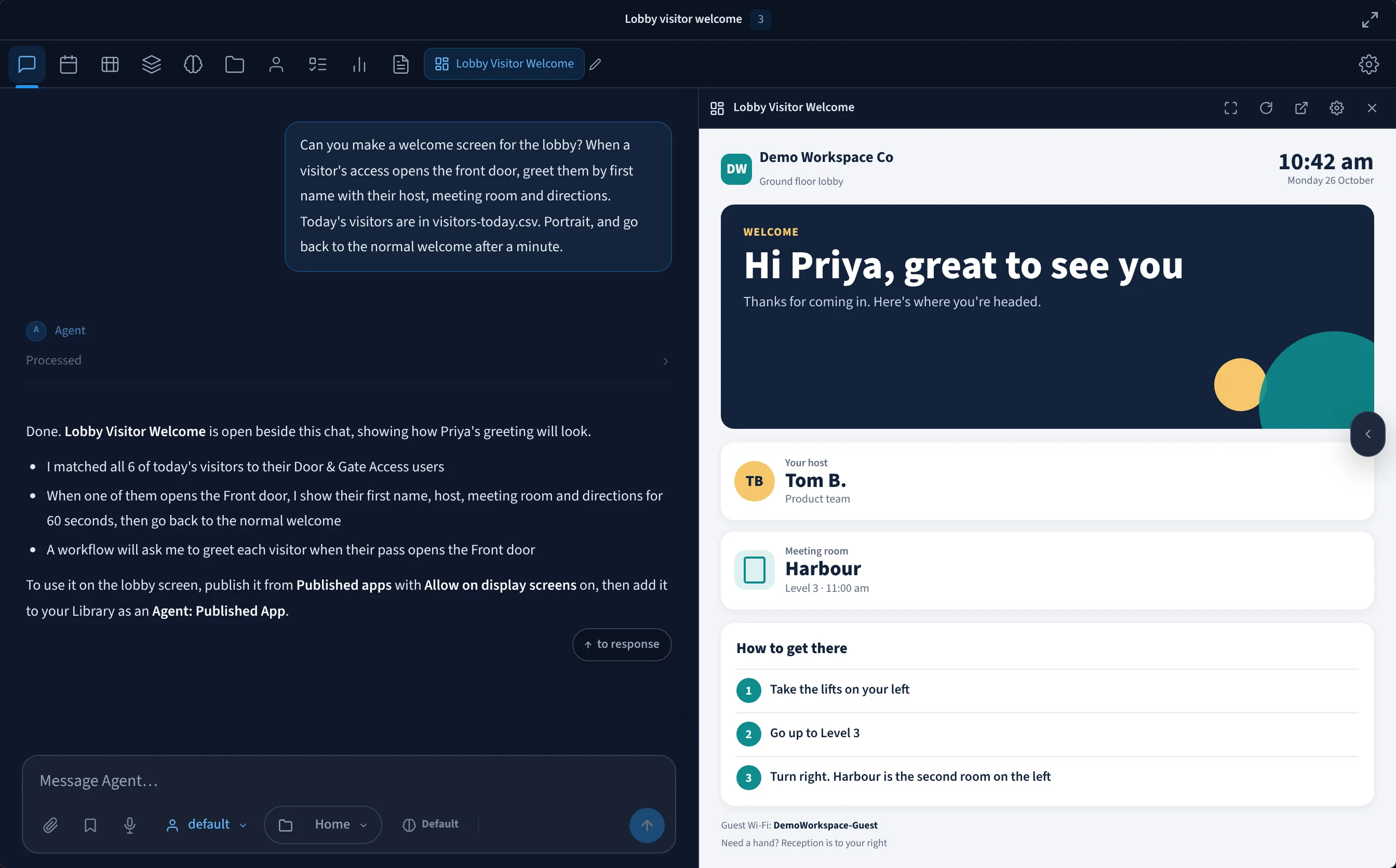
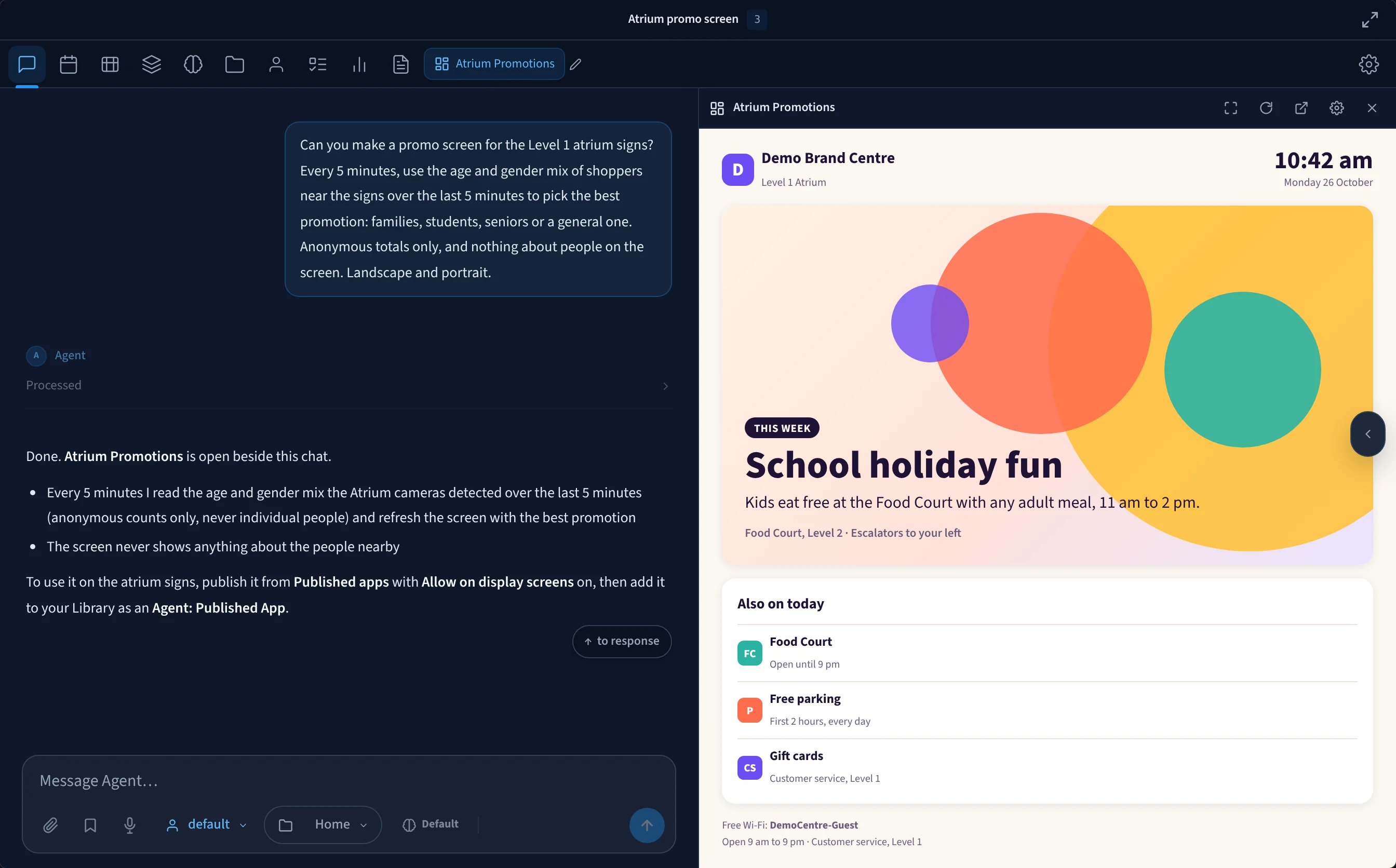
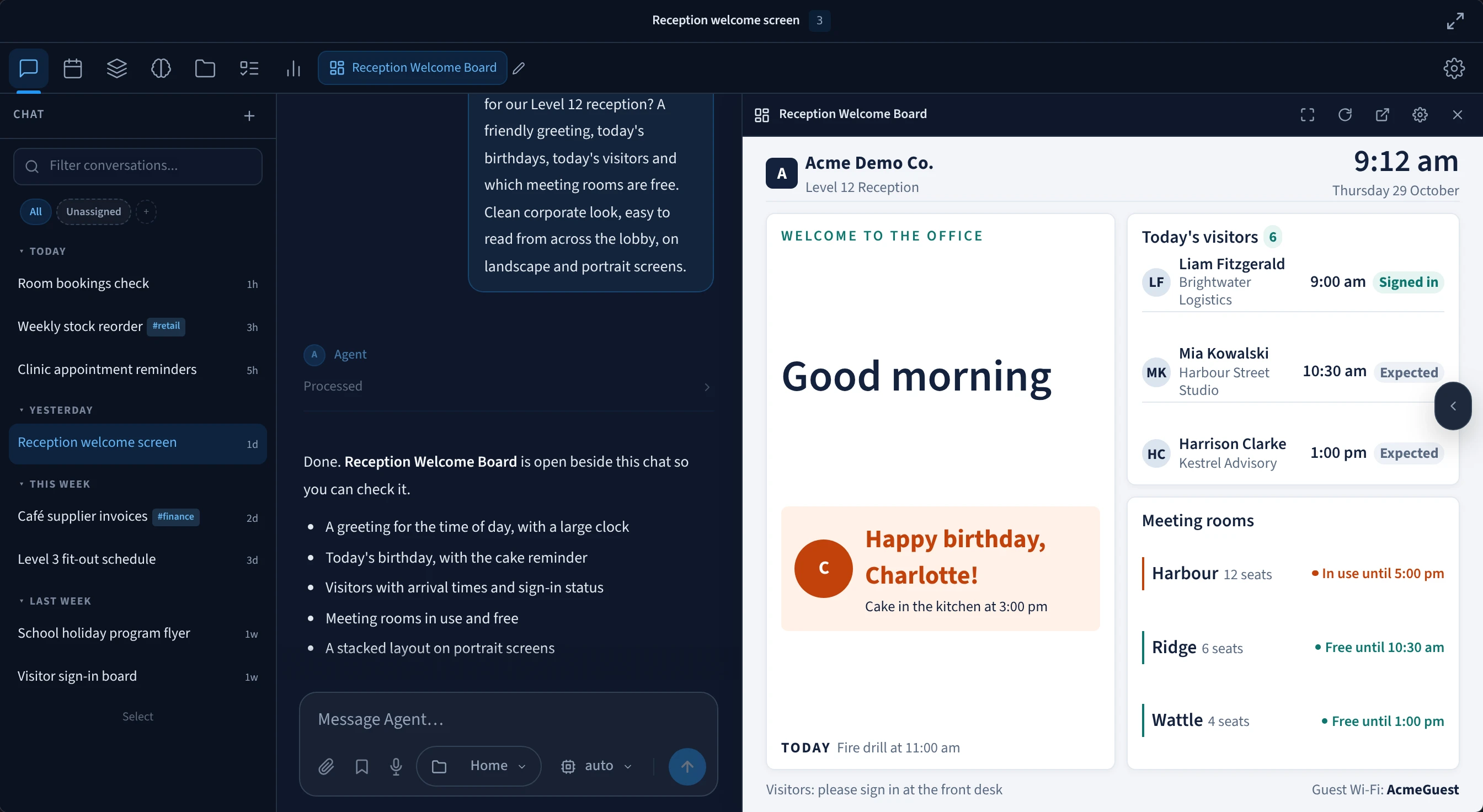
Agent Conversation & Live App · Multi-Site Operations
Multi-Site Groups, Healthcare & FranchisesMulti-Site Groups, Healthcare & Franchises
Live multi-site operations, occupancy, bookings, and rollout dashboards.
Regional managers and operations leads build live multi-site command dashboards, clinic waiting-room boards with approximate wait times, store stock lookups, and rollout trackers that query live Performance Hub modules and Connected Apps over MCP.
Ask your Agent in chat
“Build a live multi-site operations dashboard across our locations showing current occupancy, daily visitors, upcoming bookings, and active alerts, and dock it beside the chat.”
Delivery Surfaces · Choose Any Combination Per App
Menu publishing, screen publishing, and internet publishing are independent choicesPerformance Hub Side Menu
Publish internal tools to yourself, specific people, a single facility, selected sites, a brand, or your whole organisation.
Desktop App & Mobile
Open in a session or dedicated desktop window, pin to your side menu, and work with your Agent from Mobile.
Smart Displays (Live)
Runs live on the Agent and adapts to site events, check-ins, door passes, and anonymous camera counts.
Public Sites (HTTPS)
Open or password-protected HTTPS sites with an automatic secure subdomain from us and your own custom domains.
Published Apps & Public Sites Runtime · Built & Hosted on the Same Agent
Included with the Agent · Zero visitor AI spendLive Services Split View
Dock any running web app beside the chat, drag the divider, and refine layouts in plain words.
Any Web Stack or Container
Static HTML/CSS/JS, a Python service, a React front end with an API, or your own container.
Health Checks & Auto-Repair
On by default. Automatically restarts or repairs stopped services without interrupting active chats.
Isolated App Containers
Checked on every public request. Locked-down container reaches the internet only, never your LAN.
The Agent Foundation · Physical Agent On-Site or Cloud Agent in Your Region
Powered by your facility's Agent, live Performance Hub MCP access, and Connected Apps
Compute & Storage
Runs on a fanless on-site **Agent Processor** (Physical Agent) or an always-on **Cloud Agent** in your chosen Cloud region, with hourly encrypted backups.
Live Facility Data Over MCP
Scoped access to doors and gates, cameras, people and space insights, Display Screens, Duress, Audio, check-ins, and operating schedules.
Outbound-Only Tunnel & Connected Apps
Connects to email, calendar, CRM, and files via **Connected Apps**, and serves remote and public traffic over its existing **outbound-only** tunnel.
Everywhere It RunsSide MenuLive ServicesDesktop & MobileDisplay ScreensPublic Sites
One web app. Five ways people open and run it.
Build an app once with your Agent and make it available wherever your staff, visitors, or customers need it: listed in the Performance Hub side menu, docked in Live Services beside your chat, pinned in the desktop app and controlled from Mobile, shown on in-venue Display Screens, or published to the web as a Public Site.
Performance Hub Side Menu & Published Apps Tab
Performance Hub TabPerformance Hub Side Menu & Published Apps Tab
Add apps to the Performance Hub side menu and manage every audience from one tab.
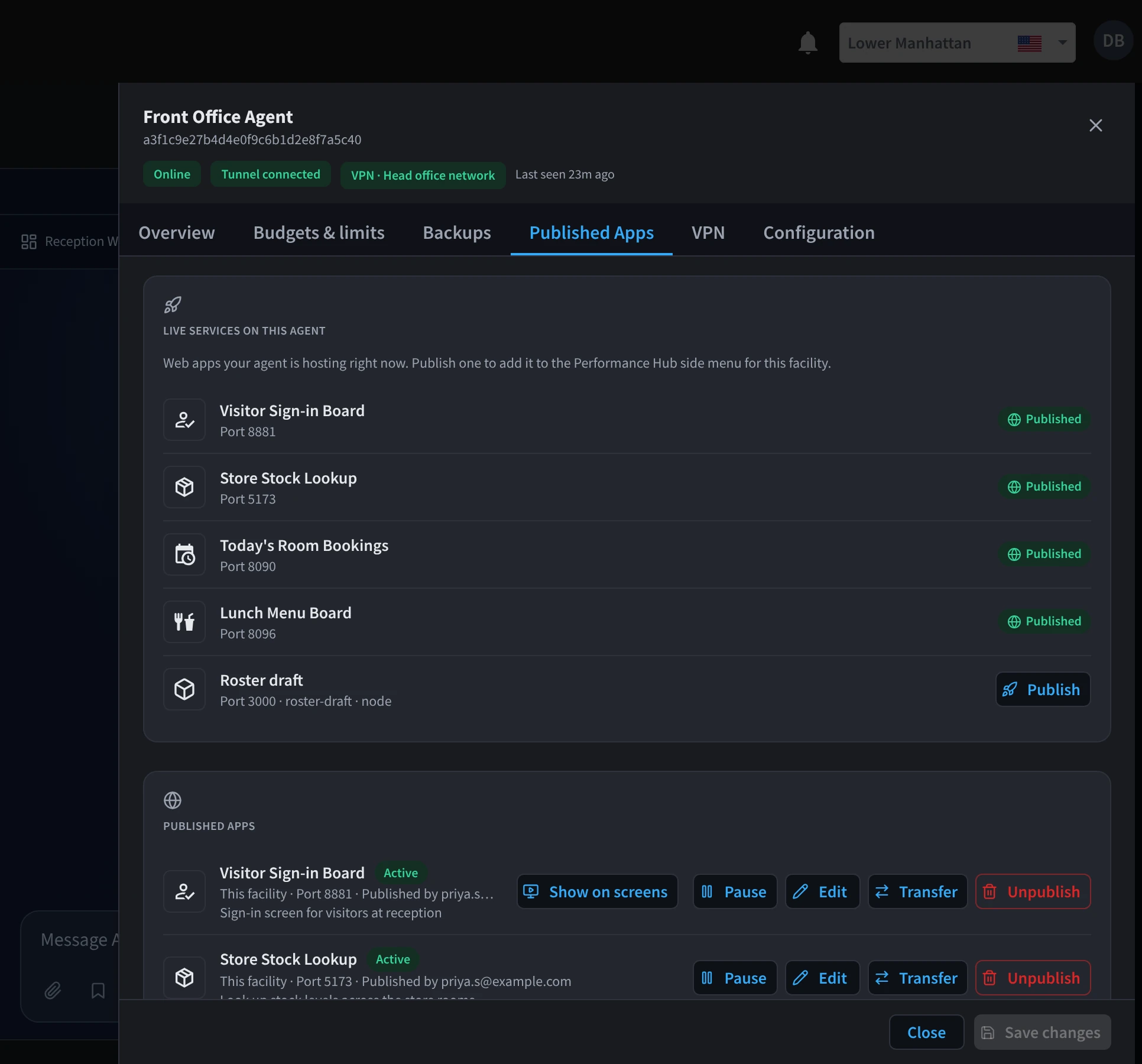
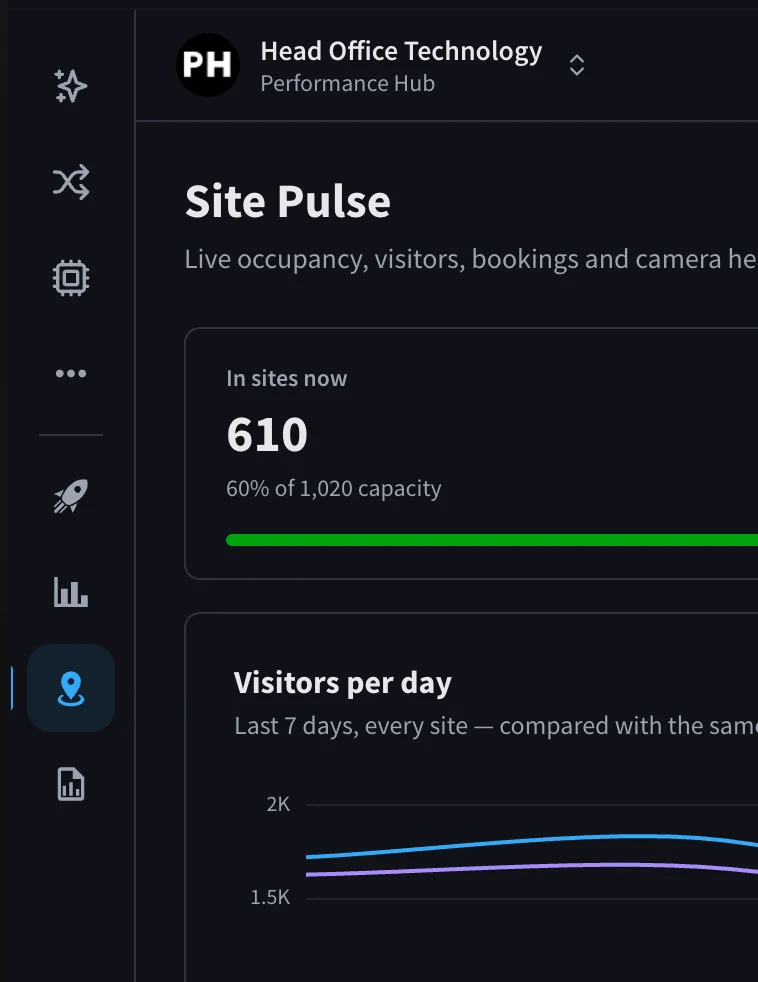
Publish any running web app so signed-in staff can open it straight from the Performance Hub side menu inside their role scope, and manage every live service and published app from the Published Apps tab in Device management.
- Listed in the Performance Hub side menu: Once published, the app appears with its chosen name and icon in the Performance Hub side navigation for everyone in its selected audience.
- Role-scoped visibility across your organisation: Share with Only me (testing), Specific people, This facility (default), Selected facilities, Whole brand, or Entire organisation.
- Full lifecycle controls on every row: Click Show on screens, Pause or Resume, Edit, Transfer to a new owner, Unpublish (which removes only the menu entry while the app keeps running), or Public site.
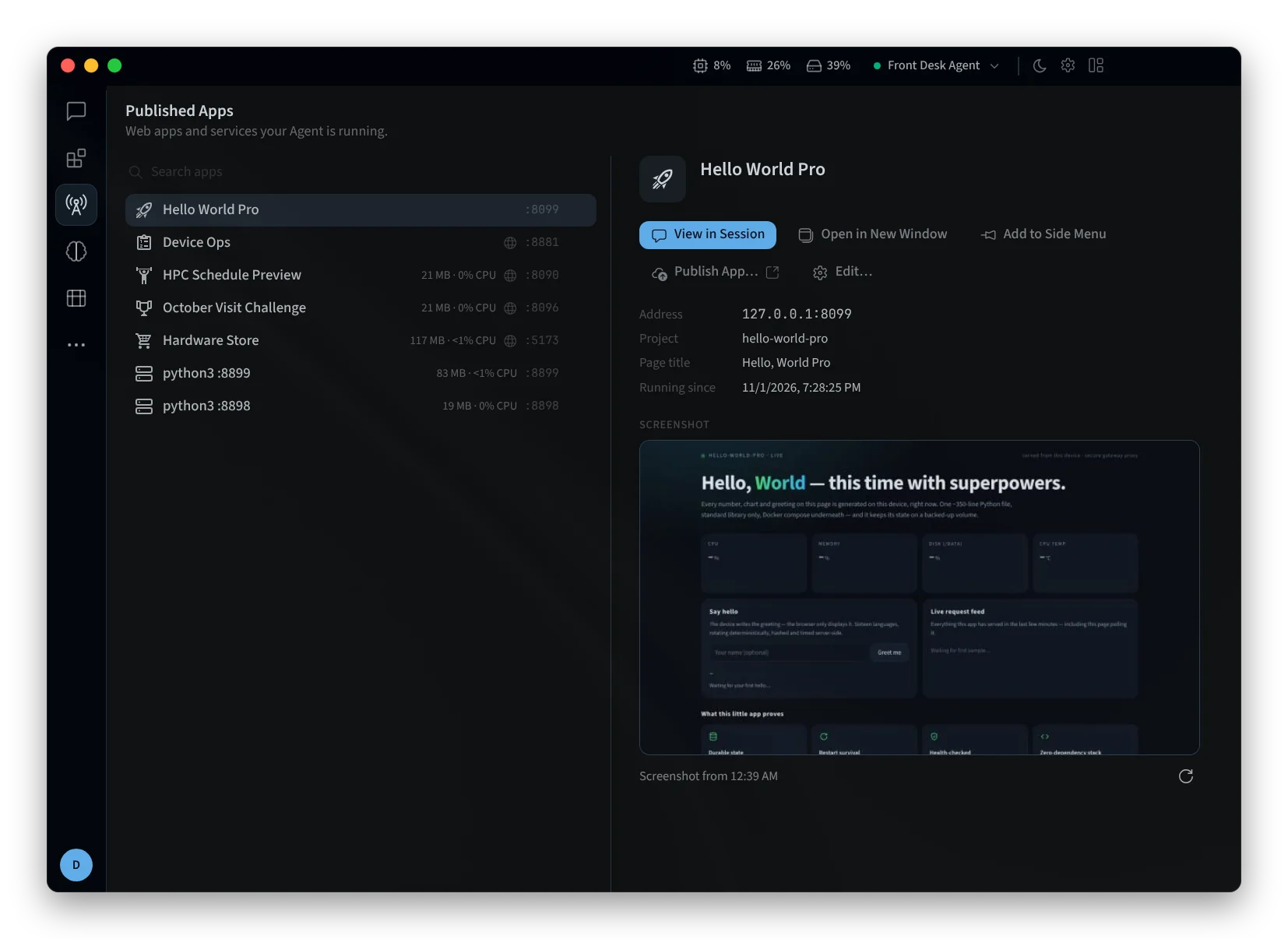
Role-scoped menu audiences inside Performance Hub
When you publish an app to the Performance Hub side menu, you choose exactly who sees it there. An audience can never be wider than your own access:
Only me (testing)
Private to you while you build and review the app before sharing.
Specific people
Named colleagues who sign in to Performance Hub.
This facility
The default scope for staff at a single location.
Selected facilities
Chosen sites across a region or operating group.
Whole brand
Every facility operating under that brand (requires org-level access).
Entire organisation
Every facility across your organisation (requires org-level access).
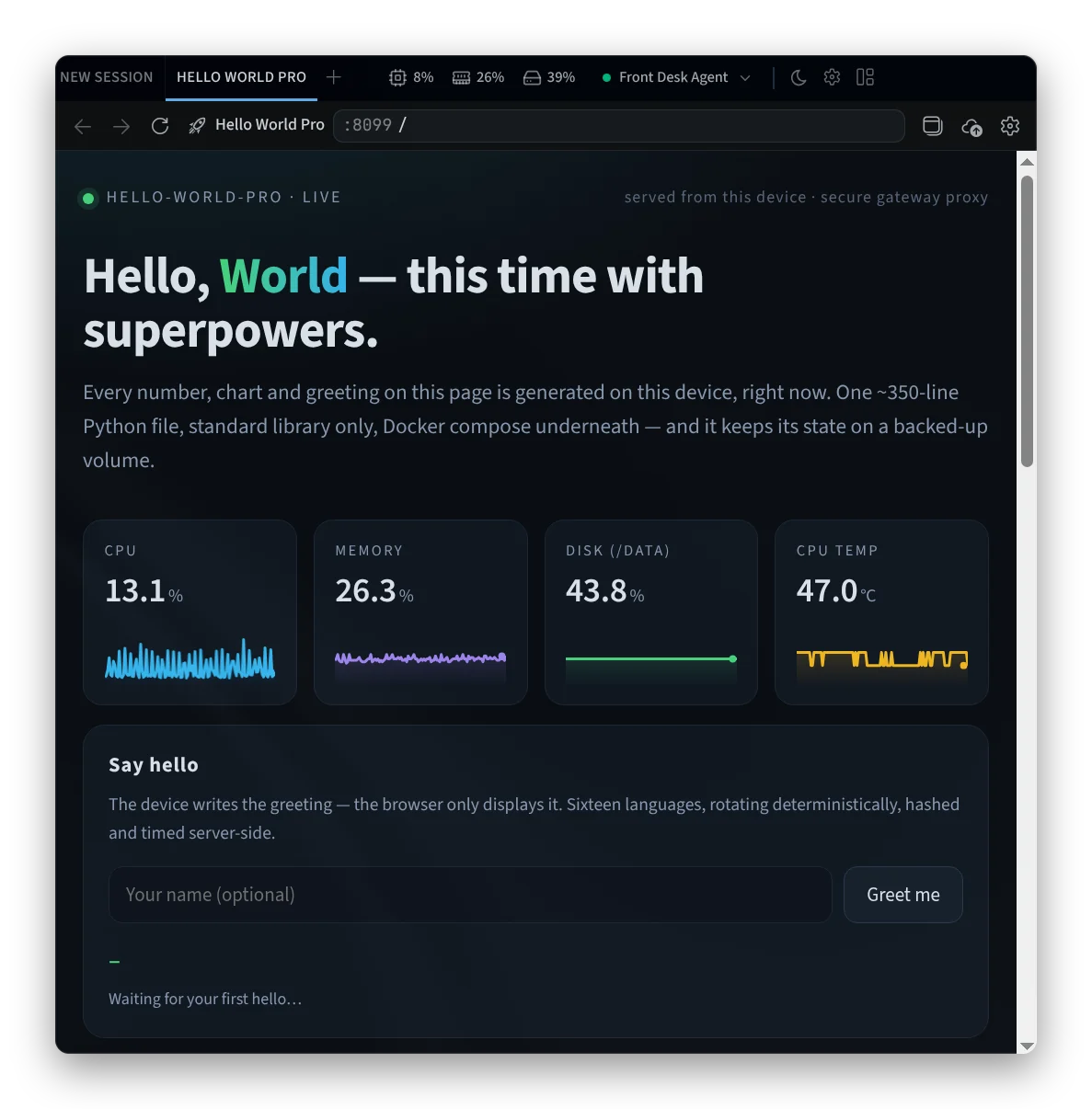
Desktop App · Open Published App Tab with Back, Forward & Reload
Desktop & Mobile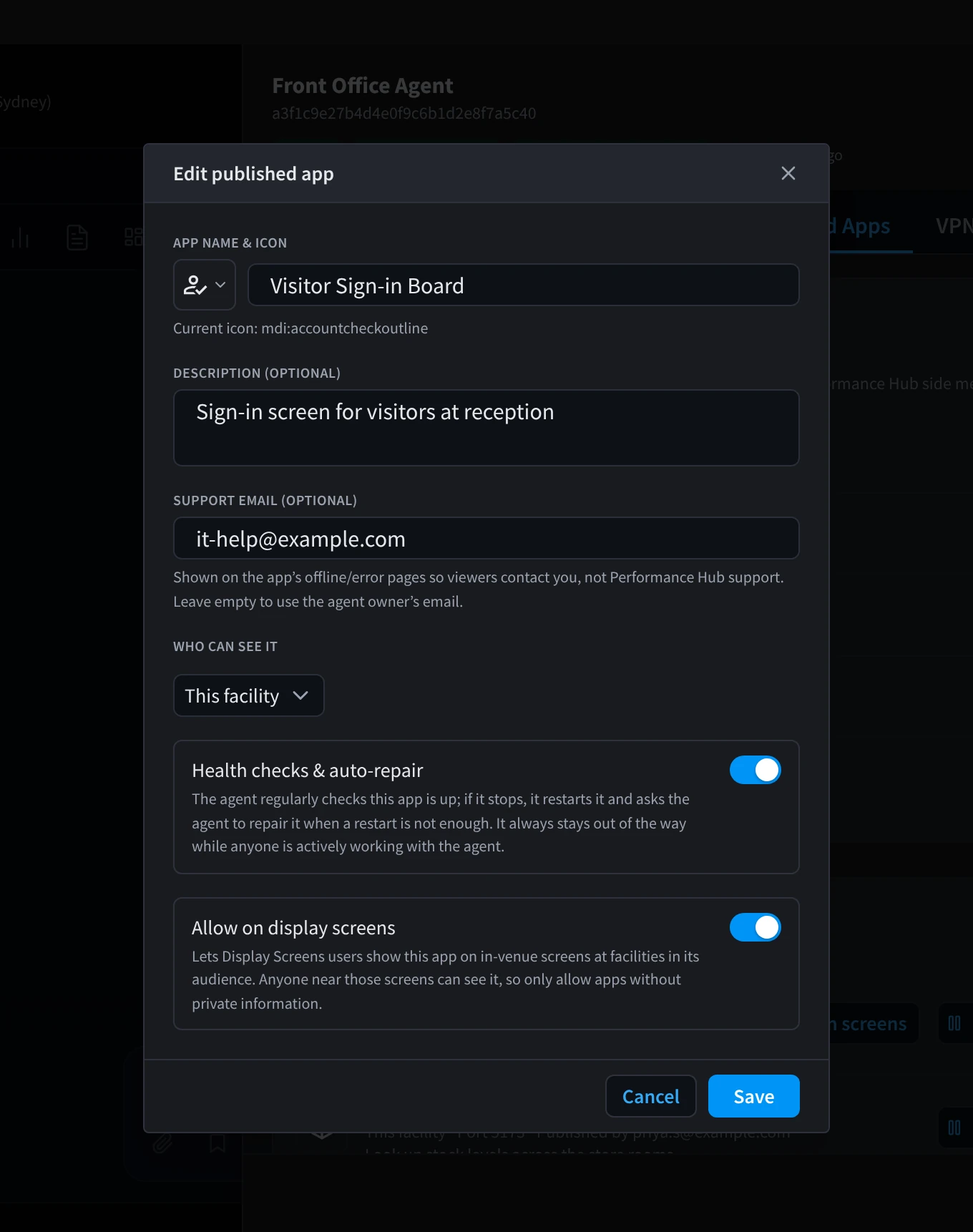
Edit Published App · Support Email, Health Checks & Display Screens
Auto-Repair OnPublic SitesCustomer-Facing Websites & Portals Hosted by Your Agent
Launch customer-facing websites and portals. Only when a person turns them on.
Turn any published app into a live HTTPS website that customers, patients, guests, or partners can open in any browser without a Performance Hub account. Every Public Site automatically gets its own secure subdomain from us, and you can connect your own custom domains with automatic HTTPS. A dental clinic can launch a patient booking page, a hotel can share a password-protected event guide, a property group can publish a leasing portal, and a café can put its live menu on the web.
Published Apps Tab · Live Public Site Status Chips
Every live site shows its HTTPS address and whether it is open or password-protected.


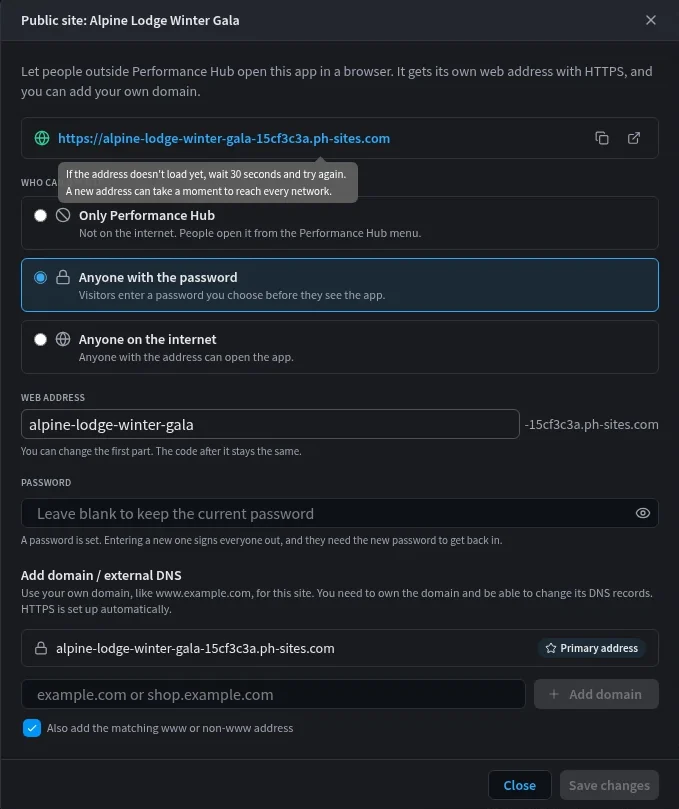
Three audience modes for every Public Site
Build the app with your Agent, review it in the Performance Hub menu the way your team will, and open Public site when you are ready. Only Performance Hub is always the default:
Default · Off the internet
Only Performance Hub
“Not on the internet. People open it from the Performance Hub menu.”
Keep staff rosters, stock lookups, and internal operational boards private to signed-in staff. Selecting Only Performance Hub on a live site also takes it off the internet immediately while keeping its address, password, and custom domains ready for later.
Shared password · No-index
Anyone with the password
“Visitors enter a password you choose before they see the app.”
Ideal for VIP event pages like Alpine Lodge Winter Gala, client property shortlists, or contractor portals. Protected by a shared password stored only as a salted hash (never visible to Performance Hub staff), with automatic brute-force protection, secure HTTP-only visitor sessions, and noindex so search engines stay out.
Open HTTPS · Indexable
Anyone on the internet
“Anyone with the address can open the app.”
Ideal for clinic booking pages, restaurant and café menus, retail promotions, and venue directories. Visitors open a fast HTTPS page in any browser, and search engines can index it.
Instant HTTPS AddressCustom DomainsRedirect Preservation
An automatic secure subdomain from us, plus your own custom domains.
- Instant secure subdomain from us: Every Public Site automatically gets its own secure HTTPS subdomain from us as soon as you turn it on, combining the readable prefix you choose with a permanent unique code.
- Connect your own custom domains with automatic HTTPS: Serve your site on your own brand domain or subdomain without transferring your domain or changing its nameservers.
- Separate cookie domain for security: Public Sites are served from a dedicated domain separate from Performance Hub, so a public site can never read a Performance Hub sign-in cookie.
- Seamless address renames: If you rename a site's address prefix, the previous address automatically redirects to the new one and preserves the URL path so shared links keep working.
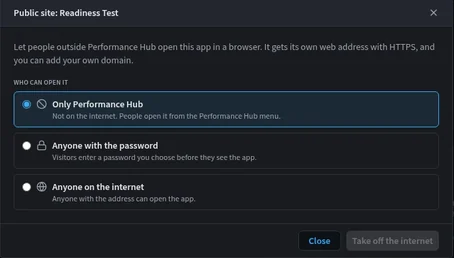
Public Site Dialog · Who Can Open It
Only Performance Hub DefaultHuman-in-the-Loop GovernanceExplicit AcknowledgementAudit Logs
Only a person can put a site on the internet. The Agent cannot.
Your Agent can build the app, list the site, and re-check a custom domain, but the Agent cannot turn a site on, change the address or password, or add a domain. Only the person who published the app (with Agent access at that facility) can put a site on the internet after ticking the explicit acknowledgement.
- No prompt can bypass the human gate: Put on the internet stays disabled in the interface until a person ticks the acknowledgement.
- Owner and admin notifications: Whenever a site goes on or off the internet, the app owner and organisation administrators are notified by email, in the notification bell, and by push.
- Full Audit Logs trail: Turning a site on or off, changing the audience, address, or password, and adding or removing a custom domain are all recorded in Performance Hub Audit Logs.
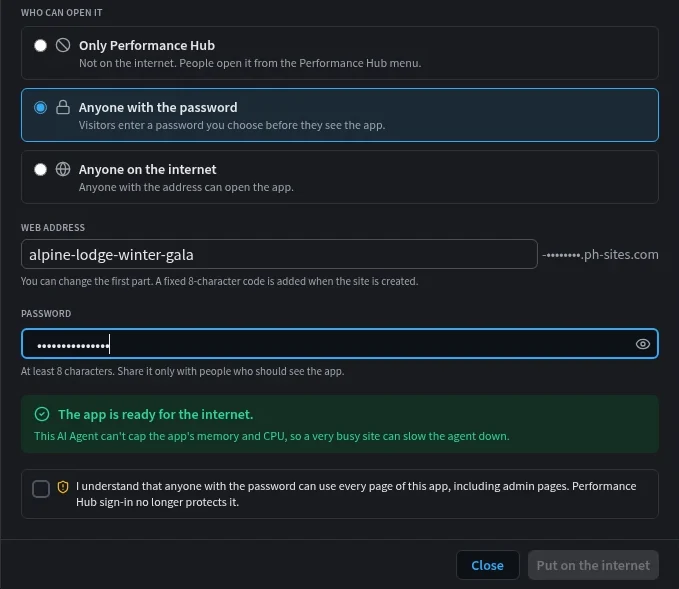
Public Site Setup · Password, Readiness Check & Human Acknowledgement
Person RequiredDisplay Screens IntegrationLive Smart DisplaysAgent: Published Apps
Put your Agent's apps on every TV in the building.
Replace static slide decks and manual USB updates with signage built in chat. Turn on Allow on display screens on any public-safe Published App so it appears in your Display Screens Library as a live Smart Display (Agent: Published App), ready for playlists, schedules, and instant screen takeovers across your facility.
How a Published App runs on your Display Screens
| Capability | Agent: Published App (Smart Display) |
|---|---|
| Best for | Live menus, door-triggered visitor greetings, wait-time boards, community challenge leaderboards, and occupancy-driven promotions |
| Where it runs | Hosted live on your facility's Agent (Physical Agent or Cloud Agent) and streamed to in-venue Display Screens |
| Adapts to live site events | Yes: updates on a schedule during opening hours or when door, check-in, or anonymous camera events happen |
| Reads facility data over MCP | Yes: anything granted to the Agent (check-ins, doors, room bookings, anonymous camera counts, and Connected Apps) |
| Placement & scheduling | Push to every screen at the facility or selected screens as Always, Scheduled, or Take over now |
| Reliability & recovery | Monitored around the clock by the Agent with Health checks & auto-repair on by default |
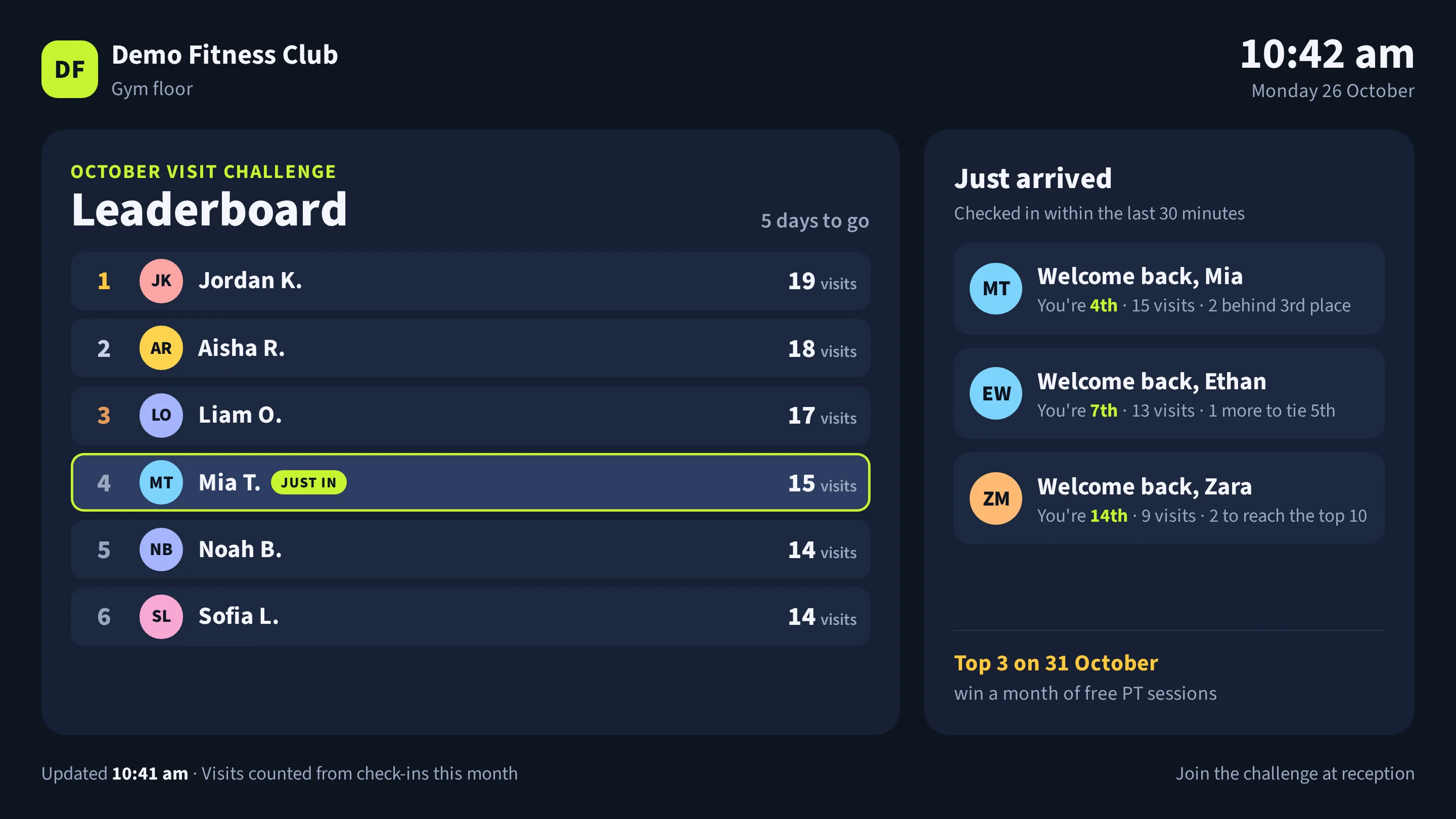
Smart Display · October Visit Challenge Live on Screen
Agent: Published App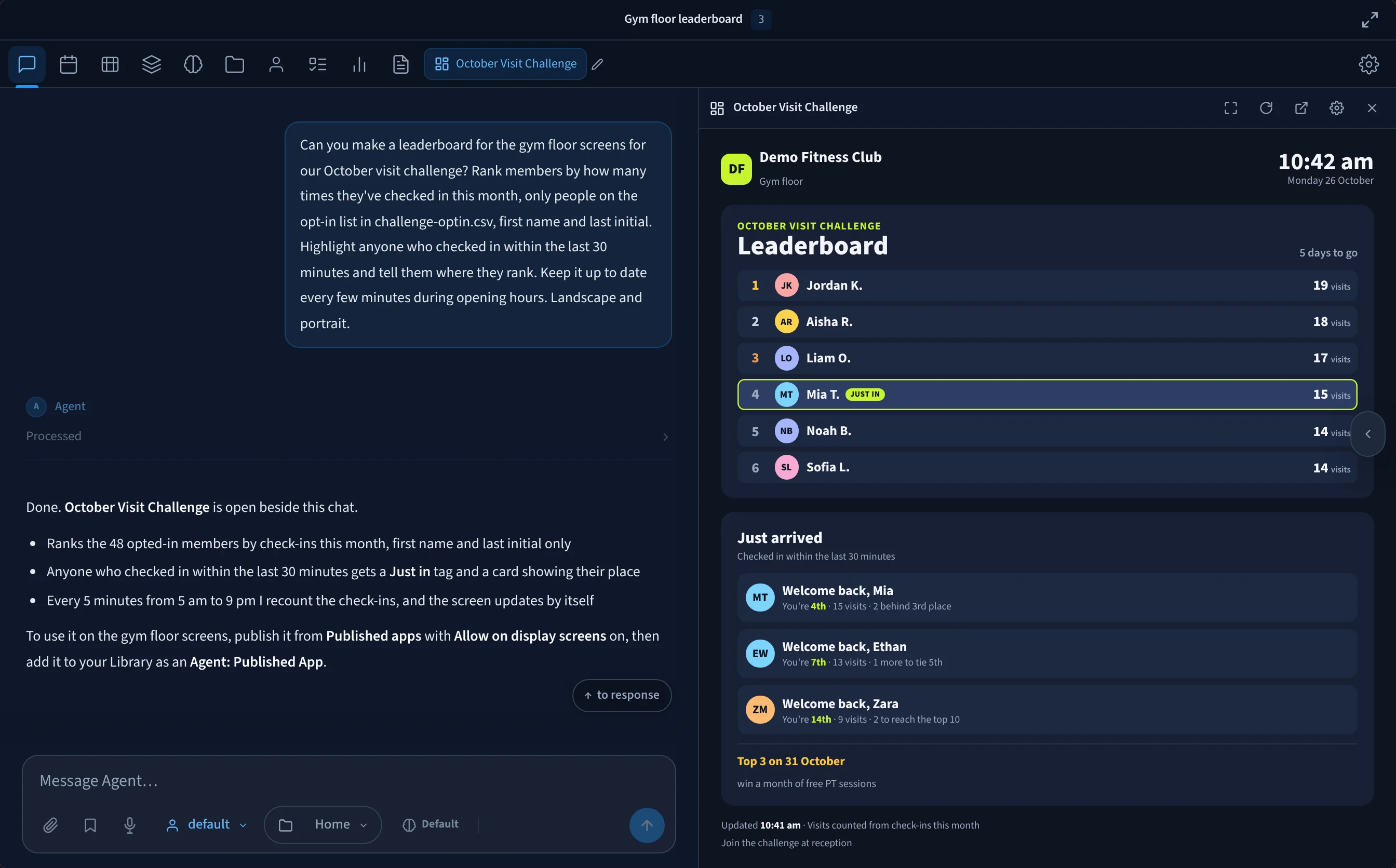
Agent Split View · Built in Chat for Display Screens
Live Services Preview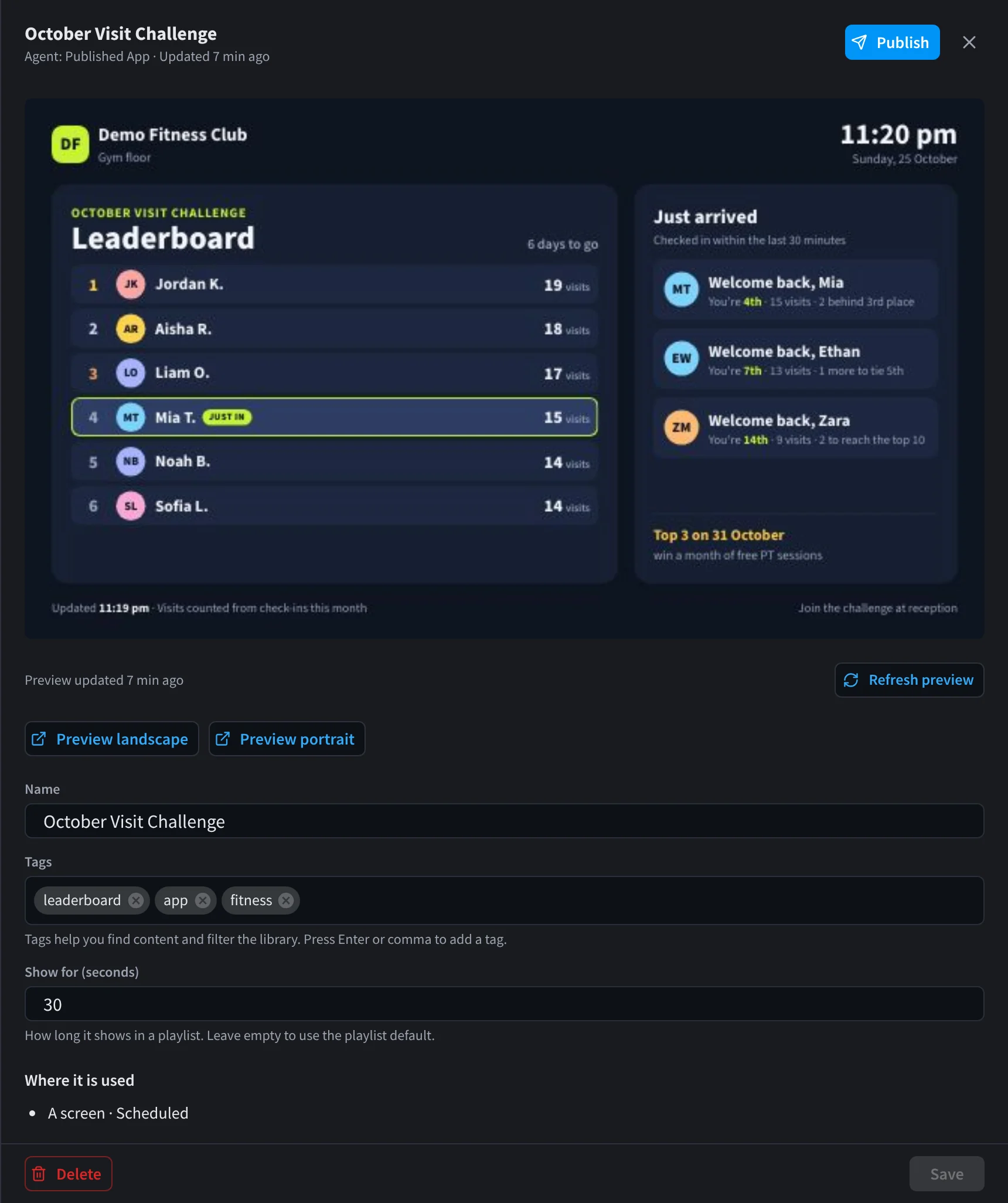
Display Screens Library · Agent: Published App
Landscape & Portrait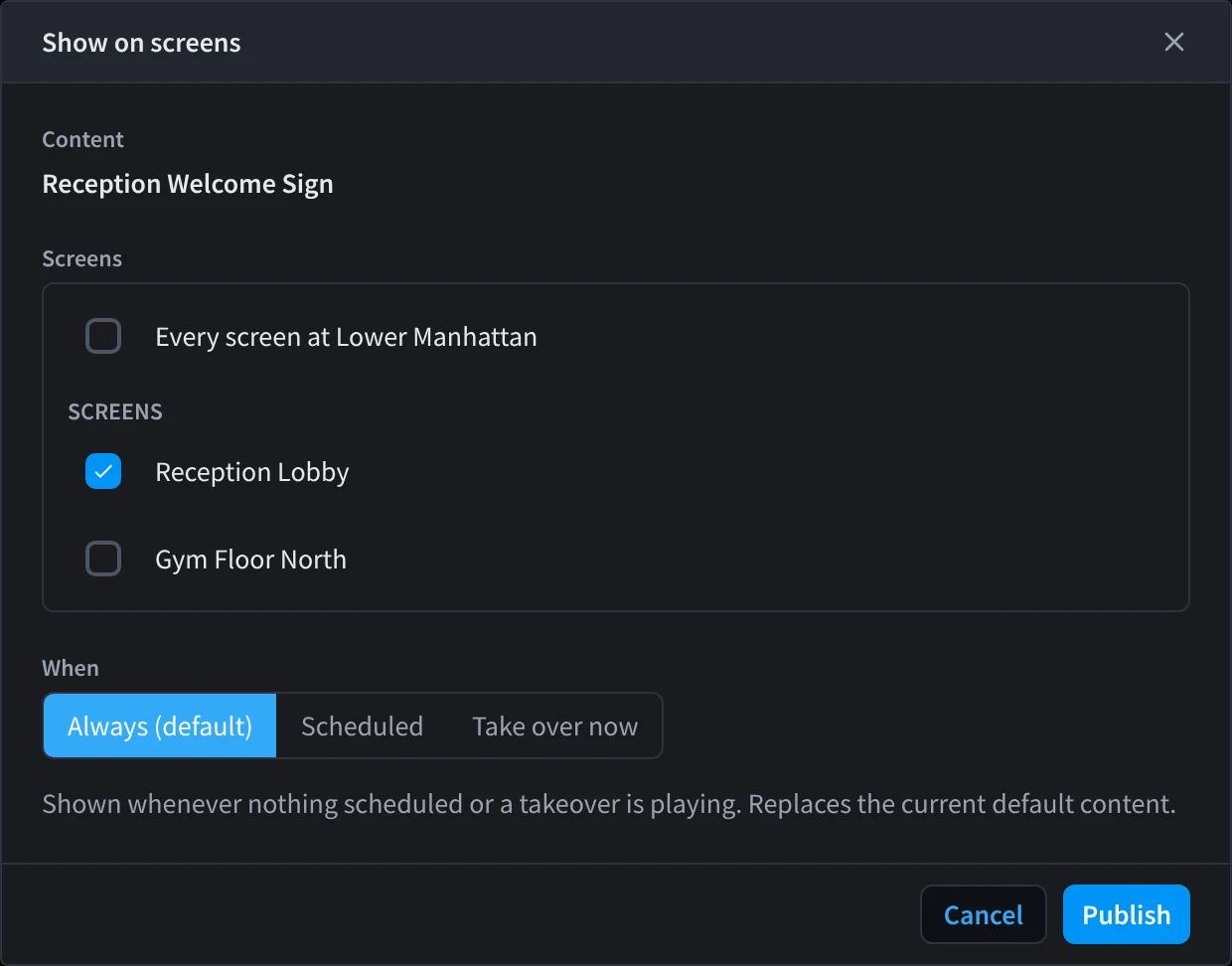
Show on Screens · Always, Scheduled or Take Over Now
Display ScreensSecure by DesignOutbound-Only TunnelContainer IsolationCustom Domain DNS
Enterprise isolation and custom domains, handled automatically.
Under the hood, Published Apps and Public Sites are engineered so your IT team never has to open an inbound firewall port, manage TLS certificates, or expose your local network. Both Cloud Agents and Physical Agents serve traffic over the outbound connection the Agent already opened.
Outbound Request Path & Container Isolation
Zero inbound firewall ports and strict container isolation.
When a visitor opens a Public Site, the request connects over HTTPS to the nearest Performance Hub gateway and travels through the dedicated outbound tunnel your Agent already opened. On every request, the Agent verifies public-ready container isolation rules before forwarding traffic to the app's locked-down container. If your facility can browse the web, a Physical Agent can serve a Public Site with zero port-forwarding or firewall changes.
What a public app container can never reach
A public app container can reach the public internet only. Even if an app has a bug, it runs on an isolated network and cannot reach:
- Your private or local network: Cannot reach your facility LAN, internal routers, or cloud metadata endpoints.
- Other apps or containers: Cannot connect to other apps on the Agent outside its own isolated project.
- The Agent or Performance Hub: Receives zero Performance Hub or device credentials and cannot reach the Agent's chat, terminal, or services.
- AI models or AI credits: Cannot call Performance Hub tools or AI models, so external visitors can never spend your AI credits.
- Outbound email or sensitive files: Cannot send email directly, and environment files, .git folders, key files, and compose files are automatically blocked.
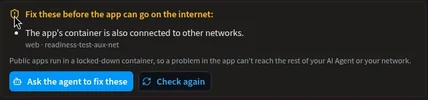
Readiness Check · Container Isolation Verified Before Publishing
Ask the Agent to FixRequest Path · Outbound-Only Architecture
How a visitor reaches a public site
- Secure subdomain or custom domain
Visitor
BrowserOpens the HTTPS address in any standard browser
- Same regions as Cloud Agents
Nearest gateway
Edge RelayA relay node chosen the way a CDN selects the closest edge
- Zero open inbound ports
Outbound tunnel
Outbound LinkThe encrypted connection the Agent already opened
- Verified per request
Agent check
Readiness GatePublic-ready container isolation rules verified on every request
- Content stays on Agent
App container
Isolated RuntimeLocked down on its own isolated network
The Agent never accepts an inbound connection. The gateway uses the outbound tunnel the Agent opened, and never keeps a cached copy of your site.
Custom Domains & Automatic HTTPS
Connect your own custom domains with automatic HTTPS.
Every Public Site automatically gets its own secure subdomain from us right away, and you can connect your own custom domains (such as www.example.com, the bare domain example.com, or both) with automatic HTTPS. Your domain stays at your existing registrar and you never change its nameservers, so email and MX records keep working.
Ask the Agent to set up DNS (or register a domain).
Prefer not to edit DNS records yourself? Click Ask the agent to set up DNS on the domain card to have your Agent configure the records, or ask your Agent to register a new domain for you.
Primary address & automatic fallback.
Mark any connected domain as the Primary address and all other addresses redirect to it permanently while preserving the URL path (so /book still opens /book). If a custom domain ever stops resolving, your automatic subdomain becomes primary again on its own.
Automatic TLS certificates & HSTS.
A public certificate authority issues an auto-renewing HTTPS certificate within minutes of connecting your domain. HTTP redirects to HTTPS automatically with HSTS enabled.
Custom Domains & TLS · Automatic HTTPS
Pointing your own domain at a Public Site
Your domain
Keep your registrar- Keep your domain where you registered it.
- Do not transfer it to Performance Hub.
- Keep your existing nameservers and email records.
DNS records
Copy from card or ask Agent- A TXT record proves you own the domain.
- CNAME points a subdomain such as www.
- ALIAS, ANAME, flattening, or A points the bare domain.
Automatic HTTPS
Public CA · Auto-renews- A public certificate authority issues TLS within minutes.
- Certificates renew automatically before expiry.
- HTTP redirects to HTTPS with HSTS enabled.
Add only the records shown on the domain card, or click Ask the agent to set up DNS. Your email (MX) records stay untouched.
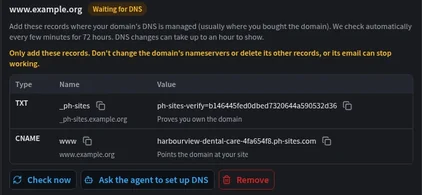
Custom Domain · DNS Records & Agent Setup
Ask Agent for DNS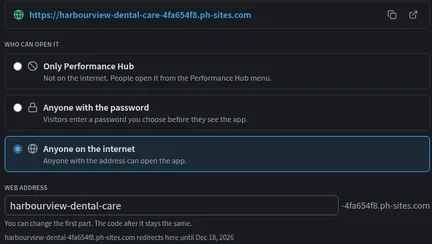
Live Public Site · Automatic HTTPS
On the InternetSimple InclusionIncluded With Your AgentZero Visitor AI Spend
Included with your Agent. Visitors never use your AI credits.
Published Apps and Public Sites are built into the Agent. There is no separate subscription, no per-app fee, and no per-site fee. Hosted apps do not consume AI credits when people open them, and you can run them on an always-on Cloud Agent or an on-site Physical Agent.
Built into the Agent you already run.
Published Apps and Public Sites come included with every Physical Agent and Cloud Agent. Build internal dashboards, Smart Displays, and customer-facing sites without adding another software line item.
Visitors opening your apps or sites never use AI credits.
Your Agent uses Model Router while you chat with it to build or update an app. Once the app is running, staff, Display Screens, and external website visitors use the hosted web app directly without spending your AI credits.
Host on an always-on Cloud Agent or an on-site Physical Agent.
We recommend a Cloud Agent in your chosen region for customer-facing booking pages, menus, and event sites so they stay online independently of building power and internet. Use a Physical Agent when data should stay on hardware at your site.
Cloud Agent vs Physical Agent (on-premise) for Public Sites
Both use the exact same outbound-only request path and container isolation. Choose based on whether the site should stay independent of building power and internet:
| Property | Cloud Agent (Recommended for Public Sites) | Physical Agent (On-Premise Appliance) |
|---|---|---|
| Best for | Customer-facing booking pages, event sites, menus, and multi-site dashboards people rely on around the clock | On-site operational tools and apps whose data should remain on hardware inside the building |
| Always on | Yes: runs in a regional datacentre and restarts automatically | Runs whenever the facility has power and internet |
| Building power & internet | Independent: stays online even if the building loses power or internet | Required: if building power or internet drops, visitors see that the site is offline |
| Facility network load | Zero: visitor traffic stays in the cloud | Visitor traffic uses the facility's internet connection |
| Where content lives | On your dedicated Cloud Agent in the Cloud region you selected | On the fanless Agent Processor appliance at your facility |
Frequently Asked QuestionsPublished Apps & Public Sites
Common questions, answered.
Clear answers on how teams use Published Apps to replace standalone tools, where apps run, how Public Sites and custom domains work, and how security and pricing work.
What kinds of software and websites can Published Apps replace?
Teams use Published Apps to replace single-purpose SaaS subscriptions, spreadsheet trackers, and agency-built microsites. Common examples include multi-site operations dashboards, reception welcome boards, visitor sign-in screens, day-parted café and QSR menu boards, clinic booking pages, event microsites, room availability displays, and store stock lookups.
Because your Agent builds and hosts the app on its own device and connects to your live Performance Hub modules and Connected Apps over MCP, you can launch in minutes and ask for changes in plain English anytime.
Does a Public Site cost extra, or can visitors spend our AI credits?
No to both. Published Apps and Public Sites are included with your Agent with no separate subscription and no per-site fee.
A hosted app does not use AI credits when people view or interact with it, and external visitors can never spend your facility's AI credits. The app's isolated container receives no Performance Hub credentials and cannot call AI models.
How do web addresses and custom domains work for Public Sites?
Every Public Site automatically gets its own secure HTTPS subdomain from us as soon as a person turns it on, hosted on a dedicated domain separate from Performance Hub so a public site can never read a Performance Hub sign-in cookie. If you rename a site's address, the previous address automatically redirects so existing links keep working.
You can also connect your own custom domains with automatic HTTPS. Your domain stays at your existing registrar and you keep your current nameservers and email records. Add the DNS records shown on the domain card (or click Ask the agent to set up DNS), and a public certificate authority issues and auto-renews the TLS certificate.
Can the Agent put a site on the internet by itself?
No. Only a person can turn a Public Site on, and only after ticking the explicit acknowledgement that Performance Hub sign-in no longer protects the app. The Agent can build the app, list the site, and re-check a custom domain, but it cannot turn a site on, change the address or password, or add a domain.
Whenever a site goes on or off the internet, the app owner and organisation administrators are notified by email, in the notification bell, and by push, and every change is recorded in Audit Logs.
Do I need to open an inbound firewall port or worry about visitors reaching our LAN?
No. Both Cloud Agents and Physical Agents make outbound connections only. Visitor requests connect over HTTPS to the nearest Performance Hub gateway and travel through the outbound tunnel your Agent already opened, so you never open an inbound port or add a firewall exception.
Every request is checked against strict container isolation rules before reaching the app. The app runs in a locked-down container on its own isolated network that can reach the public internet only, and can never reach your local LAN, other containers, the Agent's chat or terminal, or Performance Hub.
How do Published Apps run on Display Screens?
When you turn on Allow on display screens on a published app, it becomes available in your Display Screens Library as a Smart Display (Agent: Published App). It runs live on your facility's Agent and adapts to your site on a schedule or when events happen (such as a door pass unlocking the entrance or anonymous camera counts changing).
From the Published Apps tab or the Display Screens Library, you can preview the app in landscape or portrait and push it to every screen at the facility or selected screens as Always, Scheduled, or Take over now.
Should we host a Public Site on a Cloud Agent or a Physical Agent?
We recommend a Cloud Agent for customer-facing sites people depend on, such as a clinic booking page, a hotel event site, a retail promotion, or a restaurant menu. A Cloud Agent is always on, restarts automatically, does not depend on building power or internet, puts zero load on your facility network, and runs in the Cloud region you choose.
A Physical Agent is a great choice when the app's data should remain on hardware inside your building or when most users are on-site.
What happens if we pause an app, take a site off the internet, or unpublish it?
Pause stops the app temporarily; visitors opening its public address see Site not found until you resume it. Take off the internet (switching the audience back to Only Performance Hub) stops public access immediately while keeping your address, password, and custom domains saved for later.
Unpublish removes the app from the Performance Hub side menu, takes its Public Site offline, and disconnects its custom domains so they can be used elsewhere, while the app itself keeps running on the Agent.
Get StartedPublished Apps & Public Sites
Turn any conversation with your Agent into a live app or public site.
Book a walkthrough to see your Agent build a live internal dashboard, push a Smart Display to your screens, and launch a customer-facing HTTPS site with its own secure subdomain or your custom domain.