Performance Hub Agent · Desktop · Mobile · Web · On-Premise & Cloud
The enterprise Agent that runs your apps, your data, and your sites.
Your organisation's dedicated, always-on Agent: running in our native desktop and mobile apps, inside the Performance Hub web console, on a fanless on-premise processor at your site, or across 15 global cloud regions. It self-learns your operation over time, connects to 1,500+ business apps and every physical module in your building over MCP, and builds live Published Apps for your team and screens.
 macOS
 Windows
 Linux
- iOS
- Android
Talk to Your Business Over MCP: Vertically integrated with every Performance Hub module (Doors, CCTV, Computer Vision, Screens, Duress, Audio, Workflows, Check-ins, Schedules, and Published Apps) plus 1,500+ Connected Apps.
Enterprise Networking, VPN & 15 Cloud Regions: Direct peer-to-peer HTTPS on site, automatic encrypted remote access handled by Performance Hub with zero open inbound ports, built-in isolated OpenVPN, WireGuard and IPsec (IKEv2), On-Premise Intel x86_64 NUC or 15 Cloud Agent regions, and Time Machine-style single-file backups across 16 storage regions.
Skill Library, Governance, Memory & Native Apps: Security-scanned organisation Skill Library, private or shared Agent permissions with 90-day Audit Logs, a self-learning 3D Long-Term Memory graph, native desktop and mobile apps, and live Published Apps.
Talk to Your Business · Vertically Integrated Across Every Module Over MCP
Talk to your business. One Agent wired into every Performance Hub module.
Generic chat tools stop at the browser tab. Every Performance Hub Agent is vertically integrated with every module across your business and building over the Model Context Protocol (MCP) using a device-bound service account with short-lived credentials and zero static API keys on disk. Ask questions or issue commands in plain English across doors, cameras, computer vision, screens, duress, audio, workflows, check-ins, schedules, and published apps.
Click any module node to inspect its live MCP prompt and capabilities
Performance Hub Agent
On-Premise Intel x86_64 NUC or 15-Region Cloud Agent
Verified on every request against your Organisation, Brand, Region, and Facility permissions. Physical actions stay behind explicit human confirmation in chat.
Governed MCP Security Chips
- Zero static API keys
- Short-lived rotating tokens
- Facility / Region / Org scope
- Read-only mode toggle
- Per-tool permissions
- Human confirmation gates
Built-In General-Purpose Capabilities · Ready Out of the Box
Plus every capability your team expects from a general-purpose Agent, built in.
Alongside your physical building modules and 1,500+ connected business apps, every Performance Hub Agent runs on its own isolated computer with a full suite of general-purpose capabilities included out of the box.
Web search & live browsing
Search the live web, read supplier pages and industry news, cross-reference sources, and run interactive or headless browser sessions.
Deep research & maintained Wiki
Investigate multi-step questions with cited findings and maintain structured, long-lived operational notes in the Agent's built-in Wiki.
Documents, spreadsheets & PDFs
Read, write, merge, and reformat Word documents, PDFs, contracts, and invoices, and build spreadsheets with working formulas and pivots.
Coding & data analysis
Write and execute Python, Node.js, and shell scripts on its own device for statistical analysis, CSV cleanup, format conversion, and charts.
Workspace files & Spaces
Keep project folders organised across persistent Spaces, preview and edit files in place, and hand back downloadable reports and exports.
Image understanding, OCR & media
Read photographed paper forms, whiteboards, delivery dockets, and screen errors with OCR, process audio and video, and generate spoken audio.
Scheduled tasks & watchdogs
Run unattended morning briefings, Friday reports, and hourly watchdog checks in your facility's local timezone while your laptop is closed.
Long-term memory & reusable skills
Retain standing rules, people, sites, and preferences across every session, and promote any repeatable workflow into a shared skill.
1,500+ Connected Apps & 28 Built-In Services · Over MCP
Connect 1,500+ business apps in seconds. Private to each Agent, with an instant kill switch.
Connect Google Workspace, Microsoft 365, accounting, payments, POS, e-commerce, CRM, helpdesks, project trackers, rostering, and property systems over MCP so new tools are discovered automatically. Every connection belongs strictly to the single Agent you attach it to, supports multiple accounts per app, and is included at no extra per-integration fee (subject to fair use).
1,500+ Connected Apps · Suites · Built-In Services
Works with the software you already run.
Connect Google Workspace, Microsoft 365, Slack, accounting, CRM, project boards, and helpdesks via OAuth or API keys, scoped privately to each Agent with an instant kill switch.
 Google Workspace
 Microsoft 365
 Gmail
 Outlook
 Google Calendar
 Google Sheets
 Google Drive
 Google Docs
 Microsoft Excel
 Slack
 Microsoft Teams
 WhatsApp
 Xero
 QuickBooks
 Stripe
 Square
 Shopify
 HubSpot
 Salesforce
 Mailchimp
 Notion
 Airtable
 Trello
 Asana
 Jira
 Linear
 ClickUp
 Monday.com
 GitHub
 Zendesk
 Intercom
 Zoom
 Dropbox
 Canva
 Calendly
 DocuSign
 PagerDuty
 Opsgenie
 Typeform
 Excalidraw (Whiteboard Diagrams)
 Mermaid (Mermaid Diagrams)
 Malwarebytes (Link Safety Check)
One-Click Suites & OAuth
Google Workspace, Microsoft 365, and 1,500+ third-party apps.
Connect Gmail, Google Calendar, Drive, Docs, Sheets, Slides, Outlook, Microsoft Teams, OneDrive, SharePoint, Excel, Xero, QuickBooks, Stripe, Square, Shopify, HubSpot, Salesforce, Slack, Zendesk, Intercom, Jira, Linear, Asana, Monday.com, Notion, Airtable, GitHub, PagerDuty, 7shifts, Apaleo, and over 1,500 more.
28 Built-In Services Included
Zero sign-in required for built-in operational tools.
Every Agent includes 28 built-in services out of the box: live web search, Excalidraw whiteboard diagrams, Mermaid architecture diagrams, Malwarebytes link safety checks, weather forecasts, and document conversion tools.
Per-Agent Isolation & Kill Switch
Multiple accounts per app and an instant External apps off switch.
Connect both a Front desk inbox and a Bookings inbox to the same Agent without cross-agent leakage. Flip the External apps kill switch to cut all external integrations immediately while preserving credentials for when you turn it back on.
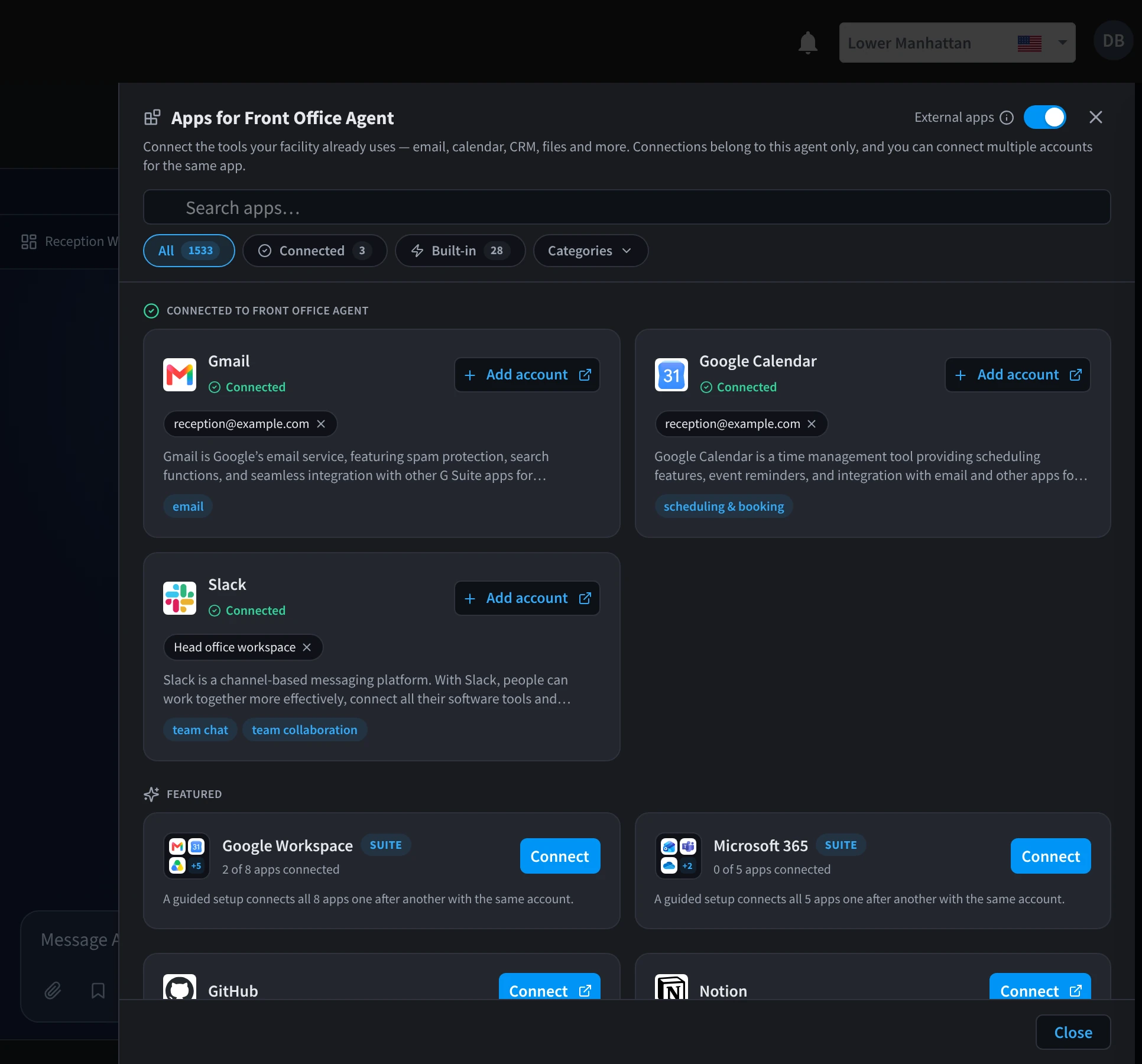
Performance Hub · Connected Apps (1,533 Apps · 28 Built-In · Kill Switch)
External Apps On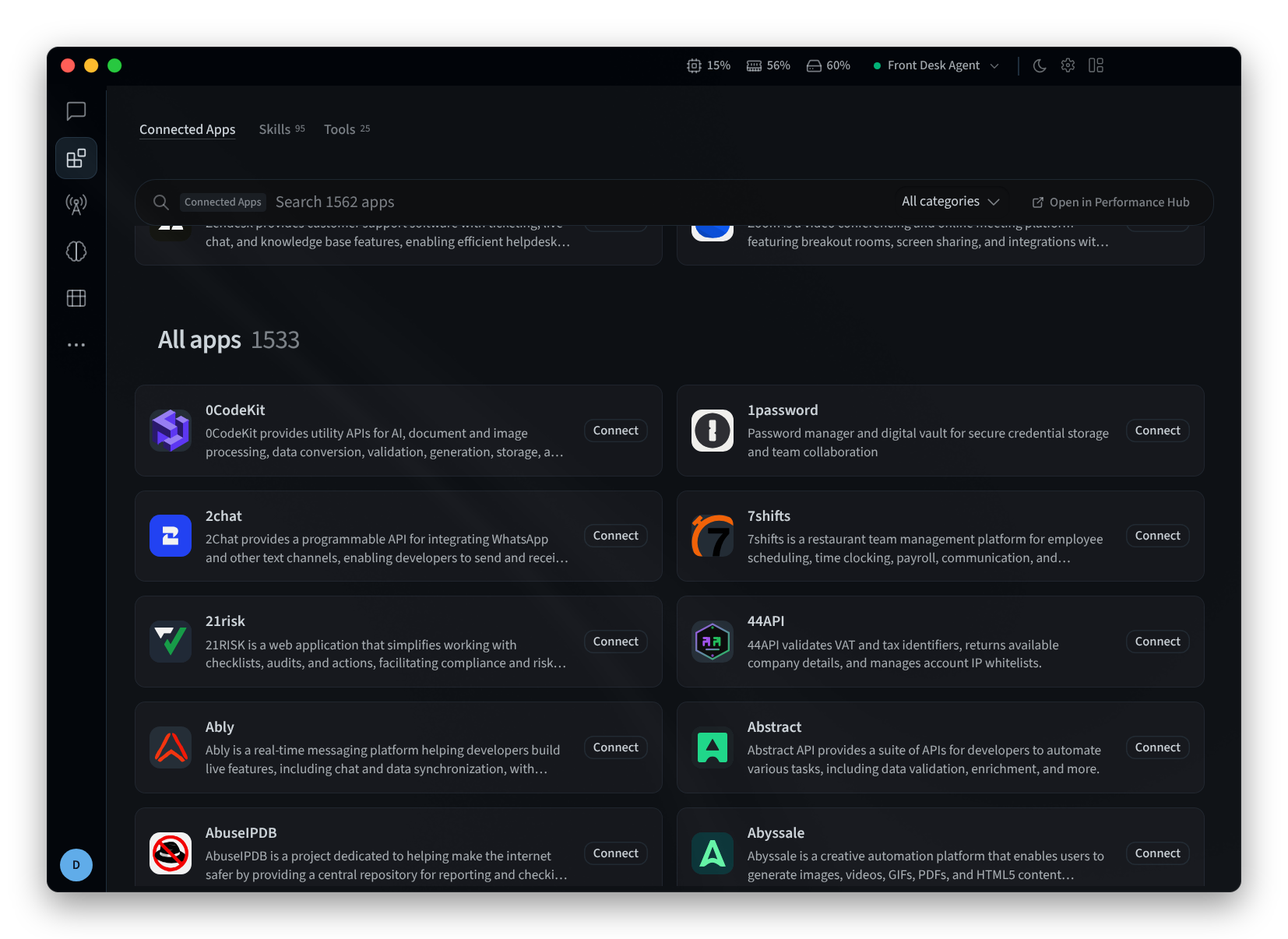
Desktop App · Connected Apps Directory & Multi-Account
Per-Agent ScopedAny AI Model · Native Model Router, BYO API Keys & On-Premise Inference
Choose any AI model. Never get locked into one provider.
Every Performance Hub Agent integrates natively with the Performance Hub Model Router out of the box using short-lived rotating tokens and zero static keys on disk. Switch between leading frontier and open-weight models per conversation, let Auto Router pick the optimal model for each prompt, bring your own API keys (BYO keys) for any model you choose, or mix and match any Agent with Cloud Inference or dedicated On-Premise Inference hardware.
Model Families Available Through Model Router & BYO API Keys
Switch freely across frontier labs and open-weight model families
Enable or disable models per facility, apply one-click presets (Frontier, Western makers, Western hosting, US-hosted only, Open weights, Budget), or bring your own API keys for any model you choose.
- OpenAI
- Anthropic
- Meta
- Mistral AI
- DeepSeek
- Qwen
- Z.ai (GLM)
- Moonshot (Kimi)
- MiniMax
- StepFun
- Perplexity
- Amazon Nova
- NVIDIA
- Tencent
- ByteDance Seed
- Xiaomi
- Nous Research
Native Model Router Out of the Box
Pre-wired to every model with zero setup.
Paired Physical and Cloud Agents connect to your facility's Model Router automatically using short-lived, device-bound rotating credentials. Switch models in the composer, configure fallback and subagent models, or apply one-click facility presets (Frontier, Western hosting, US-hosted only, Open weights, Budget).
Bring Your Own API Keys (BYO Keys)
Use your own API keys for any model you choose.
Have direct provider agreements or existing credits? Bring your own API keys (BYO keys) for any model you choose, or run your own keys alongside your prepaid Performance Hub Model Router balance so your organisation is never locked into a single AI vendor.
Auto Router & Thinking Effort Controls
Smart routing per prompt, from Minimal to Ultra.
Auto Router classifies every prompt into Simple, Medium, Complex, or Reasoning so routine checks stay fast while multi-step analysis gets deep reasoning. In the web and desktop apps, staff can also pick specific models and set Thinking effort (Minimal to Ultra).
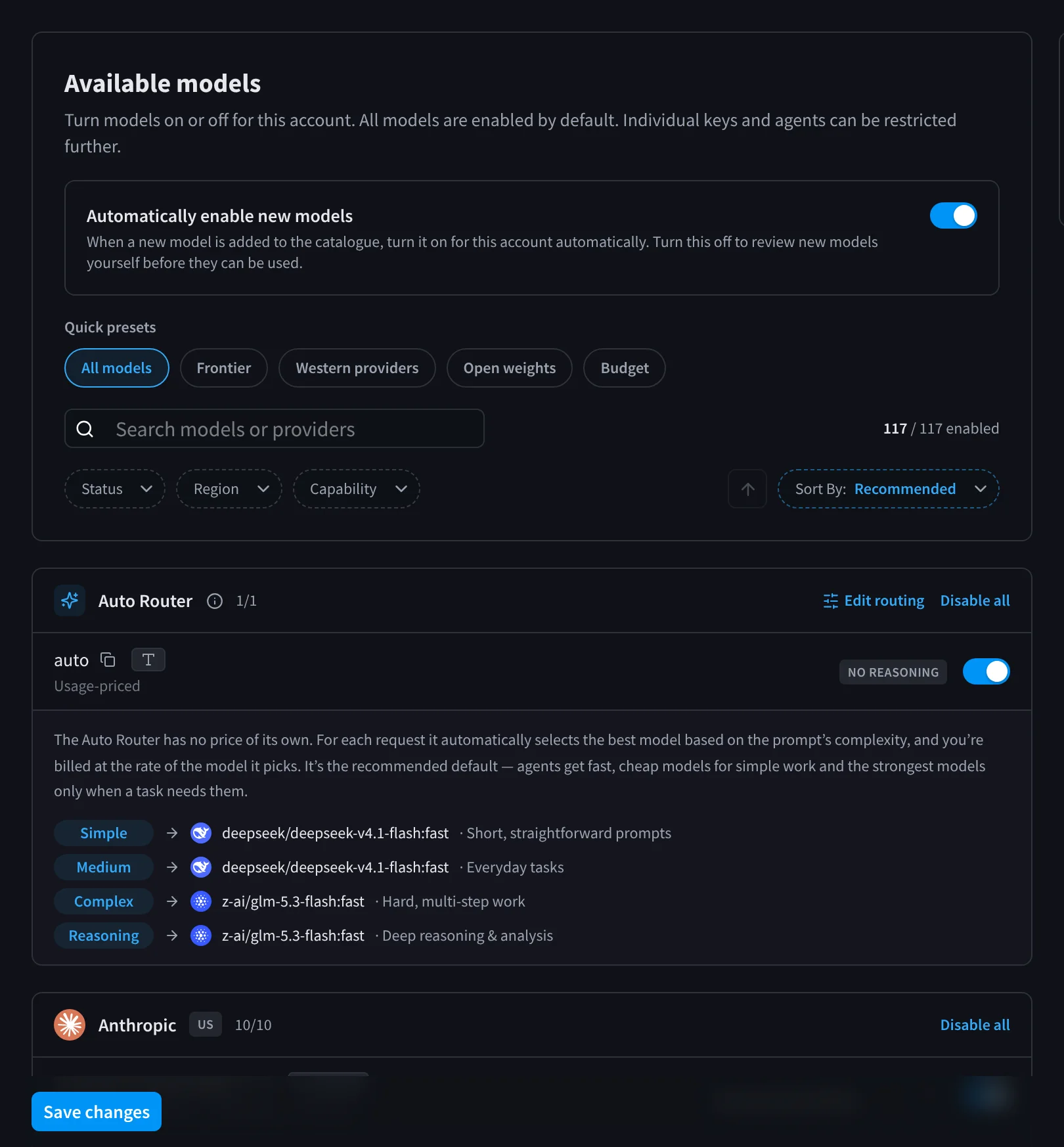
Performance Hub · Model Router · Auto Router & Frontier Models
Zero Keys on Disk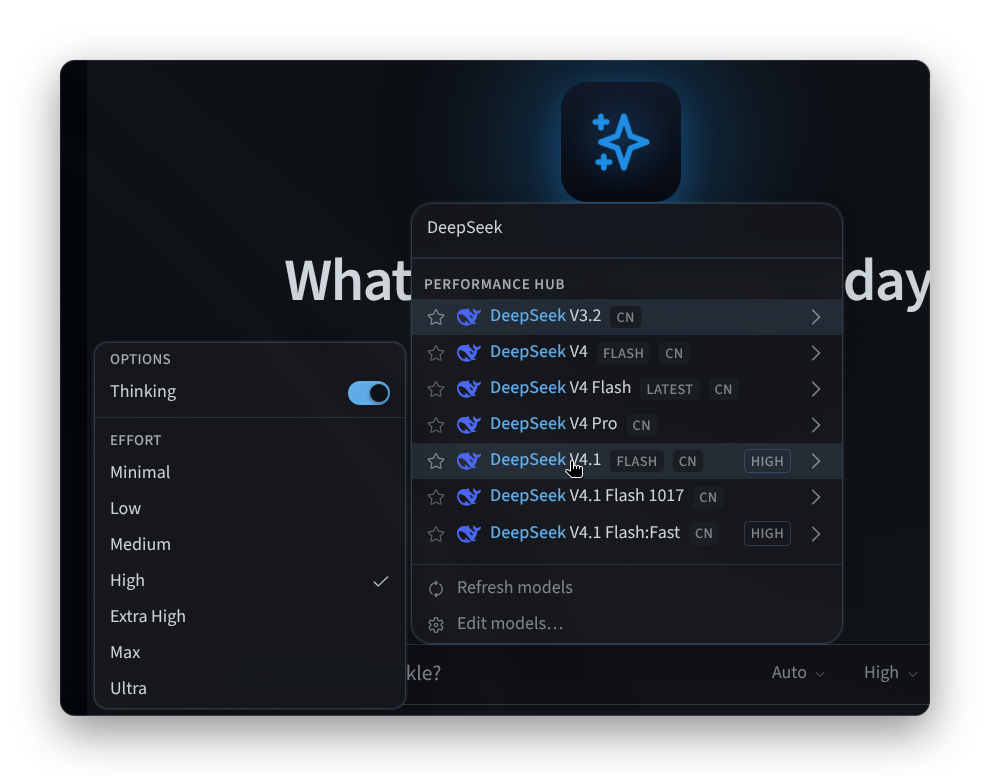
Desktop App · Model Picker · Thinking & Effort Levels
Minimal to UltraMix-and-Match Inference · Per-Agent Routing · Cloud or On-Premise
Mix and match any Agent with Cloud Inference or On-Premise Inference.
Choose how each individual Agent runs its models: route prompts through the cloud Model Router catalogue and Auto Router, use your own BYO API keys, or pair any Physical or Cloud Agent with dedicated Station-class or Rack-scale On-Premise Inference hardware.
On-Premise Agent + On-Premise Inference
Both your fanless Agent Processor and dedicated Station-class or Rack-scale inference hardware run inside your building. Prompts, workspace files, long-term memory, and model weights never leave your premises.
On-Premise Agent + Cloud Inference
Conversations, long-term memory, workspace files, and local LAN device connections stay on your on-site Agent Processor, while inference routes through the cloud Model Router catalogue, Auto Router (Simple, Medium, Complex, Reasoning), or your BYO API keys.
Cloud Agent + On-Premise or Cloud Inference
Launch an always-on Cloud Agent in any of our 15 global regions and route its inference either to your organisation's private On-Premise Inference cluster or to the cloud Model Router catalogue.
Auto Router & per-prompt Thinking effort
Auto Router classifies every prompt into Simple, Medium, Complex, or Reasoning so routine checks stay fast while multi-step analysis gets frontier reasoning. In the desktop and web apps, staff can also pick specific models and adjust Thinking effort (Minimal to Ultra).
Daily, monthly & lifetime spend caps
Set independent daily, monthly, and lifetime spend caps plus requests-per-minute and tokens-per-minute rate limits on every Agent. Model Router usage draws from your prepaid balance, separate from Cloud Agent compute.
In-transit Guardrails per facility or per Agent
Enable optional in-transit PII masking, Secret redaction, Prompt-injection shields, and custom regex content filters at the facility level or on individual Agents.
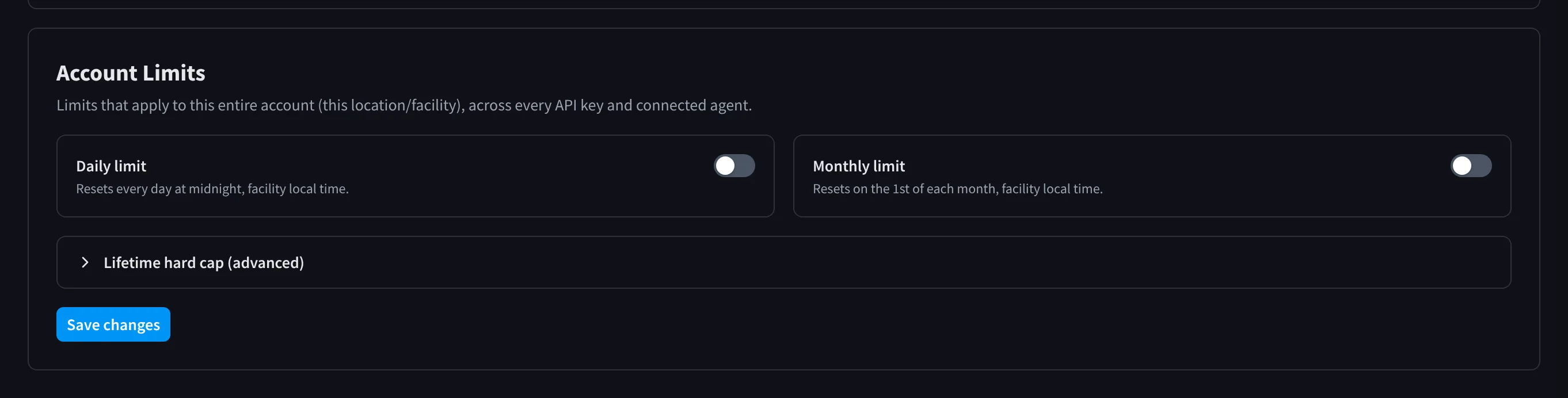
Model Router · Spend Caps & Per-Minute Rate Limits
Spend Caps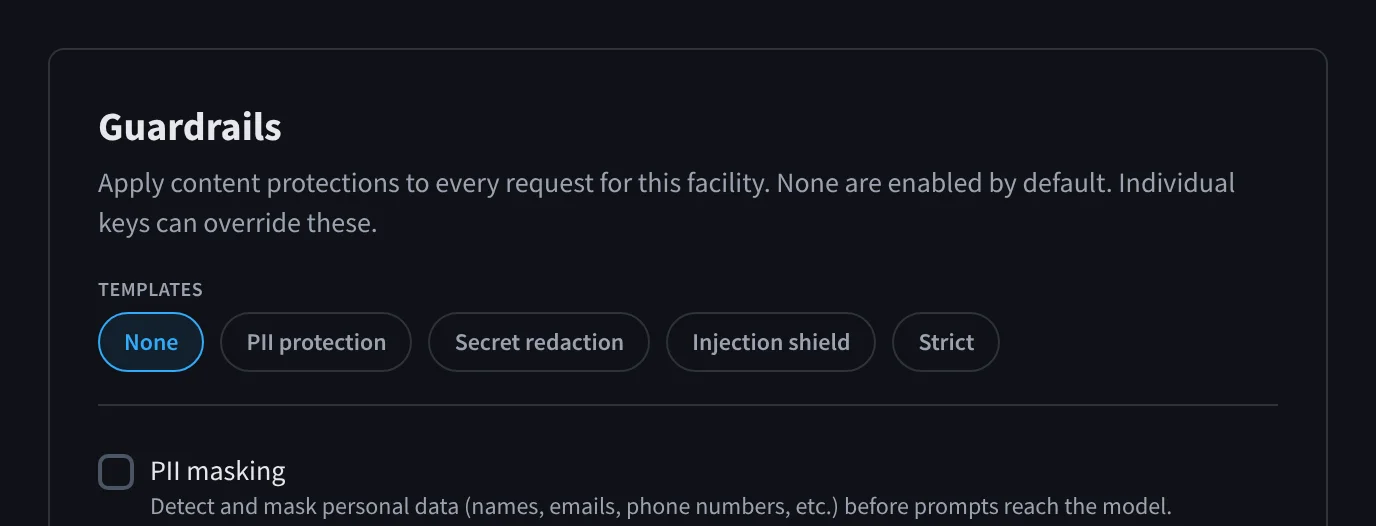
Model Router · In-Transit Guardrails (PII, Secrets & Injection)
Per Facility or AgentSelf-Learning Long-Term Memory · 3D Knowledge Graph
An Agent that self-learns your operation and never forgets a standing rule.
Ordinary chat tools reset when the window closes. Every Performance Hub Agent builds a persistent, per-device memory of the standing rules, people, sites, preferences, equipment quirks, supplier arrangements, and past decisions it encounters across work and conversations. Tell it a standing rule once in March; it still applies it in November.
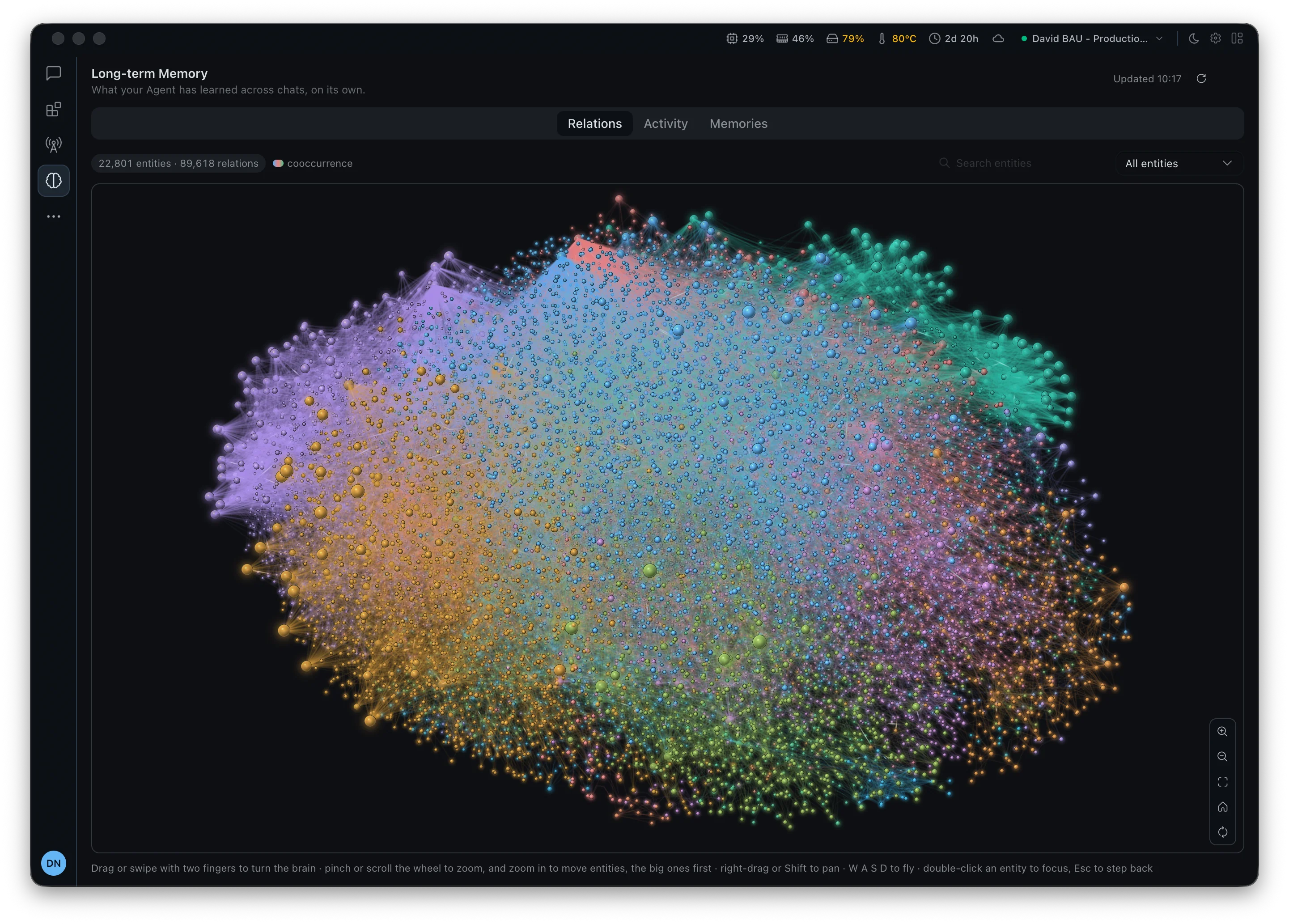
Long-Term Memory · 3D Relations Knowledge Graph
Self-Learning Active3D Relations Graph & Standing Rules
Remembers people, sites, rules, and how they connect.
My Notes and User Profile are read at the start of every session alongside the interactive 3D Relations graph: mapping key staff and roles, building layouts and room names, equipment quirks, supplier terms, preferred report formats, and past operational decisions across multi-hop entity paths.
- 3D Relations graph
- My Notes & User Profile
- People, sites & rules
- Multi-hop entity paths
Plain-English Corrections & Auditable Ledger
Correct it once in chat; audit every learned fact.
Facts, observations, and relationships are extracted automatically from conversations, documents, and completed tasks. Correct or ask the Agent to forget any rule in plain English ("Loading bay 2 closes at 4 PM on Fridays, not 5 PM"), and audit full provenance in the Activity view and Memories ledger (All, Observations, World, Experience).
- Plain-English steering
- Instant forget & update
- Activity & Memories ledger
- Full provenance
Private Per Agent & Backed Up Hourly
Strictly isolated per organisation and backed up hourly.
Every memory belongs exclusively to your organisation and the specific Agent that learned it. It never crosses tenant boundaries, is never used to train external models, respects restricted-Agent access lists, and is protected in hourly encrypted Time Machine-style backups.
- Per-Agent isolation
- Never trains external models
- Restricted-Agent privacy
- Hourly encrypted backups
Zero-Configuration Networking · Direct P2P LAN · Encrypted Cloud Relay · Isolated OpenVPN, WireGuard and IPsec (IKEv2)
Peer-to-peer on site. Automatic encrypted networking remotely. Zero network setup.
All networking is automatic so your team never has to configure firewalls, port forwarding, static IPs, or TLS certificates. When your browser, desktop app, or mobile app is on the same network as an on-premise Agent Processor, local On-Premise Inference cluster, or Model Router, it connects directly peer-to-peer over HTTPS. When you connect remotely, Performance Hub handles encrypted routing automatically with zero open inbound ports, alongside built-in isolated OpenVPN, WireGuard and IPsec (IKEv2) clients for private corporate networks.
All networking is automatic. Customers never have to worry about network configuration.
Performance Hub automatically establishes direct peer-to-peer connections on site, switches seamlessly to the encrypted Cloud Relay when users are remote, isolates corporate OpenVPN, WireGuard and IPsec (IKEv2) tunnels per Agent, and routes to local On-Premise Inference or the Model Router (which also connects peer-to-peer when on the same network).
On-Site Users connect Peer-to-Peer on LAN
Desktop, web, and mobile apps on the same network connect directly to your on-site Agent over TLS 1.3 with automatic certificates.
Remote Users connect automatically from anywhere
Off-site staff reach either your Physical Agent or Cloud Agent through the encrypted Cloud Relay with zero open inbound ports or port forwarding.
Run on a fanless Intel x86_64 NUC or across 15 Cloud regions
Both run the identical software image and share the same encrypted backup format so you can move between on-premise and cloud anytime.
Local On-Premise Inference or Cloud Inference via Model Router
Route prompts to Station-class or Rack-scale On-Premise Inference, or to frontier and open-weight models via Model Router. When on the same network, the Model Router connection is also direct P2P.
Built-in isolated OpenVPN, WireGuard and IPsec (IKEv2) to corporate networks
Connect via OpenVPN, WireGuard and IPsec (IKEv2) so your Physical or Cloud Agent can query private head-office APIs and internal databases in strict per-Agent isolation.
(a) Direct P2P on Site
Local LAN TLS 1.3 straight to your on-site Intel x86_64 NUC.
(b) Encrypted Cloud Relay
Automatic remote access with zero open inbound ports.
(c) Physical NUC & Cloud Agent
Run on-premise or across 15 regions; migrate via snapshots.
(d) Corporate VPN Tunnel
Per-Agent isolated OpenVPN, WireGuard and IPsec (IKEv2) to private corporate systems.
(e) Model Router & Local Inference
On-premise or cloud inference; Model Router is also P2P on same LAN.
Direct P2P On-Premise
Direct peer-to-peer HTTPS on your local network.
When your browser, desktop app, or mobile app is on the same network as an on-premise Agent Processor, the client software establishes a direct peer-to-peer connection (Direct (local network)) with automatic TLS certificates, device-bound service-account authentication, short-lived rotating tokens, and zero static API keys on disk.
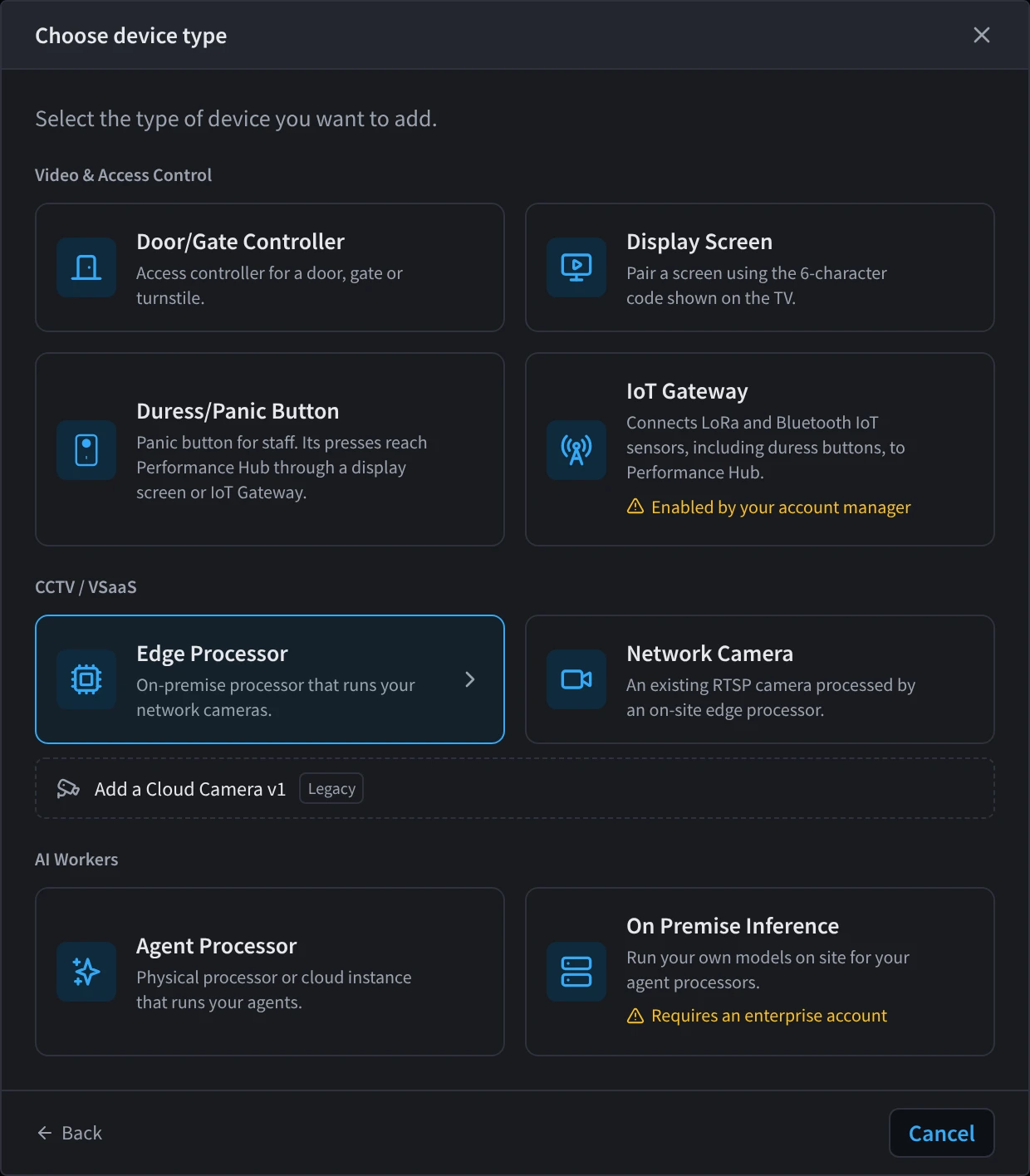
Unified Device Management · Agent Processor
Intel x86_64 NUC or CloudEncrypted Remote Access
All remote networking and encryption handled by Performance Hub.
When you are off-site or connecting to a Cloud Agent, all routing (Cloud relay) and end-to-end TLS encryption are handled automatically by Performance Hub. The appliance makes outbound-only connections: no open inbound ports, no port forwarding, no static IPs, and no firewall setup.
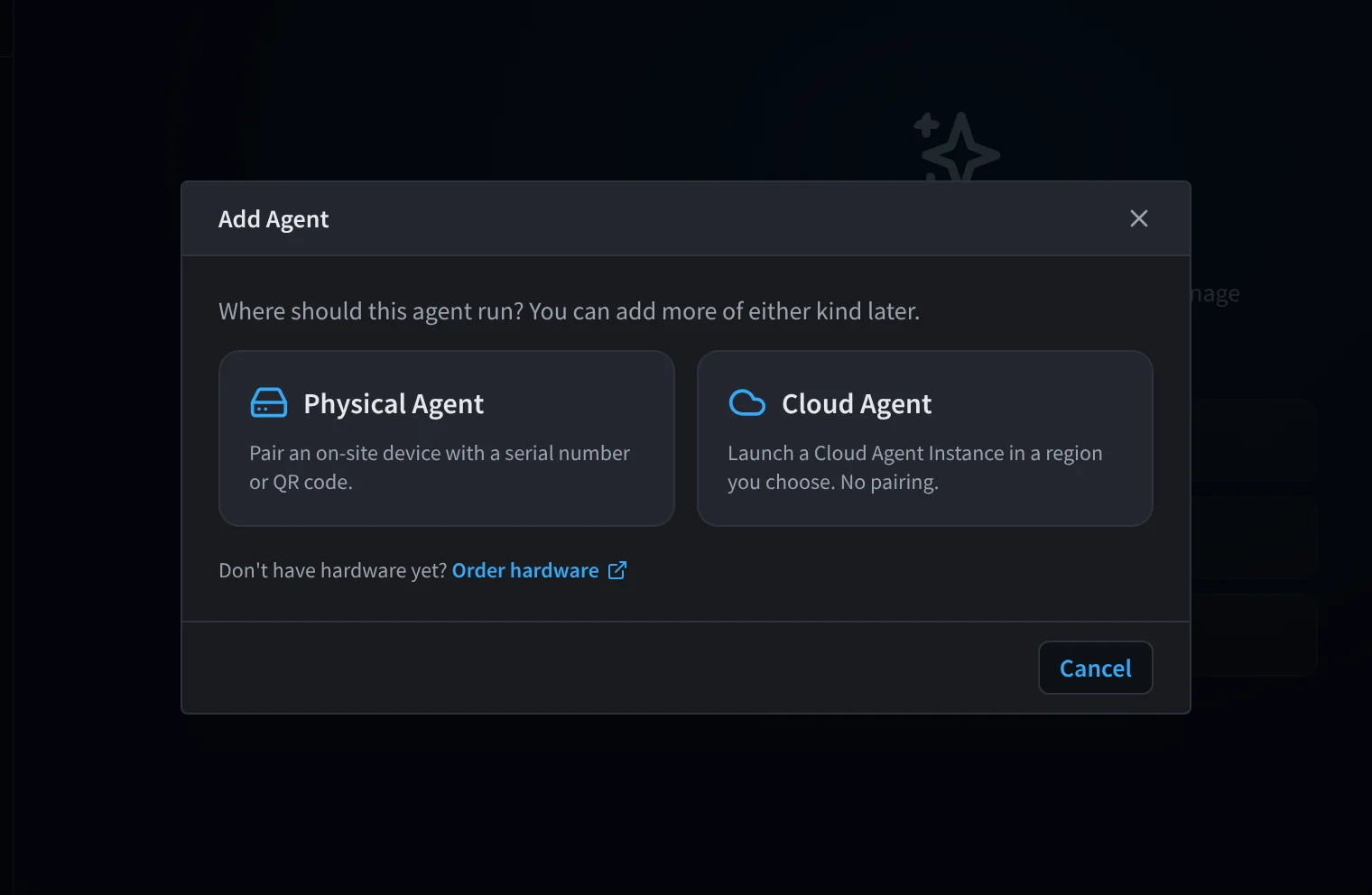
Add Agent · Physical Agent or Cloud Agent
Same Software ImageBuilt-In Isolated OpenVPN, WireGuard and IPsec (IKEv2)
Connect to private corporate networks in strict isolation.
Configure an OpenVPN, WireGuard and IPsec (IKEv2) tunnel on the VPN tab so your Agent can query head-office servers, private APIs, or internal databases. The VPN tunnel is strictly isolated to that Agent and its workloads; nothing else on the LAN can route through it.
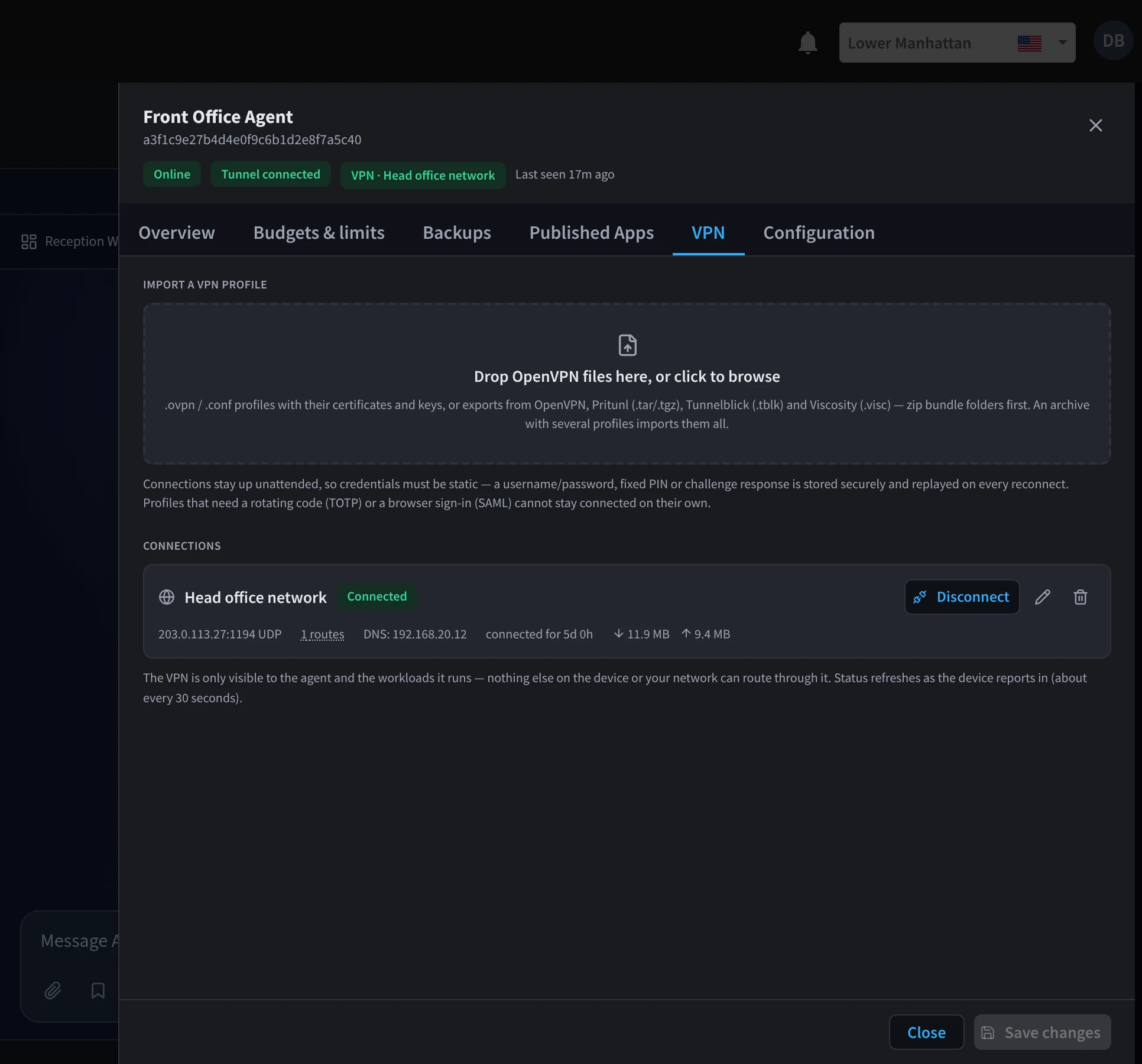
Agent · VPN · OpenVPN, WireGuard and IPsec (IKEv2) Tunnel
ConnectedOn-Premise NUC & 15 Cloud Agent Regions · 9 Instance Sizes · Bidirectional Mobility
Run on an on-site NUC or across 15 Cloud Agent regions. Move between them anytime.
Deploy a Physical Agent on a silent, fanless Intel x86_64 NUC Agent Processor at your site or launch an always-on Cloud Agent in minutes across 15 global regions and 9 instance sizes up to 64 vCPU and 256 GB RAM, with network ingress and egress included.* Physical and Cloud Agents run the identical software image and share the same encrypted backup format.
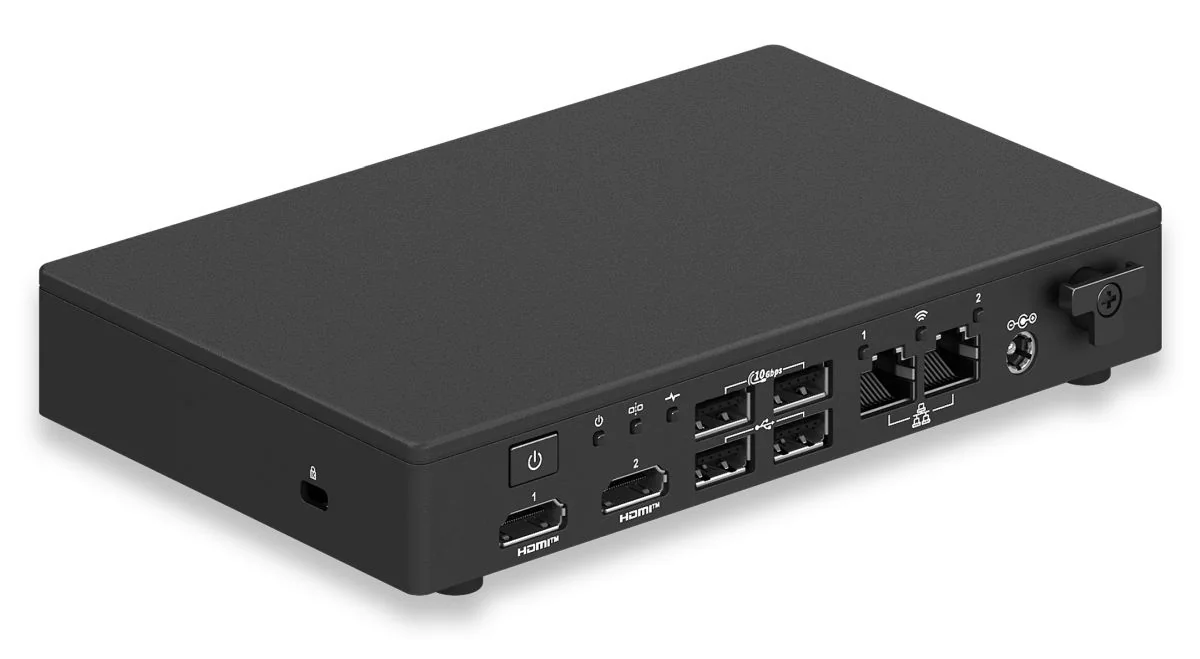
Physical Agent (On-Premise Intel x86_64 NUC)
Runs on the Agent Processor, a silent, fanless, solid-state Intel x86_64 NUC hardware appliance with Gigabit Ethernet, dual-band Wi-Fi, and HDMI status output. Ideal when workloads interact directly with local LAN devices or when conversations, memory, and workspace files must remain on Intel x86_64 hardware you physically control.
Cloud Agent (15 Global Regions)
Launches in minutes with zero hardware and no pairing, with network ingress and egress included. Ideal for highly available, always-on services such as a Published App used across the organisation, or for multi-site teams without a local comms cabinet. Choose from 9 instance sizes up to 64 vCPU, 256 GB RAM, and 2,048 GB SSD*.
Move On-Premise to Cloud & Back
Physical and Cloud Agents run identical software and share the same encrypted snapshot format. Select Restore from a backup when launching a Cloud Agent to migrate an on-premise Agent into the cloud, or seed a new on-site Agent Processor from a Cloud Agent's snapshot to bring it on-premise, carrying over every chat, memory entity, file, skill, and scheduled job.
15 Cloud Agent Launch Regions · 12 Countries
Launch a Cloud Agent in the exact region your operation requires.
Pin each Cloud Agent to a specific city across North America, Europe and the UK, or Asia-Pacific so compute, workspace files, and hosted Published Apps stay in the jurisdiction you choose.
North America (3 Regions)
- Chicago, USA
- New York, USA
- San Jose, USA
Europe & UK (10 Regions)
- London, United Kingdom
- Frankfurt, Germany
- Amsterdam, Netherlands
- Madrid, Spain
- Warsaw, Poland
- Stockholm, Sweden
- Copenhagen, Denmark
- Stavanger, Norway
- Helsinki, Finland
- Helsinki 2, Finland
Asia-Pacific (2 Regions)
- Singapore
- Sydney, Australia
Cloud Agents run strictly in the region you select at launch and never migrate to another jurisdiction unless you explicitly restore a backup into a new region.
Enterprise Accounts · Additional Global Locations (Case-by-Case Quote)
Enterprise accounts can also deploy Cloud Agents in additional locations worldwide.
Beyond the 15 self-service launch regions above, additional city locations are available on enterprise accounts. These deployments are quoted case by case, are not self-service, and minimum order commitments may apply.
Additional enterprise locations
Ohio, Montreal, Calgary, Mexico City, São Paulo, Dublin, Zurich, Tel Aviv, Bahrain, Dubai, Cape Town, Hong Kong, Taipei, Mumbai, Hyderabad, Seoul, Jakarta, Melbourne, Kuala Lumpur, Auckland, Bangkok.
Network ingress and egress are included in every Cloud Agent rate.*
Inbound network ingress and outbound network egress are included in the hourly Cloud Agent price, with no separate bandwidth or data-transfer charge.* Sync 1,500+ Connected Apps, host live Published Apps for your team and Display Screens, transfer workspace files, and run corporate VPN tunnels without unpredictable bandwidth bills.
* Subject to our fair usage policy.
- Inbound ingress included*
- Outbound egress included*
- US$0 data-transfer fee*
Cloud Agent Instance Sizes & Transparent USD Rates (9 Production Sizes)
Network Ingress & Egress Included*Instance Size
vCPU
RAM
NVMe SSD
Hourly Rate (USD)
Est. Monthly (USD)
Small
2 vCPU
4 GB
64 GB
US$0.057 / hr
US$39.77 / mo
Medium (Recommended)
4 vCPU
8 GB
128 GB
US$0.085 / hr
US$59.12 / mo
Large
4 vCPU
16 GB
256 GB
US$0.116 / hr
US$79.60 / mo
4 vCPU / 32 GB RAM
4 vCPU
32 GB
512 GB
US$0.288 / hr
US$195.71 / mo
8 vCPU / 32 GB RAM
8 vCPU
32 GB
512 GB
US$0.354 / hr
US$239.71 / mo
8 vCPU / 64 GB RAM
8 vCPU
64 GB
1,024 GB
US$0.609 / hr
US$411.43 / mo
16 vCPU / 128 GB RAM
16 vCPU
128 GB
2,048 GB
US$1.039 / hr
US$699.86 / mo
32 vCPU / 192 GB RAM
32 vCPU
192 GB
2,048 GB
US$1.595 / hr
US$1,073.86 / mo
64 vCPU / 256 GB RAM
64 vCPU
256 GB
2,048 GB
US$1.873 / hr
US$1,260.86 / mo
Hourly billing: Billed per hour, rounded up to the whole hour, with a 1-hour minimum per launch. Billing runs from launch until you delete the Agent (delete the Agent to stop compute charges).
Data transfer included: Network ingress and egress are included in the Cloud Agent price, subject to fair use, with no separate data-transfer charge. Prices can vary slightly by region; the launch wizard shows the exact price for your Agent.
No lock-in: No setup fee, no minimum term, and no monthly minimum. Encrypted backups are on by default and billed separately (US$7.99 per TB per month). Model Router usage is billed separately from your prepaid USD balance.
Time Machine-Style Backups · Single-File Restore · 16 Storage Regions
Restore a single file from three weeks ago, or roll back an entire Agent.
Every Physical and Cloud Agent takes incremental, deduplicated snapshots every hour by default, plus nightly maintenance snapshots at 3:00 AM, on-demand manual snapshots with notes, and automatic safety snapshots before any rollback. Snapshots are encrypted on the device before upload using a per-facility key.
Offline Backup File Browser
Browse folders and files across every point in time.
Open Browse backup on any restore point (Workspace, Wiki, Data, or system files) even if a physical device is offline or being replaced. Search across All restore points to locate a file deleted weeks ago.
Single-File Version History
Step through every hourly version of an individual file.
Select any file (such as weekly-summary.md or room-bookings.json) to inspect every historical version with timestamps and byte sizes, compare it against the previous version, download a copy, or restore that single file in place while the Agent keeps running.
What Changed Diffs
Inspect added, modified, and removed files before restoring.
Compare any historical snapshot against the Agent's current live state to review every added, modified, and deleted file before you commit to a rollback.
Selective Rollback, Safety Snapshot & Undo
Restore just Workspace or Wiki without restarting, with one-click Undo.
Restore Only selected areas (Workspace files or Wiki while the Agent stays online) or Everything (full state plus optional software version pin). Every restore takes an automatic Safety snapshot first so you can click Undo this restore at any time.
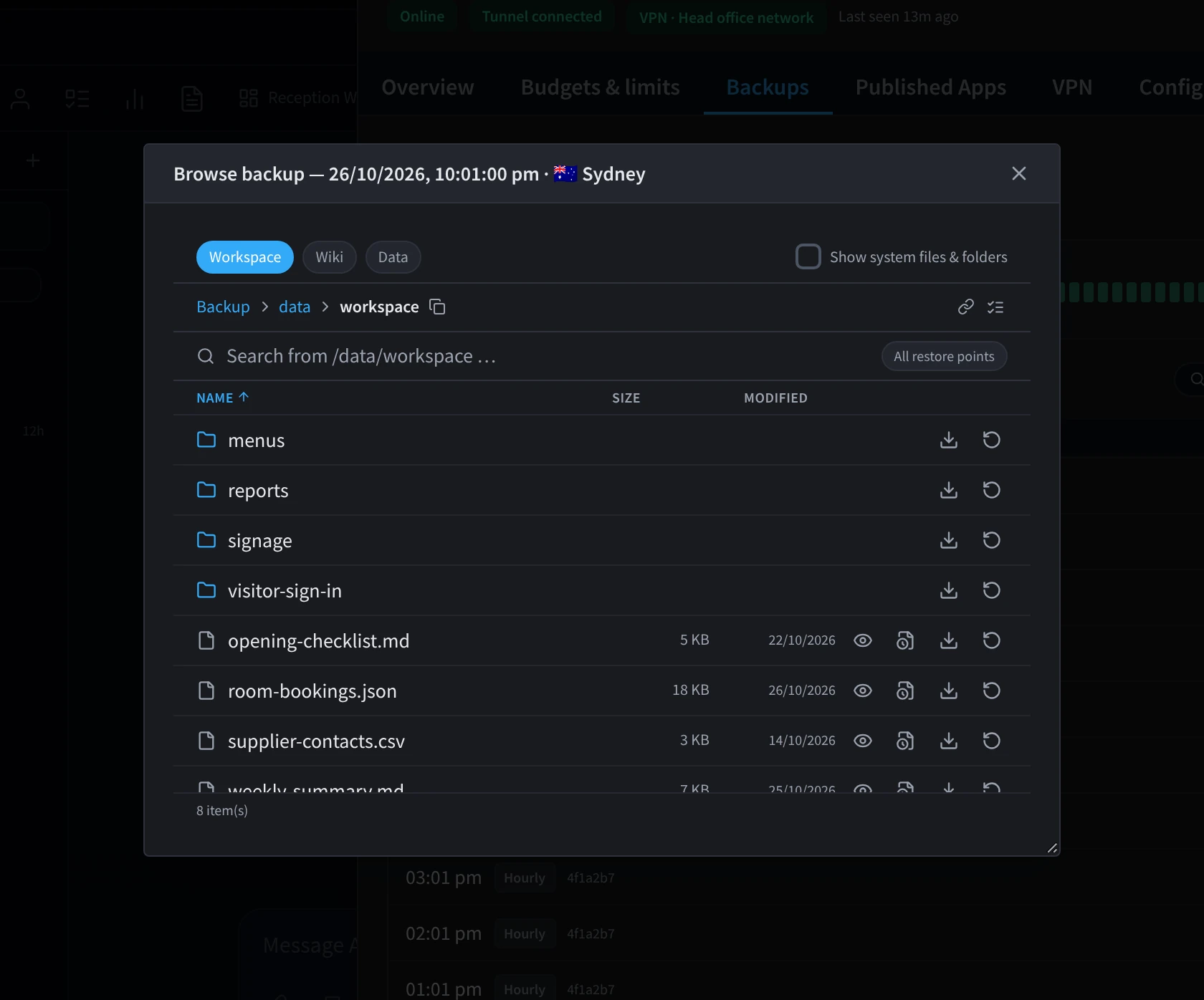
Browse Backup · Time Machine-Style File Browser & Single-File Restore
Offline Browsable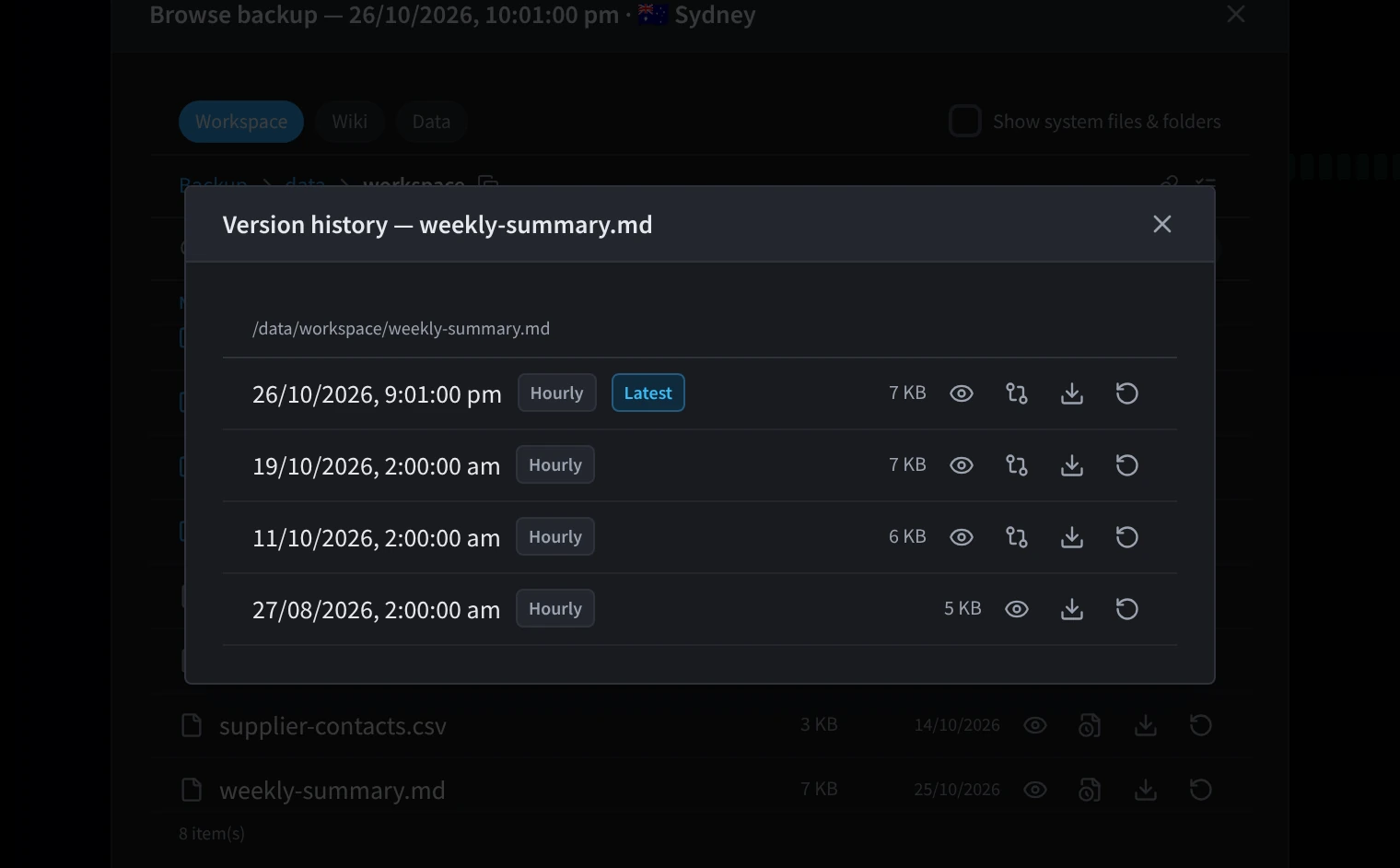
Single-File Version History · Compare & Restore Individual Versions
Hourly History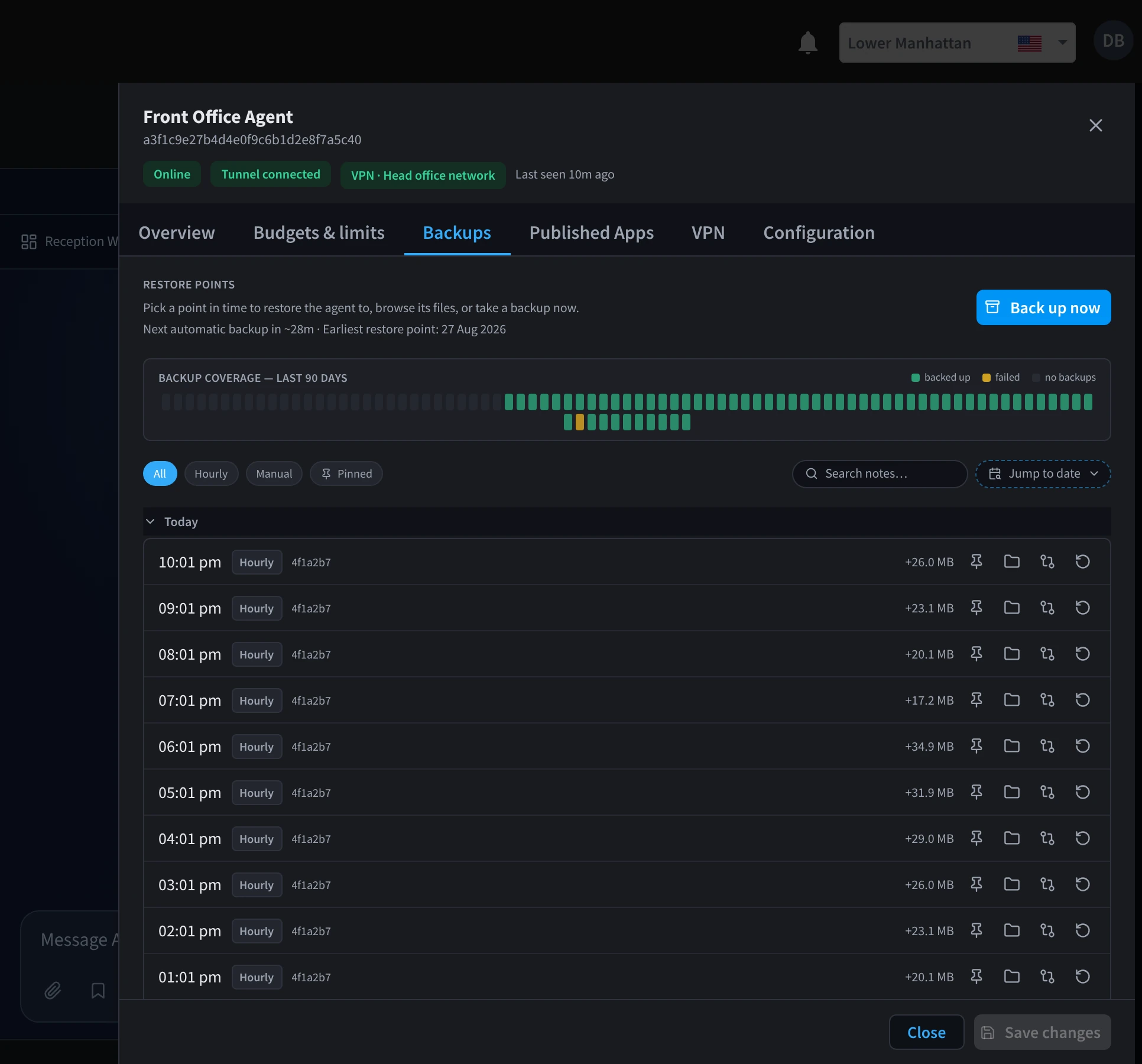
Agent · Backups · 90-Day Coverage Strip & Restore Points
Encrypted Hourly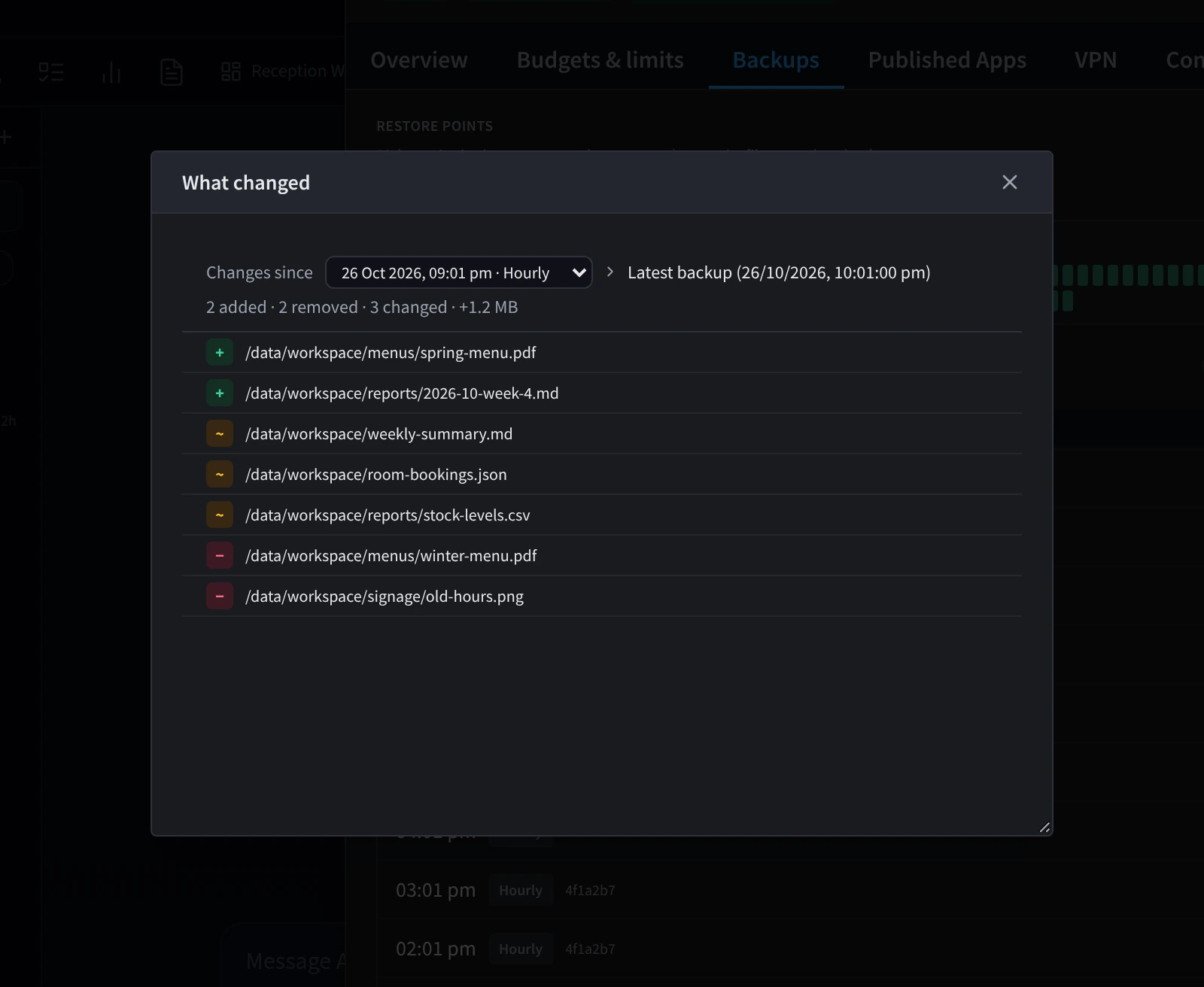
What Changed · Added, Modified & Removed File Diffs
Pre-Restore Diff16 Cloud Backup Storage Regions · Multi-Region Pinning
Pin encrypted backups across 16 global storage regions.
Keep backups for 7, 14, 30, 60, or 90 days (default), or 1, 2, or 5 years, pin critical snapshots indefinitely, and replicate independent encrypted copies across any of 16 Cloud Backup storage regions at the standard Cloud Object Storage rate (US$7.99 per TB per month).
North America (6 Regions)
- Virginia (Ashburn), USA
- Virginia (Manassas), USA
- Texas, USA
- Oregon, USA
- San Jose, USA
- Toronto, Canada
Europe & UK (6 Regions)
- Amsterdam, Netherlands
- Frankfurt, Germany
- London (Slough), UK
- London (Chessington), UK
- Paris, France
- Milan, Italy
Asia-Pacific (4 Regions)
- Tokyo, Japan
- Osaka, Japan
- Singapore
- Sydney, Australia
Snapshots are encrypted on the Agent before upload and stored only in the backup regions your administrators select.
Enterprise Skill Library · Security Scanning & Version Governance
Show one Agent how it is done. Share the skill across every site.
Where memory holds facts, a skill holds a repeatable operational procedure: how to compile the Monday room-booking report, reconcile supplier invoices, or run an end-of-month summary. Teach a skill in plain conversation or refine its procedure steps, rules, and reference files on the Skills tab, then share it through your organisation's governed Skill Library.
room-booking-report) · Scope & scan (Share a skill) · Govern in Skill Library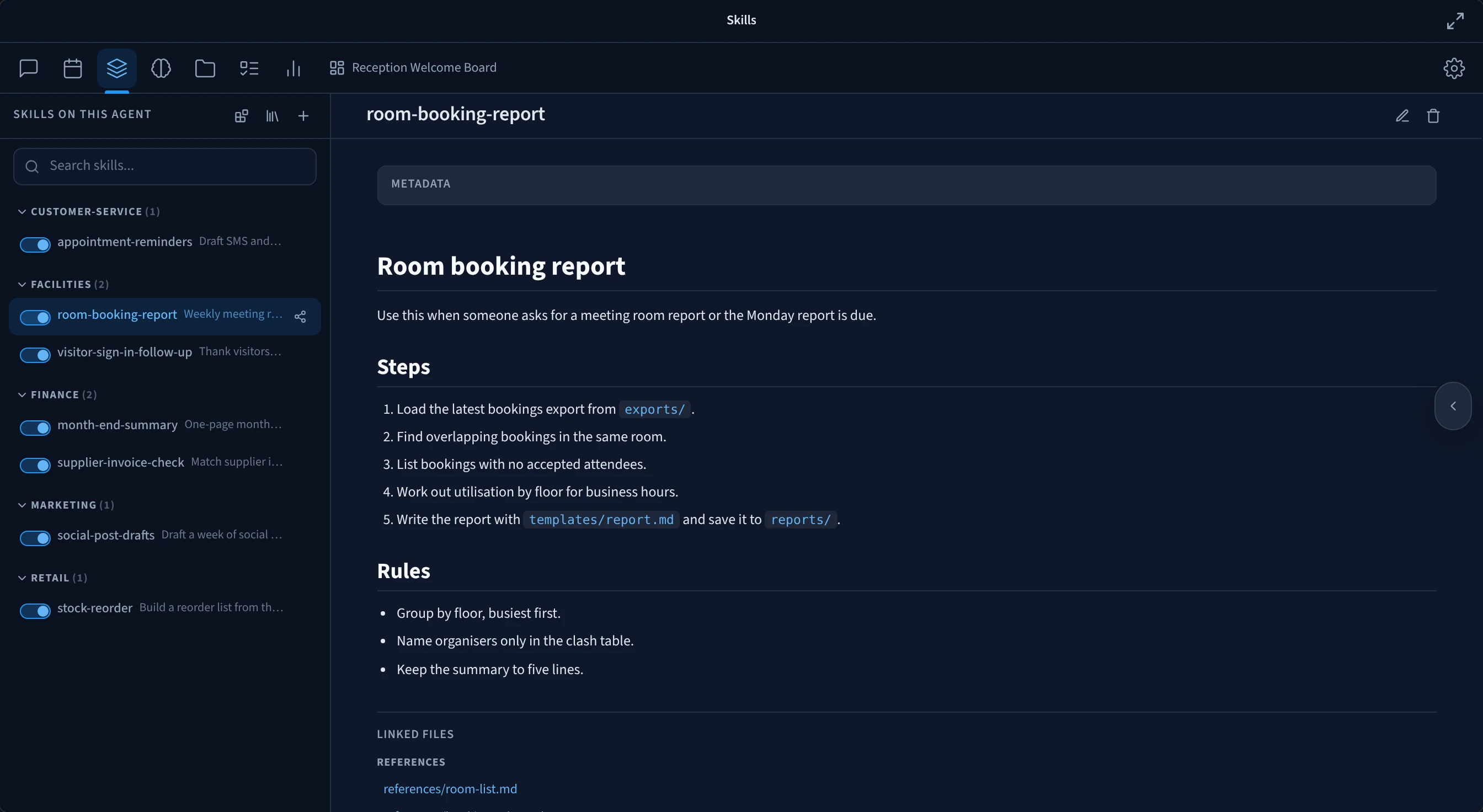
Performance Hub · Agent · Skills · room-booking-report
Main Skill Procedure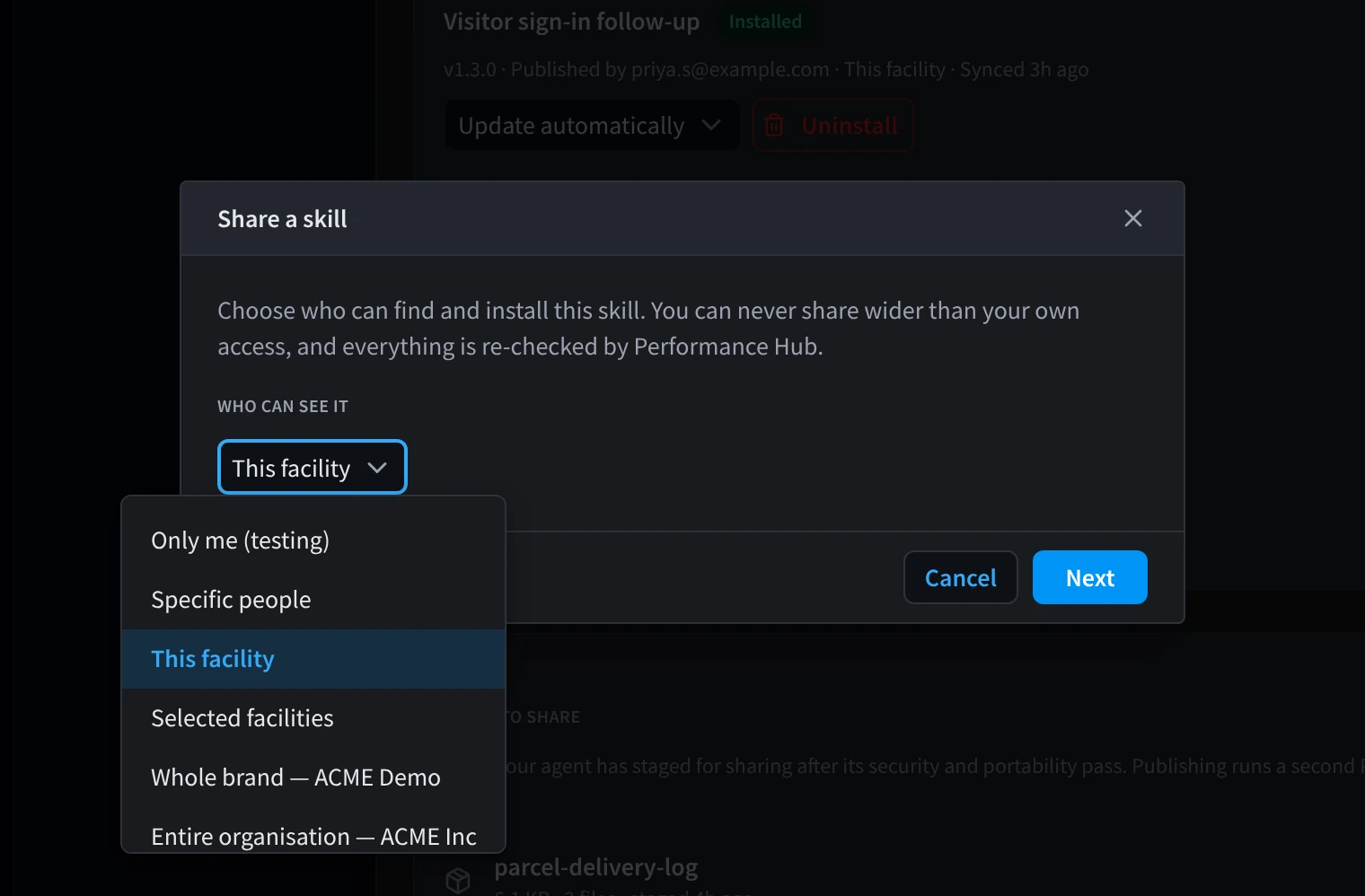
Share a Skill · 6 Visibility Scopes
Scan & Publish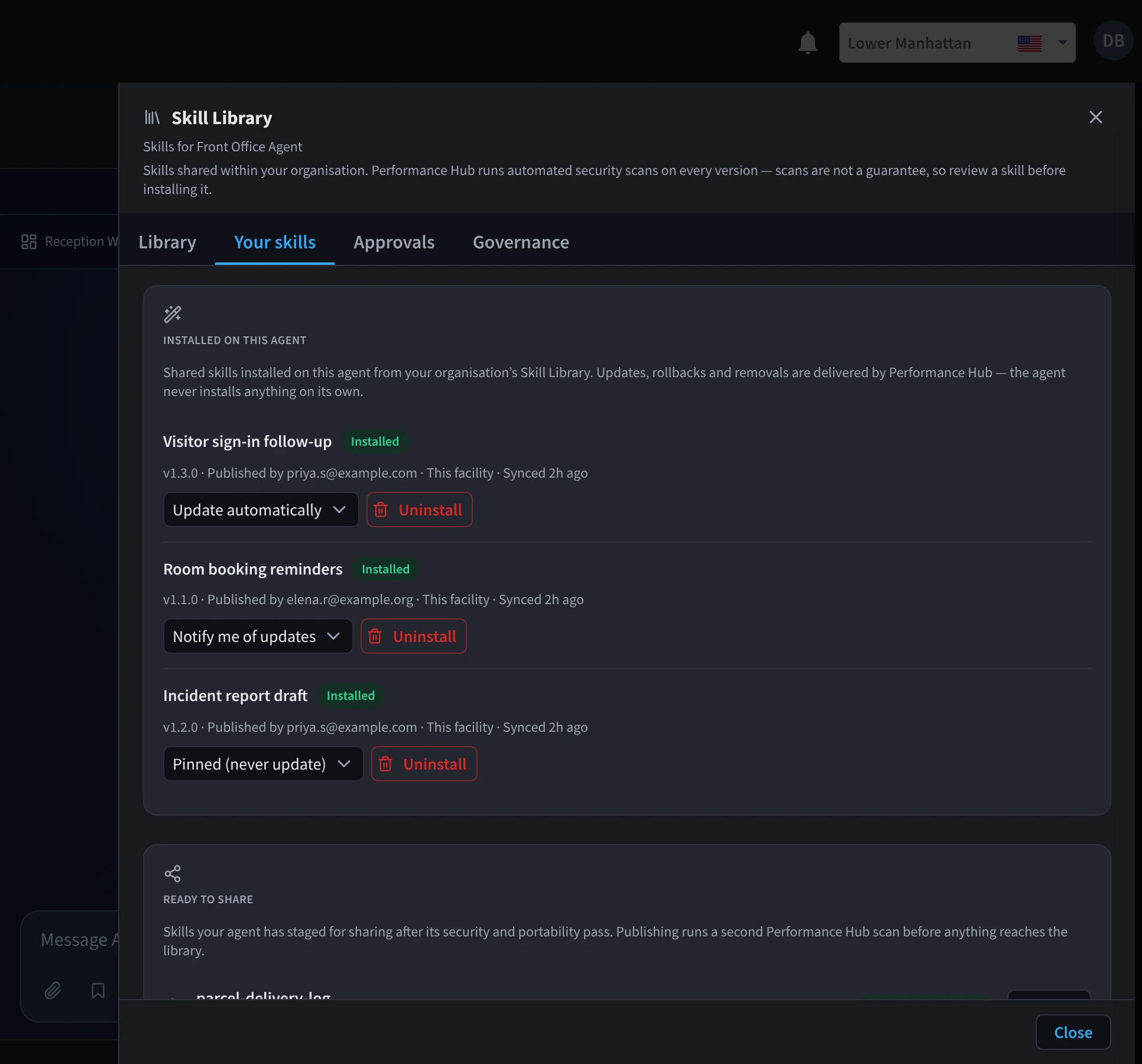
Skill Library · Approvals & Pinning
Version ControlTwo-Pass Security & Portability Scan
Automatic secret stripping before anything is shared.
When an author stages a skill for sharing, the Agent runs a portability pass to strip local secrets or site-specific details. When published (Scan & publish), Performance Hub runs a second automated security scan before the skill enters the library.
Scoped Sharing & Admin Approvals
Six visibility scopes plus Approvals and Governance tabs.
Share to Only me (testing), Specific people, This facility, Selected facilities, Whole brand, or Entire organisation, with optional organisation-administrator review workflows on the Approvals and Governance tabs.
Per-Agent Version Pinning
Each receiving Agent controls how installed skills update.
Choose Update automatically, Notify me of updates (reviewing the changelog before approving), or Pinned (never update) for change-controlled sites. Every Agent also ships with a maintained operational runbook skill.
Skill Usage Analytics
Measure invocations, active skills, and patches across sites.
The Insights tab tracks total skill invocations, active skills in use, views, patches, and usage share so operations leaders can see which procedures save the most time.
Governance & Permissions · Private or Shared Agents · 90-Day Audit Logs
Share an Agent across the team, or lock it down to a single owner.
Every Agent has a designated Owner, uses a device-bound service account with short-lived rotating tokens and zero static API keys on disk, and fits naturally into your Organisation, Brand, Region, and Facility hierarchy. Scope which facilities and capabilities each Agent can reach, keep physical actions behind human confirmation gates, and leave an Agent open to the facility team or restrict it to a named allowlist for finance, HR, executive, or clinical governance work.
Share an Agent across the facility or brand team.
Open by default to staff whose Performance Hub role grants access to that facility and module. Built for Reception, Operations, Facilities, and shift collaboration.
- Role-inherited team access: Authorised staff at the site can chat, run skills, and open Published Apps immediately with zero per-user setup.
- Built-in Request Access approvals: Colleagues who need entry can click Request access; the Owner approves or denies in one click via in-app or email.
- Shared operational memory: The entire shift collaborates against the same standing rules, 3D Relations graph, and workspace files.
- Individual user attribution: Even on a shared Agent, every prompt and tool invocation is recorded against the signed-in person in 90-day Audit Logs.
Lock an Agent down to a single Owner or named allowlist.
Turn on Restrict access to this agent for executive, finance, HR, legal, or clinical governance workloads that require strict confidentiality.
- Single Owner or explicit allowlist: Leave People with access empty so only the Owner can open the Agent, or add specific named colleagues.
- Hidden from everyone else's switcher: Enable Only admins can see this agent to hide the Agent completely from non-admin staff.
- Strict admin privacy boundary: Organisation admins not on the allowlist cannot read chats, files, skills, or backups; they see only a Backup health status card.
- Support access kill switch: Toggle Permit access from Performance Hub Support off at any time so not even support staff can open a restricted Agent.
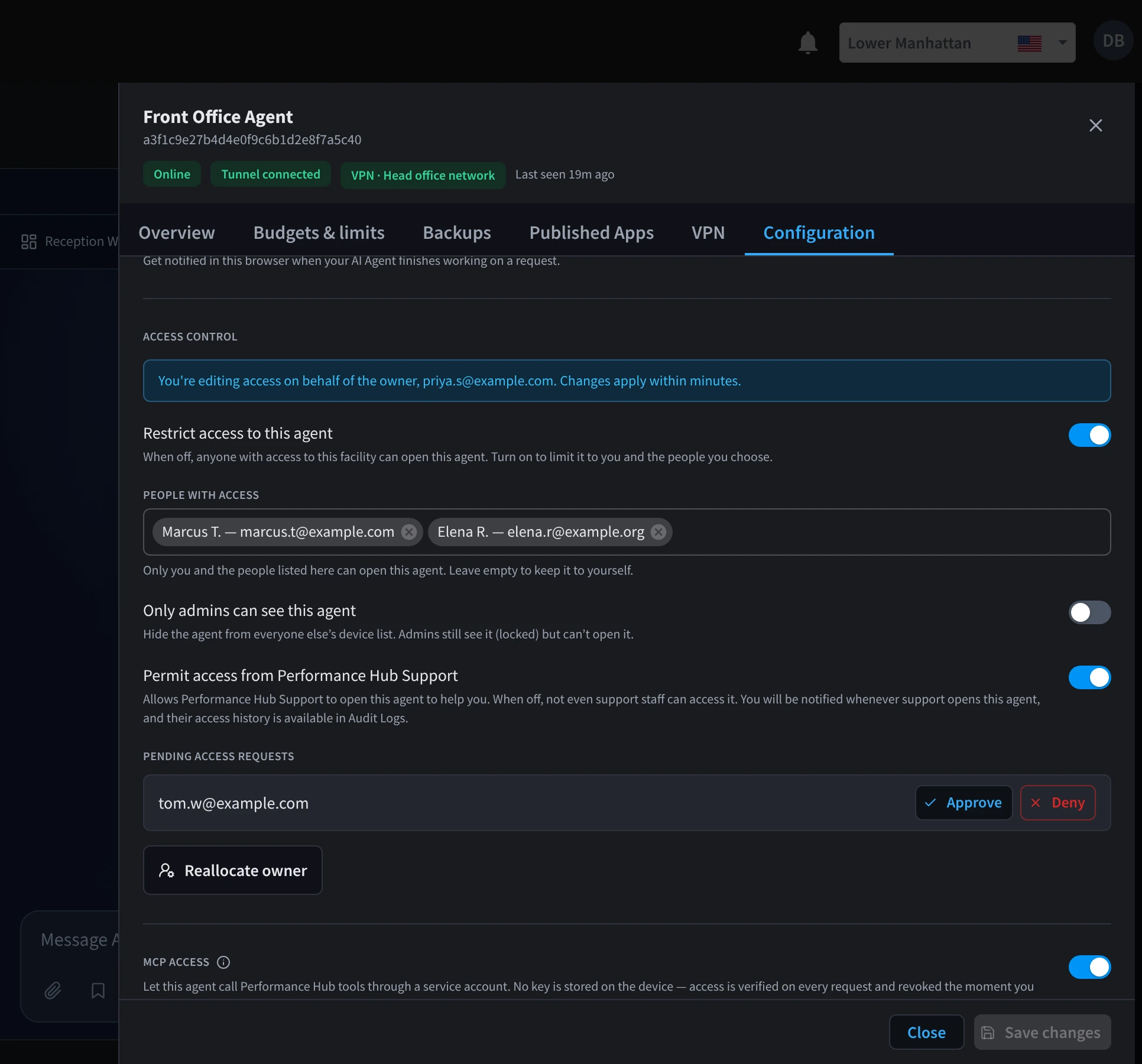
Agent · Access Control · Owner, Restrict Access & Support Toggle
Shared or Private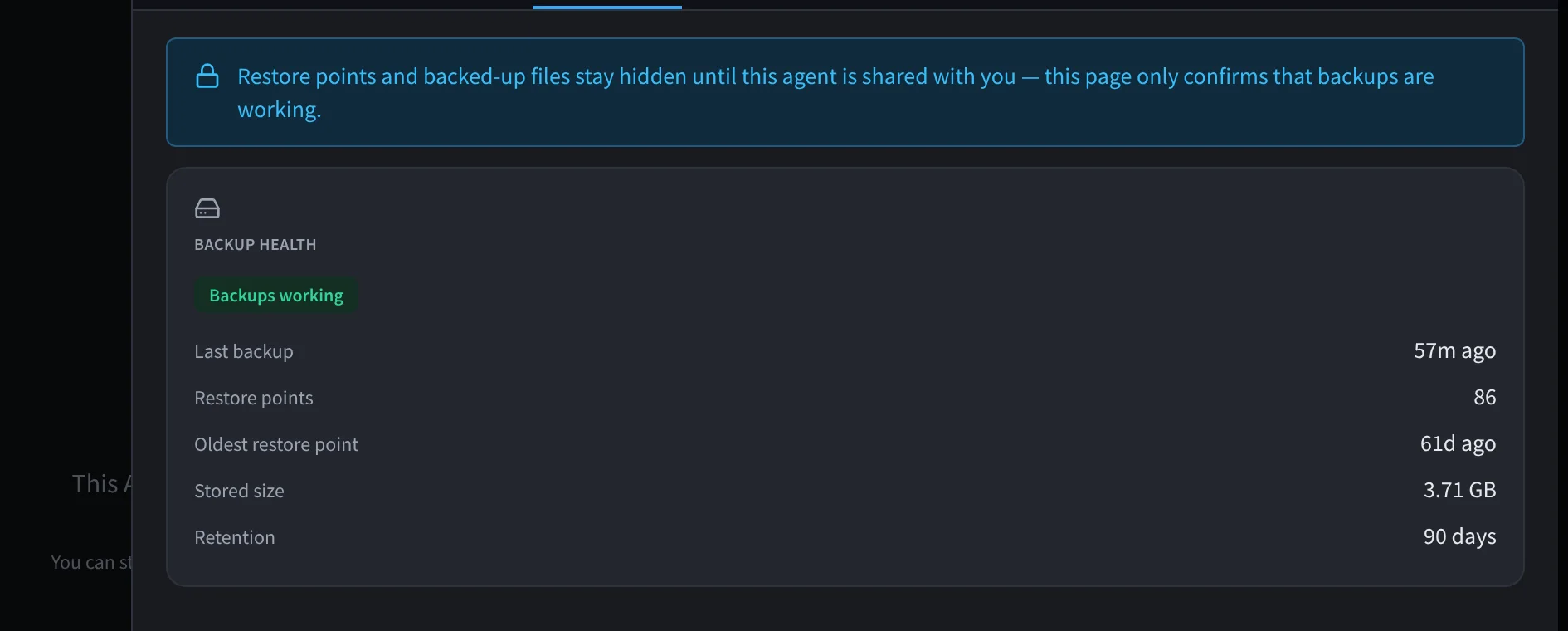
Restricted Agent · Backup Health Status Only (Admin Privacy Boundary)
Contents HiddenScoped Capabilities & Physical Safety Gates
Server-enforced MCP scope, per-tool controls, and human confirmation gates.
Facility, Region & Org scope
Granular facility & capability scope.
Scope each Agent to This facility, Selected facilities, Regions, or Entire organisation, and grant All capabilities, Only selected capabilities, or All capabilities except selected. An Agent's grant is verified on every request and can never exceed the granting administrator's own permissions.
Server-enforced MCP controls
Read-only mode & per-tool selection.
Turn on Read-only mode so every mutating tool is hidden and refused at the server, or expand Advanced tool selection to enable or disable individual MCP tools across Doors, Cameras, Screens, Duress, Check-ins, and Audio.
Physical action safety
Human-in-the-loop confirmation gates.
Physical actions stay behind explicit human confirmation. Unlocking a door, triggering a lockdown, or taking over venue screens happens only at the autonomy level you set, with an explicit confirmation prompt in chat.
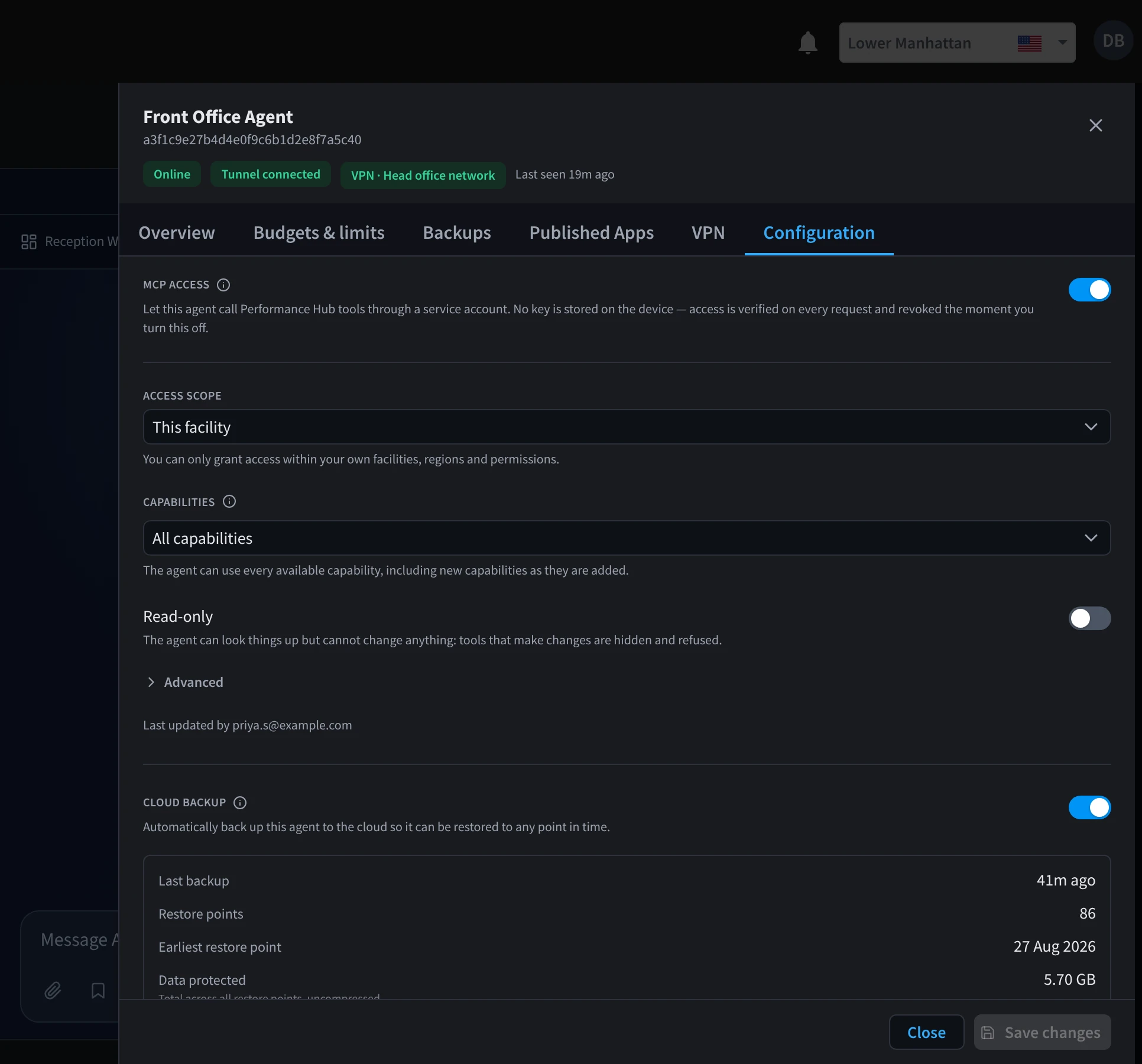
Performance Hub · Agent · MCP Access & Capabilities
Zero Static KeysI checked the Front Entrance intercom camera and verified the courier at the main lobby door. Confirm below to momentarily unlock the door.
Door Access · Unlock Front Entrance (5 seconds)
MCP tool: doors.unlock_opening
Opening
Front Entrance (Main Lobby)
Duration
5 seconds (momentary)
Audit trail
Signed-in user & IP
Human-in-the-Loop Confirmation Gate · Explicit Approval in Chat
Confirmation Required90-day searchable trail
Complete attribution & External MCP Server.
Every user signs in with their Performance Hub account (Google, Microsoft, Apple, email/2FA, or SAML/OIDC SSO), and alongside your dedicated facility Agent, any compatible external MCP client can connect via our MCP server under the signed-in person's own Performance Hub permissions. Audit Logs record every request made by people, MCP clients, and Agents: who made it, source IP, HTTP method, status, latency in milliseconds, 90-day history, 7-day request/response payloads, plain-language AI Error Summaries, and CSV export.
Official Model Context Protocol (MCP) Endpoint
External MCP Server included
Connect Claude, Cursor, Copilot Studio, Glean, or any MCP-compatible client directly to your facility under each signed-in person's own Performance Hub permissions and 90-day audit trail.
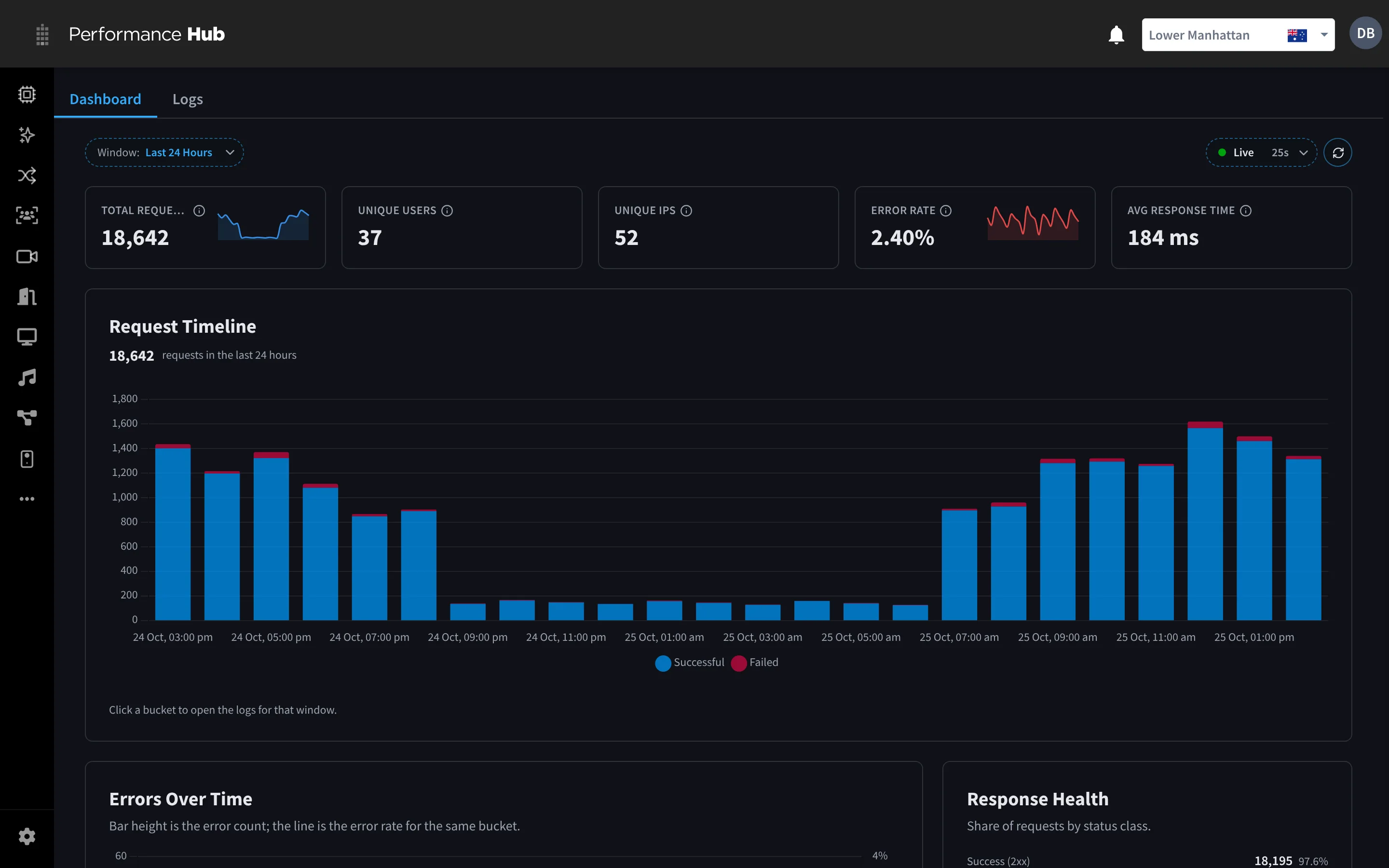
Performance Hub · Audit Logs · 90-Day Attributed Request Trail & 7-Day Payloads
Full AttributionBuilt-In Assistant Migration · Encrypted Transfer
Bring over the skills, files, and memory from the assistants your team already uses.
Transfer conversation history, long-term memory, workspace files, reusable skills, and scheduled jobs across from your existing assistants in one guided flow so your facility Agent starts with your team's context from day one.
- Conversation history
- 3D Long-Term Memory
- Workspace files & Wiki
- Skills & procedures
- Scheduled jobs
Native Desktop & Mobile Apps · Bot Mode & Kanban
Work with specialist bots like teammates. On your desktop or in your pocket.
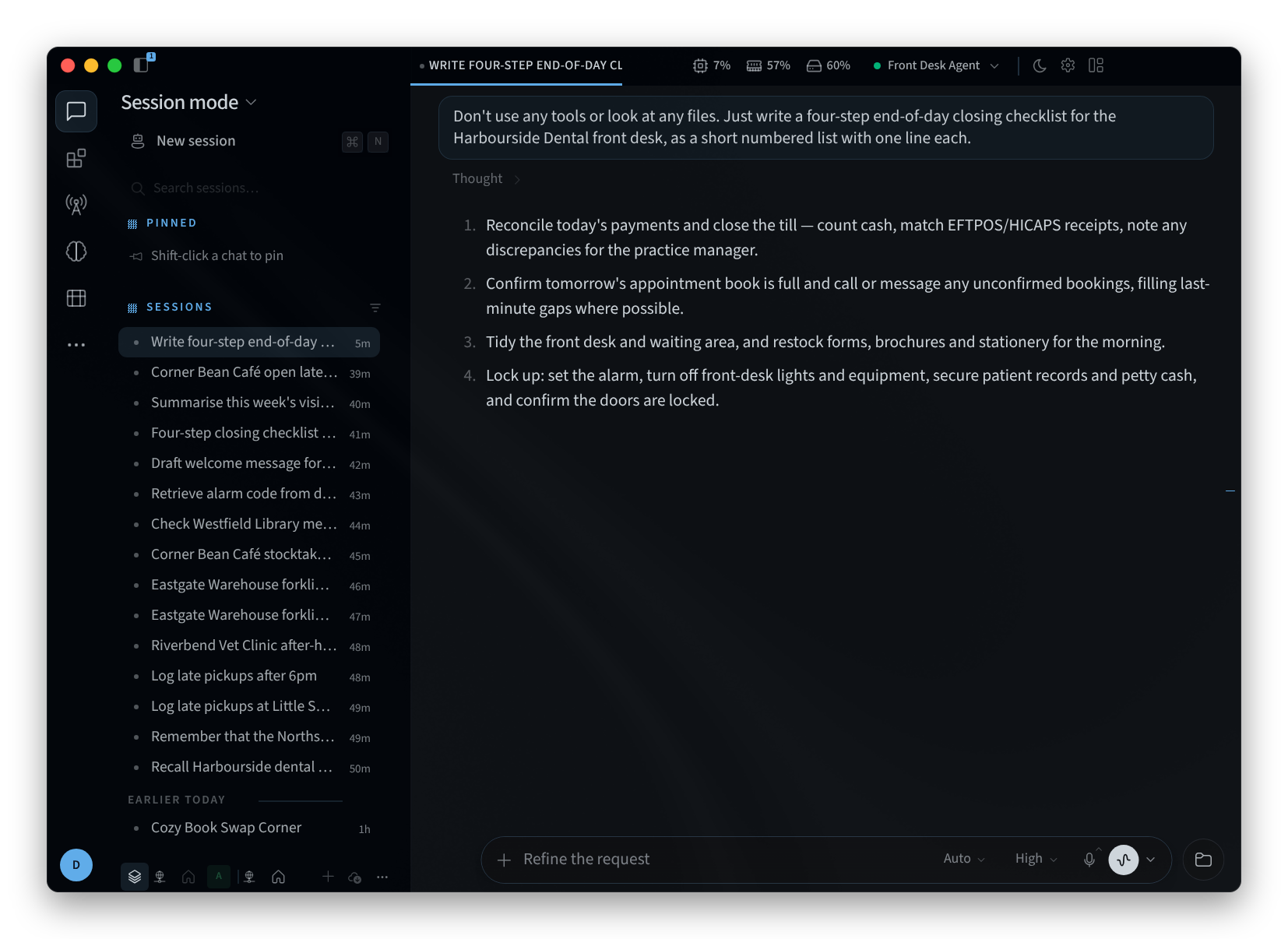
Performance Hub Agent runs natively on macOS (signed and notarised for Apple silicon), Windows (64-bit installer), Linux (Ubuntu, Debian, Fedora, RHEL, and openSUSE), and Mobile alongside the web console. Because your Agent runs on its own dedicated processor or Cloud Agent instance, long-running jobs, scheduled briefings, and hosted apps keep working when you close your laptop or lock your phone.
Performance Hub Agent · Bot Mode & Live Apps
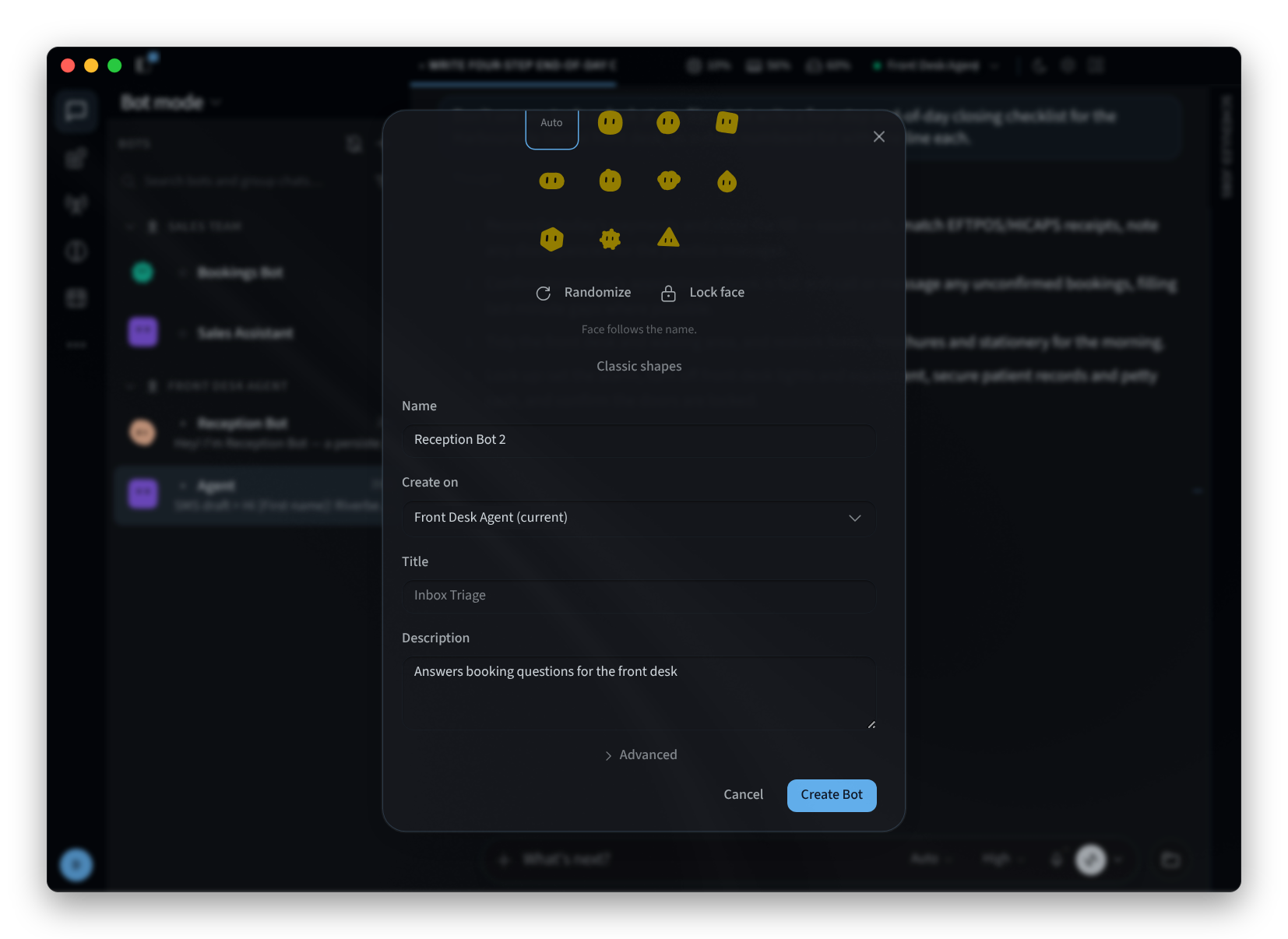
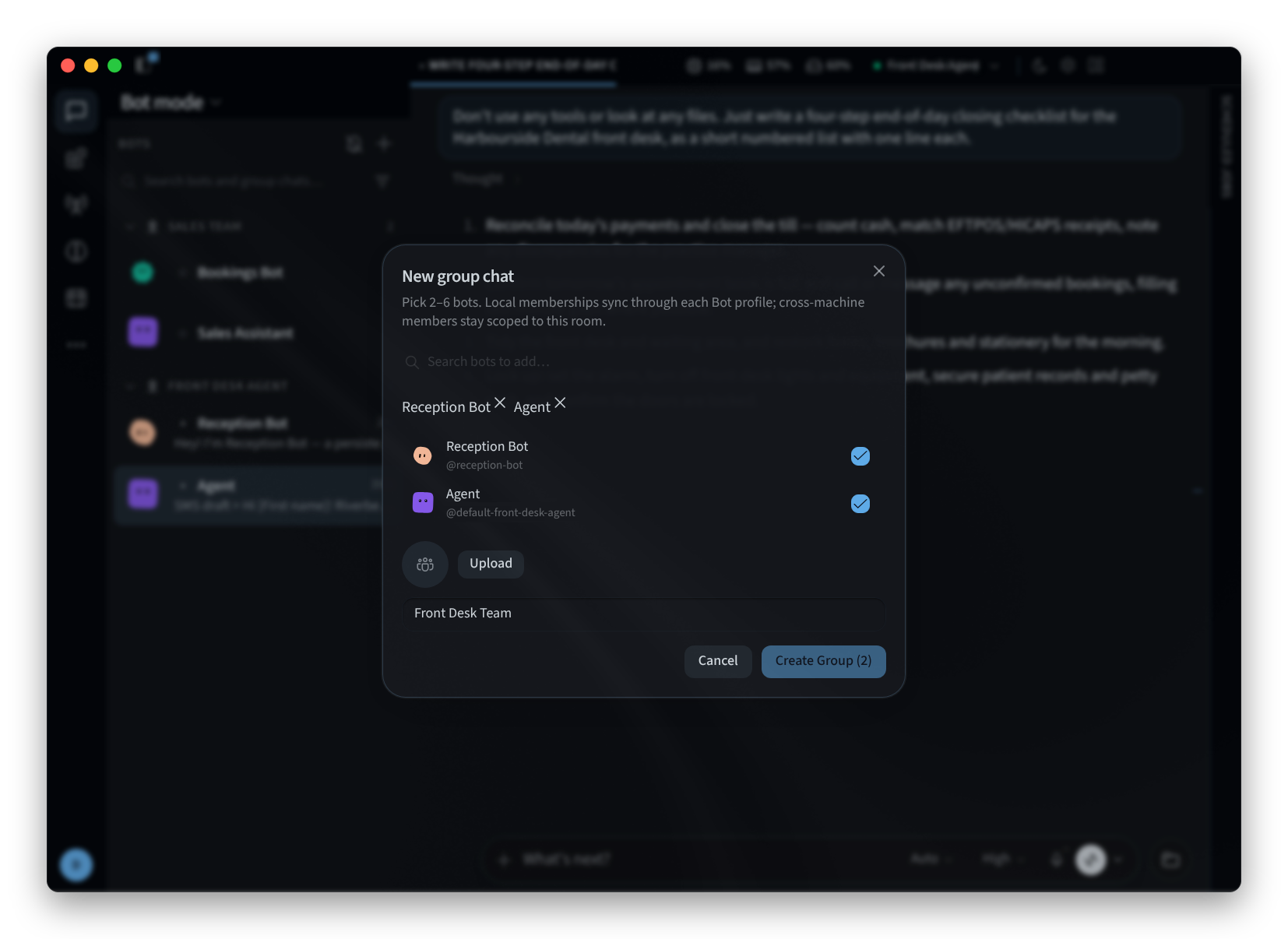
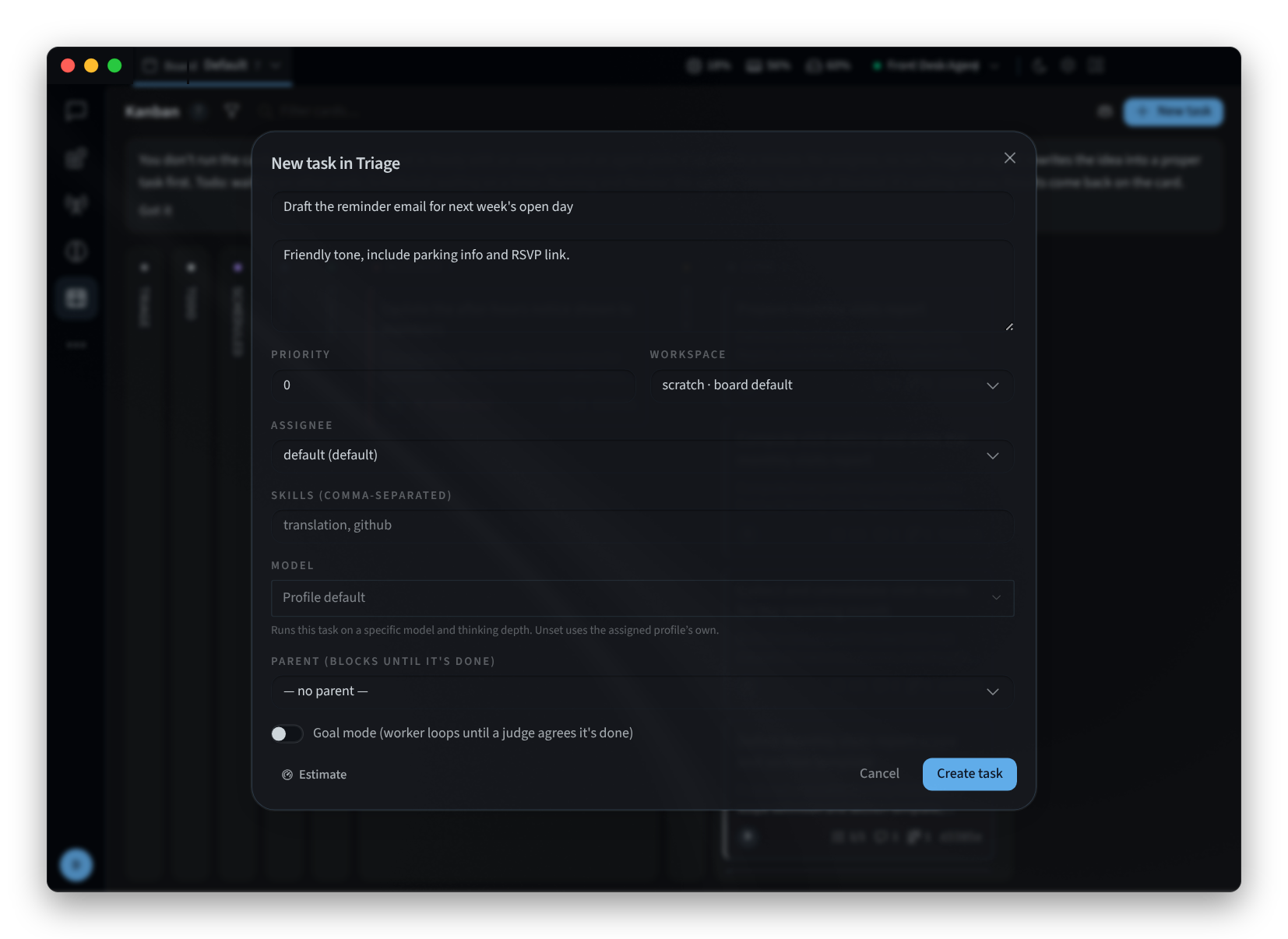
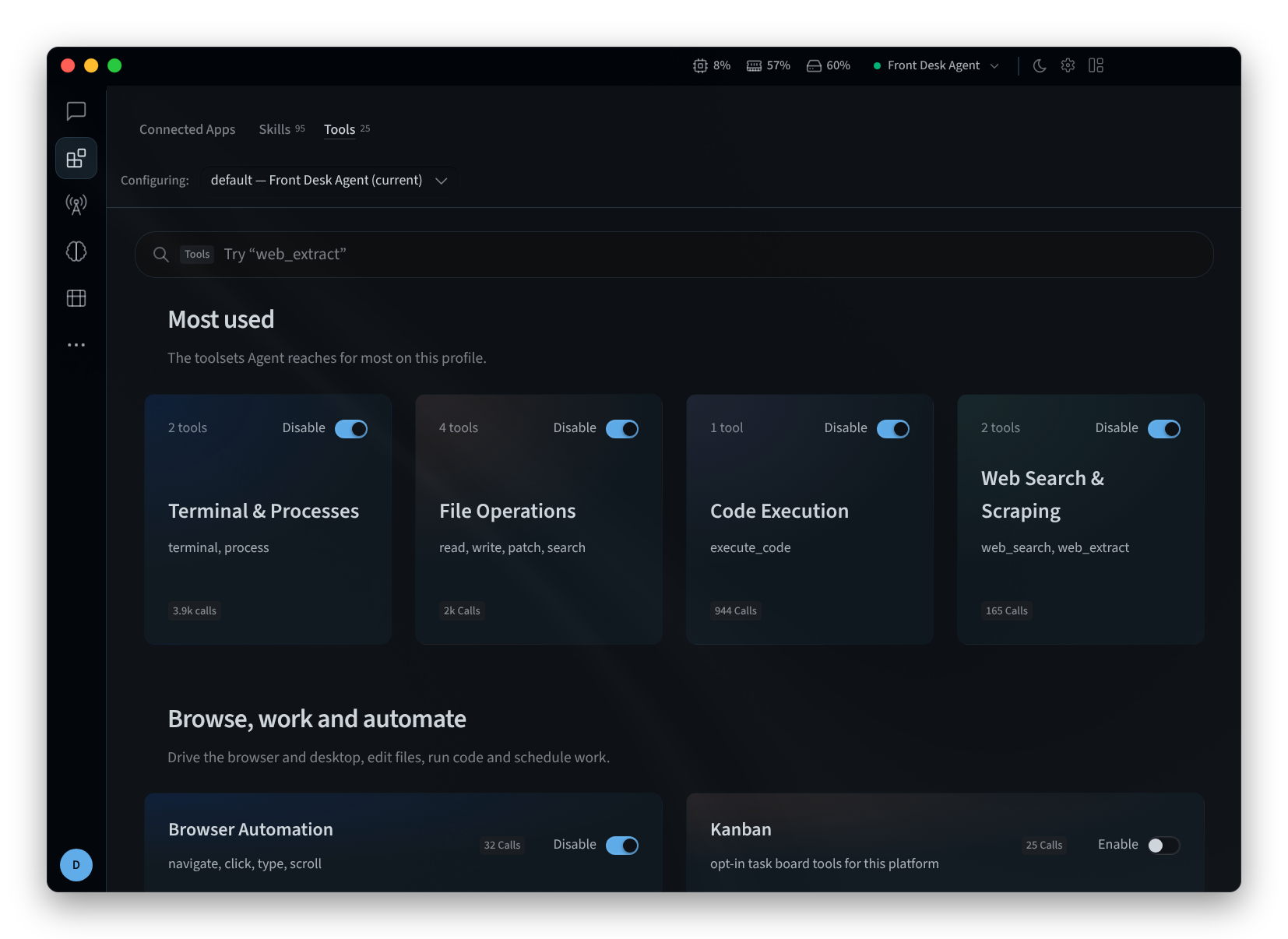
Native Desktop AppWork with named specialist bots side by side with live Published Apps.
- Dedicated specialist profiles: Give each bot (Chief of Staff, Operations, Websites, Support) its own role, face, custom instructions, long-term memory, and default skills.
- Live Services docked beside the chat: Preview and interact with web apps your Agent is hosting without leaving the conversation.
- Live hardware telemetry in the titlebar: Monitor CPU, memory, disk health, and active connection status (Direct local network or Cloud relay) at a glance.
Mobile
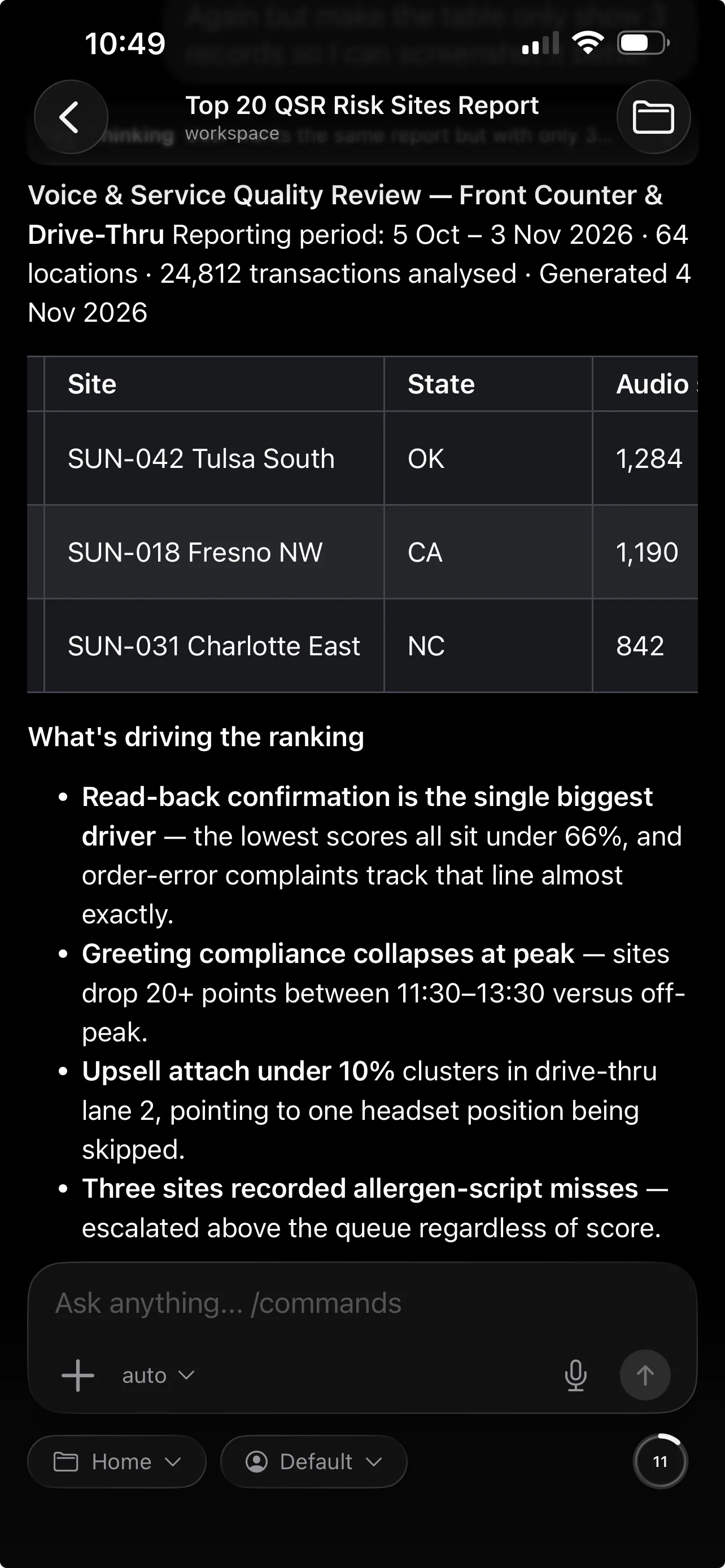
A native Mobile pocket remote for every site.
The Performance Hub Agent Mobile app keeps you connected to your facility Agents on the floor, between sites, or after hours.
Live Lock Screen Progress
Follow long-running reports, migrations, and Kanban tasks right on your lock screen without opening the app.
Home Screen & Lock Screen Widgets
Jump straight into Quick Actions or your most recent Agent sessions with a single tap from your home screen or lock screen.
Voice Commands & System Share Sheet
Ask your Agent or start a new voice chat hands-free, or share PDFs, invoices, photos, and links from any mobile app straight into an Agent chat.
Offline Cache & Inline Notification Replies
Read recent conversations and reports even in basement plant rooms with poor reception, and approve or reply to Agent prompts directly from a notification.
Published Apps & Public Sites · Side Menu · Desktop · Mobile · Display Screens · Custom Domains
Ask your Agent for an app. Run it in the menu, on your screens, or on the public internet.
Layered onto the Agent you already run, Published Apps turns a plain-language conversation into a live web app hosted on your Physical Agent or Cloud Agent. Open it from the Performance Hub side menu, in the desktop app and Mobile, on in-venue Display Screens, or on the public internet with its own secure subdomain from us or your own custom domains.
- Internal tools for your chosen audience: Publish dashboards, room bookings, and stock lookups to the Performance Hub side menu for Only me (testing), Specific people, This facility, Selected facilities, Whole brand, or Entire organisation, or open and pin them in the desktop app and control your Agent from Mobile.
- Display Screens as live Smart Displays or offline Web Apps: Turn on Allow on display screens to run live Smart Displays (Agent: Published App) that adapt to your site, or package static On-Device Web Apps that download to each screen and keep playing offline.
- Public Sites with automatic HTTPS and custom domains: Publish a booking page, event site, or menu to the public internet with an automatic secure subdomain from us, connect your own custom domains with automatic HTTPS without moving nameservers, and choose between Only Performance Hub (default), Anyone with the password, or Anyone on the internet.
- Human-gated, isolated, and self-healing: Only a person can turn a Public Site on after ticking an explicit acknowledgement (the Agent cannot), visitors never spend your AI credits, and every app runs with automatic Health checks & auto-repair on by default.
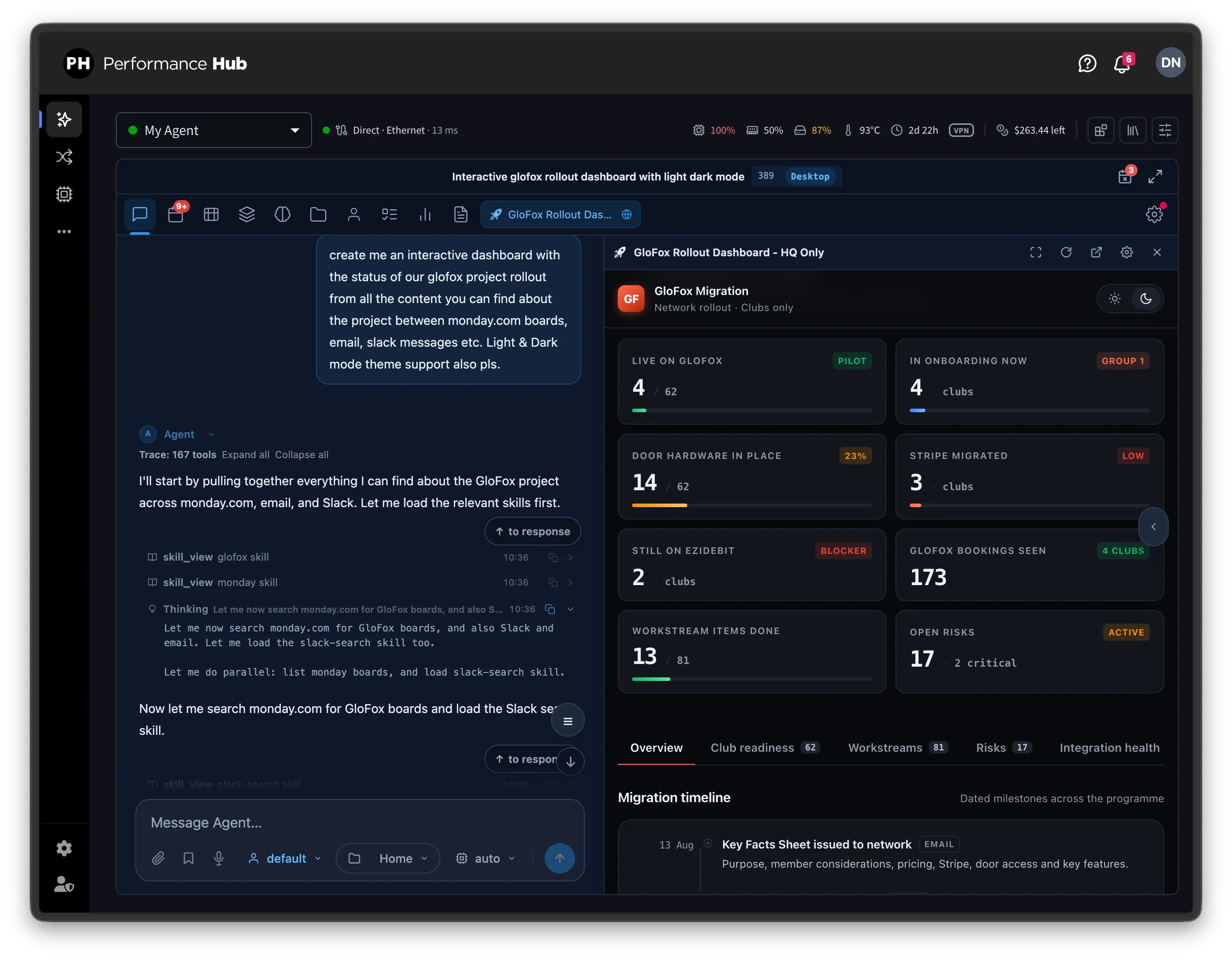
Published Apps · Live Dashboard
Hosted on Agent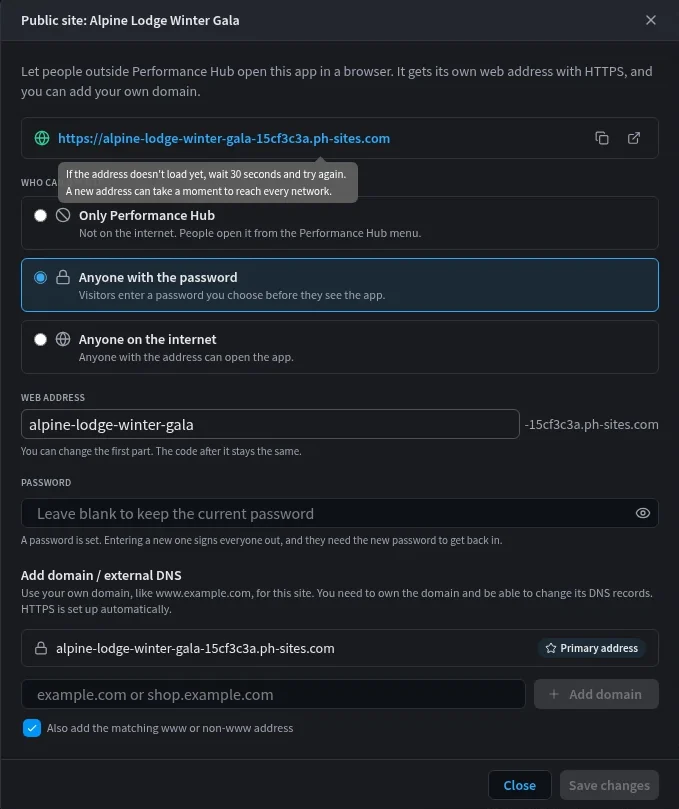
Public Sites · Secure Subdomain & Custom DNS
Automatic HTTPSBuilt for Every Physical Industry · 10 Verticals
Built for every physical industry. Ready for how each site actually runs.
Every building has its own operational rhythm, hardware mix, and governance rules. Across all 10 physical verticals, your Performance Hub Agent connects to the exact modules, operating hours, and business apps your sites rely on.
Common Questions · Performance Hub Agent
Common questions.
Clear answers on the Performance Hub Agent, native desktop and mobile apps, Published Apps, Long-Term Memory, the Skill Library, 1,500+ Connected Apps, Model Router, peer-to-peer networking, Cloud Agent regions, Time Machine backups, and governance.
What makes the Performance Hub Agent enterprise-ready?
It is a dedicated, hardened Agent engineered by Performance Hub for multi-site physical operations: complete with native desktop and mobile apps, live Published Apps, a 3D Long-Term Memory graph, a security-scanned Skill Library, 1,500+ Connected Apps and full platform control over MCP, Model Router spend caps and guardrails, peer-to-peer LAN and OpenVPN, WireGuard and IPsec (IKEv2) networking, Time Machine-style backups across 16 storage regions, and 90-day attributed Audit Logs.
What is the difference between a Physical Agent and a Cloud Agent, and can I move between them?
Both run the exact same software image and share the same encrypted backup format. A Physical Agent (US$49 / device / month) runs on a silent, fanless Intel x86_64 NUC Agent Processor at your site and connects peer-to-peer on the local network. A Cloud Agent (from US$0.057 / hour for Small) launches in minutes across 15 global regions with 9 instance sizes up to 64 vCPU and 256 GB RAM, with network ingress and egress included.
Because they share the same backup format, you can move an Agent from on-premise to cloud or from cloud back to on-premise at any time by restoring from a backup.
How do local peer-to-peer networking, remote access, and VPN work?
When your browser, desktop app, or mobile app is on the same network as an on-premise Agent Processor, it connects directly peer-to-peer over HTTPS with automatic TLS certificates. When you are off-site or using a Cloud Agent, all routing and encryption are handled automatically. The appliance makes outbound-only connections with zero open inbound ports, zero port forwarding, and zero firewall setup. Built-in OpenVPN, WireGuard and IPsec (IKEv2) support also lets an Agent connect to private corporate networks in strict isolation.
Where do Published Apps run, and who can open them?
Your Agent writes and hosts live web applications on its own device, with automatic health checks and self-repair enabled by default. You can preview them in Live Services split view beside the chat, open and pin them in the desktop app, publish them into the Performance Hub side menu for your chosen staff audience, show them on in-venue TVs as live Smart Displays or offline On-Device Web Apps, or put them on the public internet as Public Sites with their own secure HTTPS subdomain from us or your own custom domains.
Can we choose any AI model, bring our own API keys, and mix Cloud or On-Premise Inference?
Yes. Every Agent integrates natively with Model Router (Model Router documentation) out of the box with zero static API keys on disk, so you can choose any frontier or open-weight model or let Auto Router pick the right model per prompt. You can also bring your own API keys (BYO keys) for any model you choose. For deployment, you can pair an On-Premise Agent with On-Premise Inference so prompts, files, memory, and model weights never leave your building; pair an On-Premise Agent with Cloud Inference; or pair a regional Cloud Agent with either your private On-Premise Inference cluster or the cloud Model Router catalogue.
How do Time Machine-style backups and single-file restores work?
Encrypted incremental backups run hourly by default across 16 global storage regions. Even if a physical device is offline, you can open Browse backup to explore folders at any point in time, view single-file Version History across hourly snapshots, inspect What Changed diffs, and restore a single file in place without restarting the Agent. Full or selective Workspace/Wiki rollbacks take an automatic Safety snapshot first and include one-click Undo.
How is a Cloud Agent billed?
By the hour, rounded up to the whole hour, with a 1-hour minimum per launch. Billing runs from launch until you delete the Agent (delete the Agent to stop compute charges). Network ingress and egress are included, subject to fair use, with no separate data-transfer charge. Prices can vary slightly by region, and the launch wizard shows the exact price. There is no setup fee, minimum term, or monthly minimum. Backups (US$7.99 per TB per month) and Model Router usage are billed separately. See the published platform rates for every size.
Can I keep an Agent private, or share it with specific people?
Yes. Every Agent has an Owner. By default it is shared with staff who have access to that facility and module. Turning on Restrict access to this agent locks it down to the Owner and an explicit People with access allowlist, and Only admins can see this agent hides it from everyone else's switcher. Even organisation administrators who are not on a restricted Agent's allowlist cannot read its chats, files, or backups (they see only a Backup health status card). Owners can also toggle Performance Hub Support access on or off at any time.