Plug-and-Play Site AppliancesMulti-Site Fleet ManagementOutbound-Only Networking
Pre-configured site hardware. Claimed in minutes, managed across every site.
Roll out appliances across one building or an entire multi-site network without imaging operating systems, opening firewall ports, or sending technicians to site for routine maintenance.
Every Performance Hub appliance arrives pre-configured for its role at your facility. Plug into power and your local network, claim by QR or pairing code in Device Management, and oversee live health, bulk software updates, remote reboots, and cross-facility hardware transfers across your entire estate from one browser tab.
- Pre-configured before shipping
- Fast claiming & CSV camera import
- Bulk updates, reboots & transfers
- Live health & site internet speed
- Outbound-only TLS connections
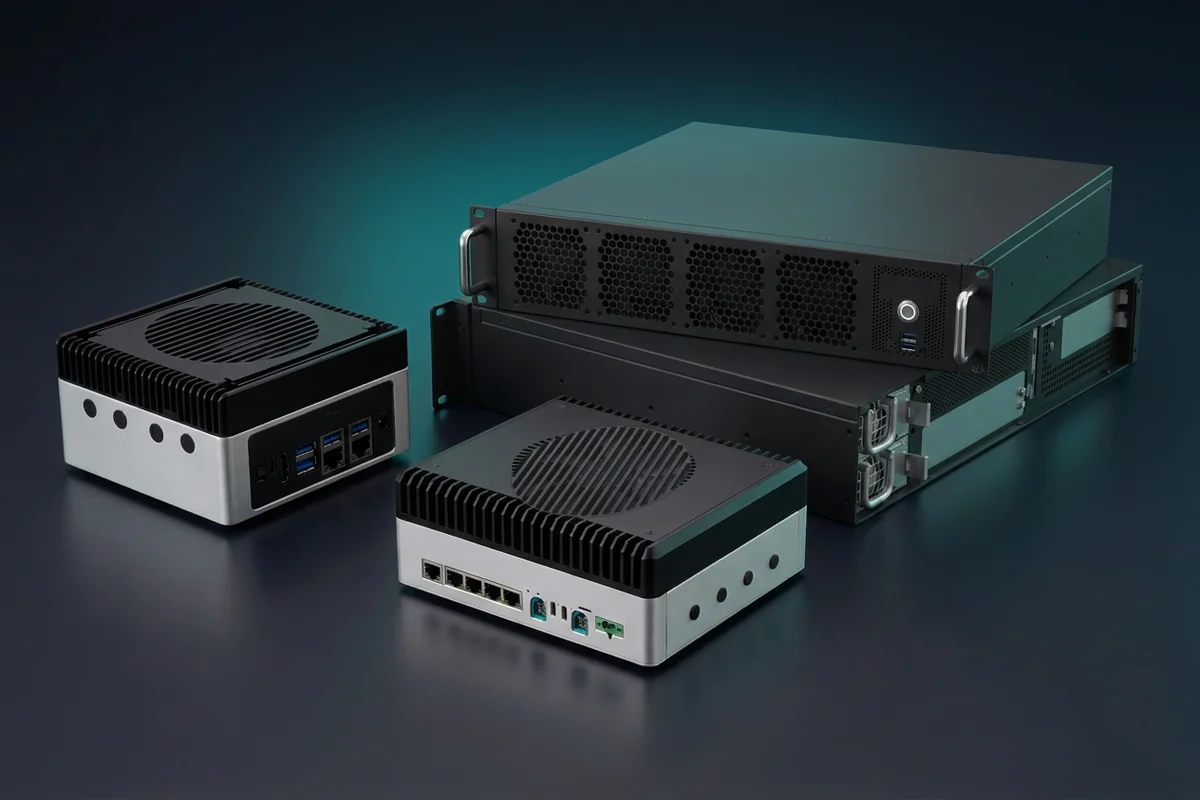
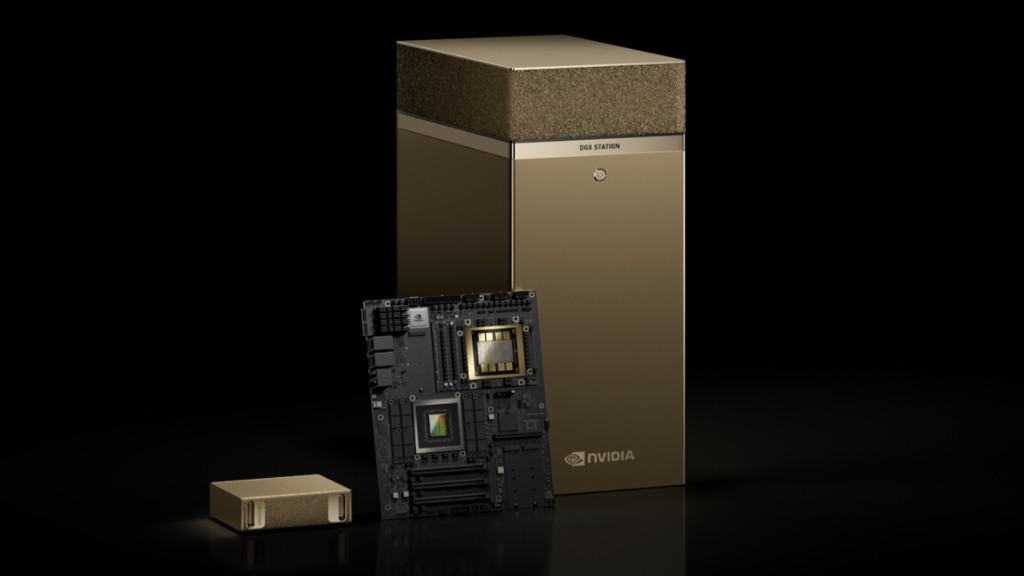
Edge Processor Family · Compact, Multi-Stream & Rack-Class
Three Hardware Tiers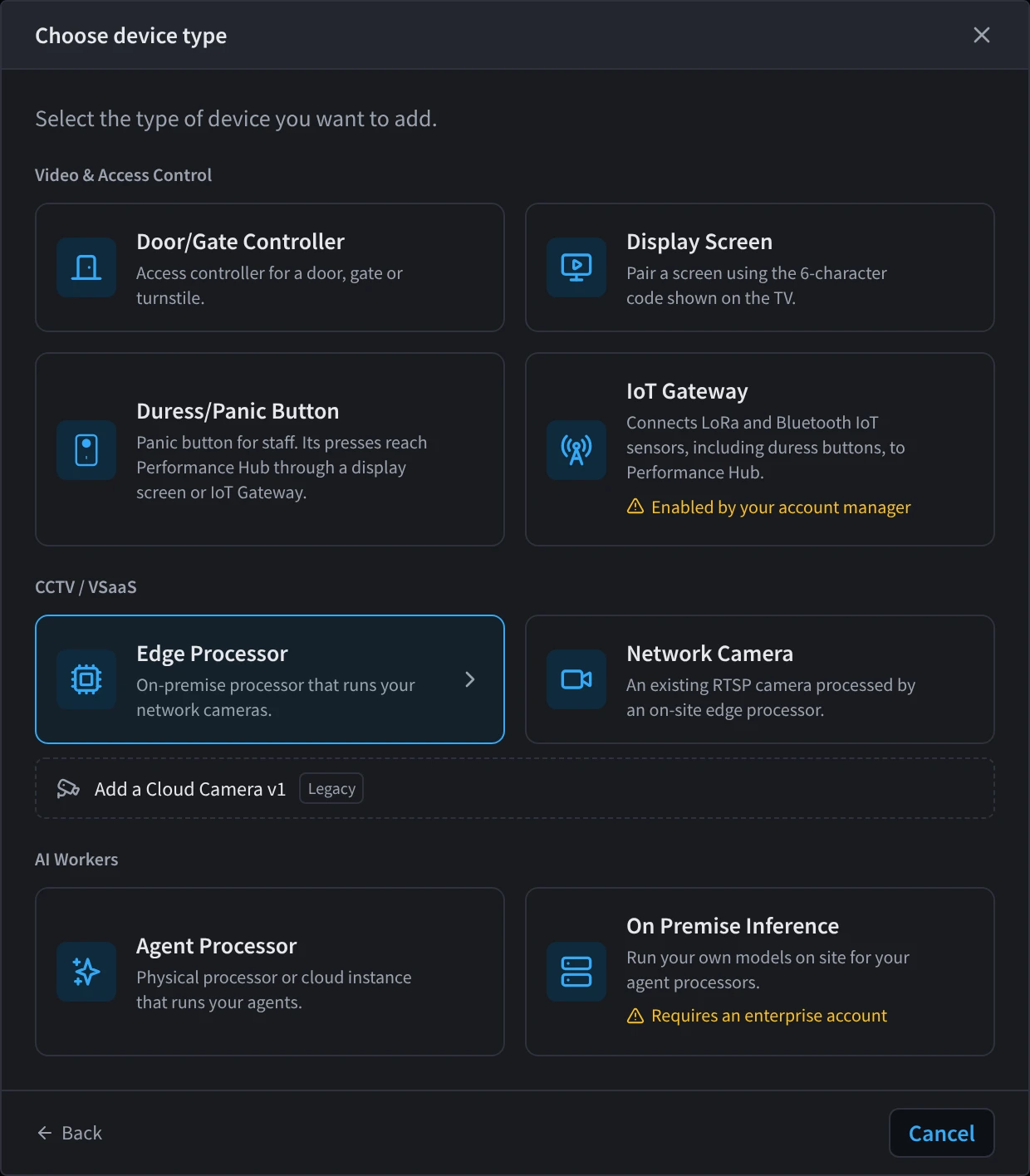
Device Management · Add Any Appliance in Seconds
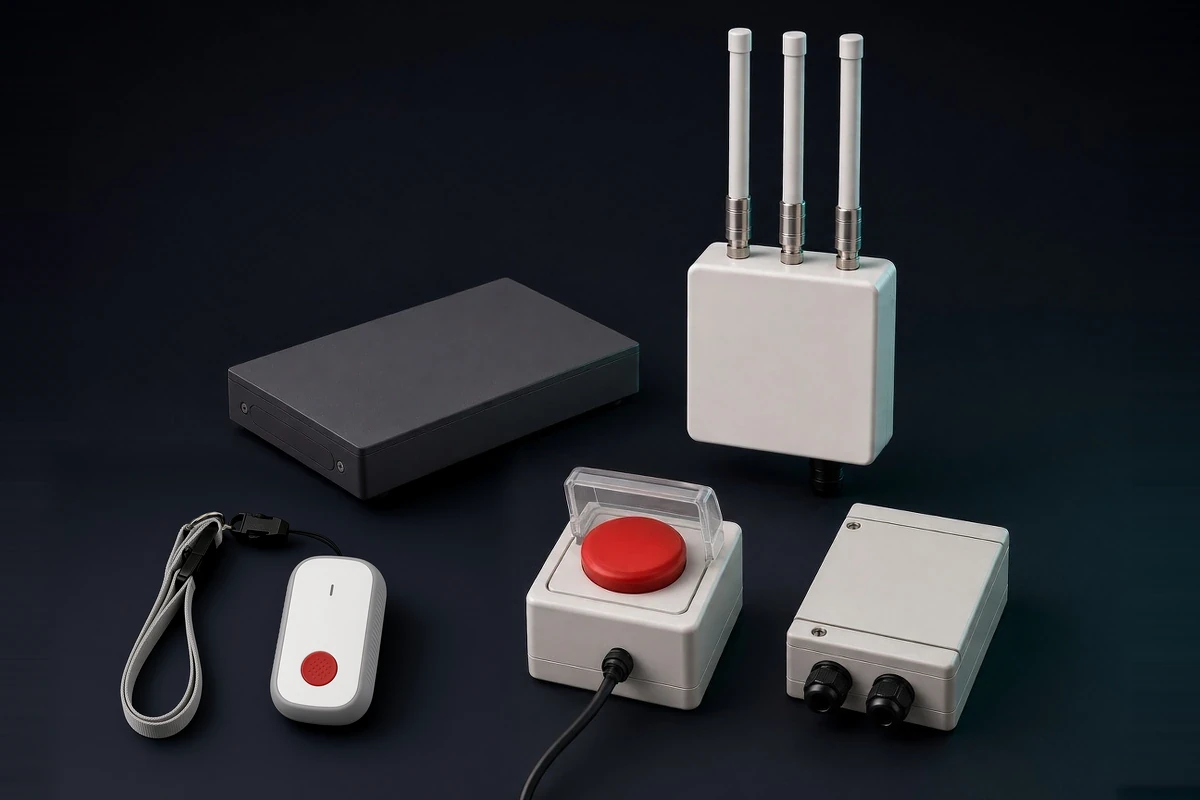
QR · Serial · Pairing CodeSite Appliance LineupReal HardwarePurpose-Built per Role
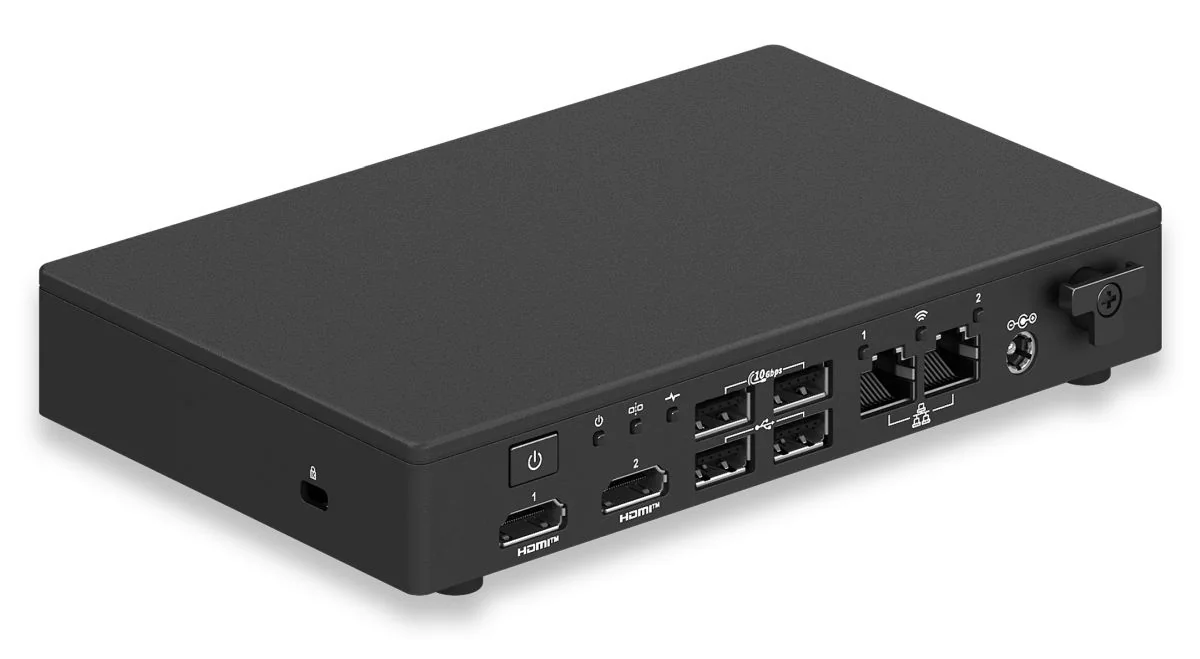
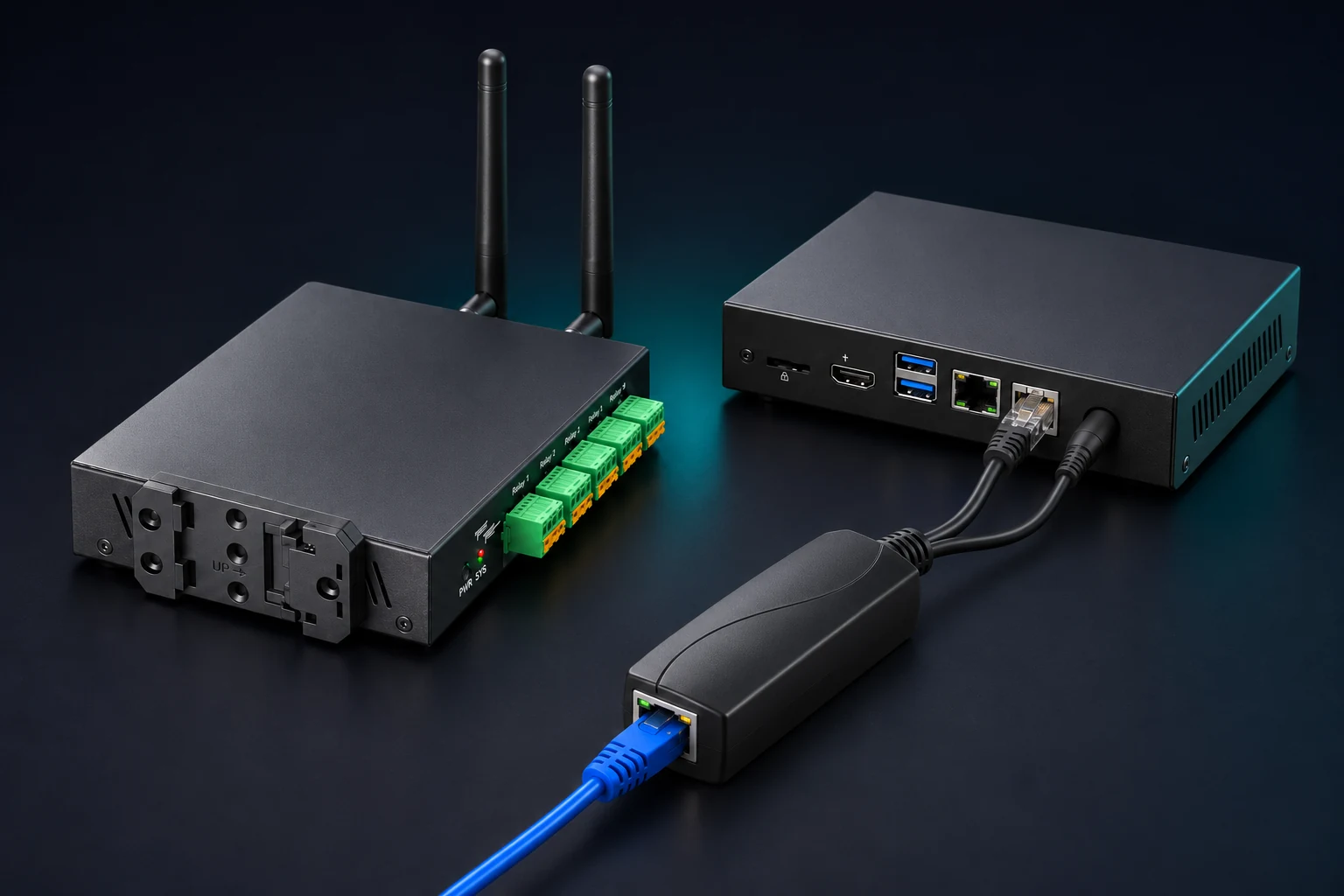
Five appliance families that connect your physical site.
Each appliance is built for its specific job on site, connects outbound to Performance Hub with short-lived rotating credentials, and reports into the same cloud Device Management inventory.
Hardware · Edge Processor
Edge Processor 16, 32, 64 & Custom Rack-ClassOn-site video and vision appliances across three hardware form factors.
Replaces fragile local recorders with solid-state local caching and encrypted regional cloud archiving for the RTSP and ONVIF cameras you already run. Available across compact, high-density, and rack-mount form factors, and clusterable for large estates.
- Priced transparently online: Edge Processor 16 (US$1,704), Edge Processor 32 (US$3,488.50), Edge Processor 64 (US$5,323.50), and Custom rack-class deployments, with a flat US$49 / month appliance software licence that includes standard camera recording.
- Local SSD cache for offline resilience: Every appliance buffers recordings to internal solid-state storage if internet drops and drains the upload queue automatically when connectivity returns.
- Order online or explore the modules: Configure your tier on the Order Hardware page, or explore CCTV / VSaaS and Computer Vision.
Fleet Visibility at ScaleClaimingLive HealthSite Internet Diagnostics
Monitor and manage hundreds of devices across every site from one inventory.
Whether you are rolling out hardware to your first location or overseeing a national estate, Device Management gives operations and IT teams a single live view of every screen player, door controller, duress button, IoT gateway, edge processor, camera, and agent appliance.
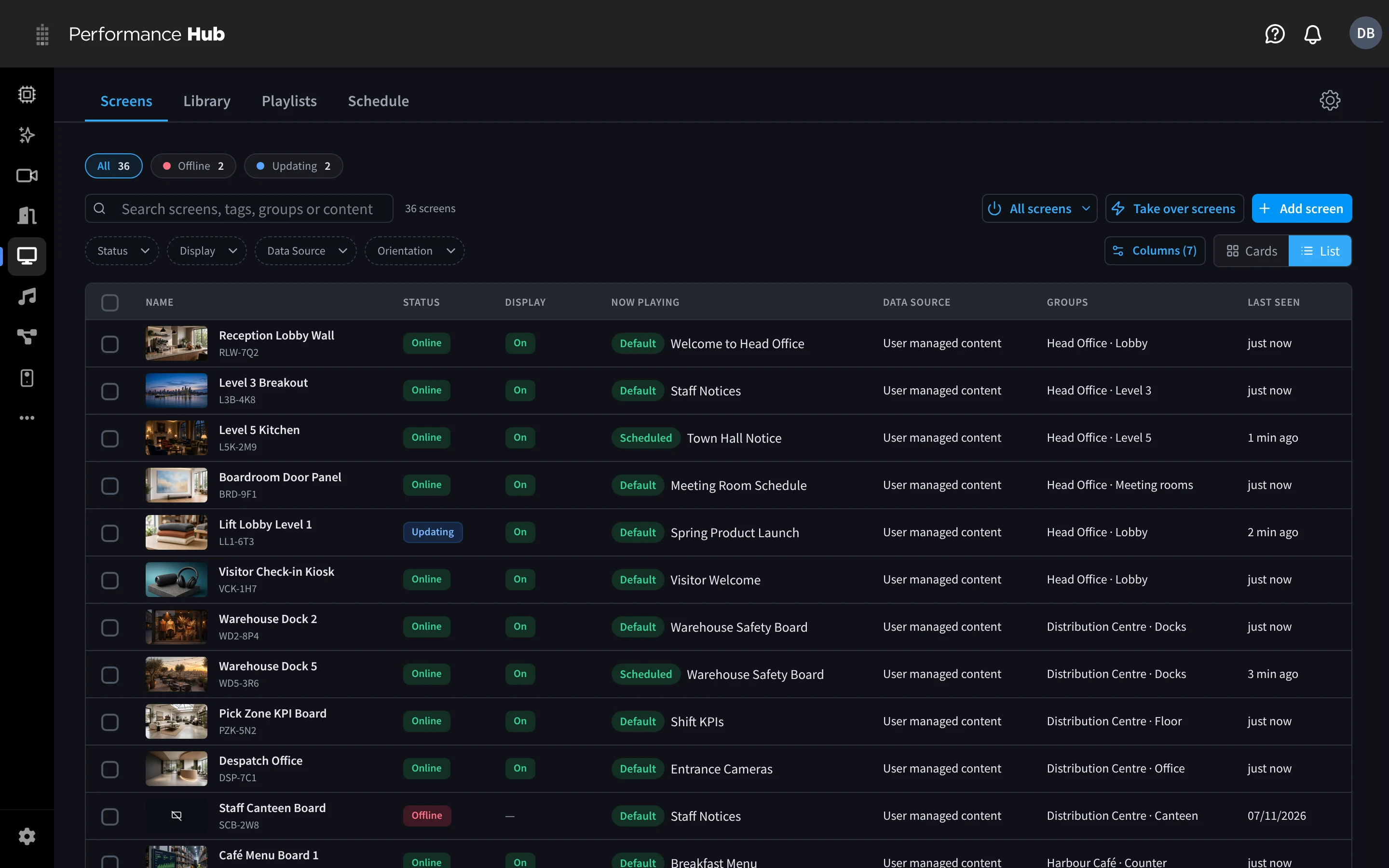
Fleet Inventory · Multi-Site Status, Groups & Live Heartbeats
Online · Offline · Updating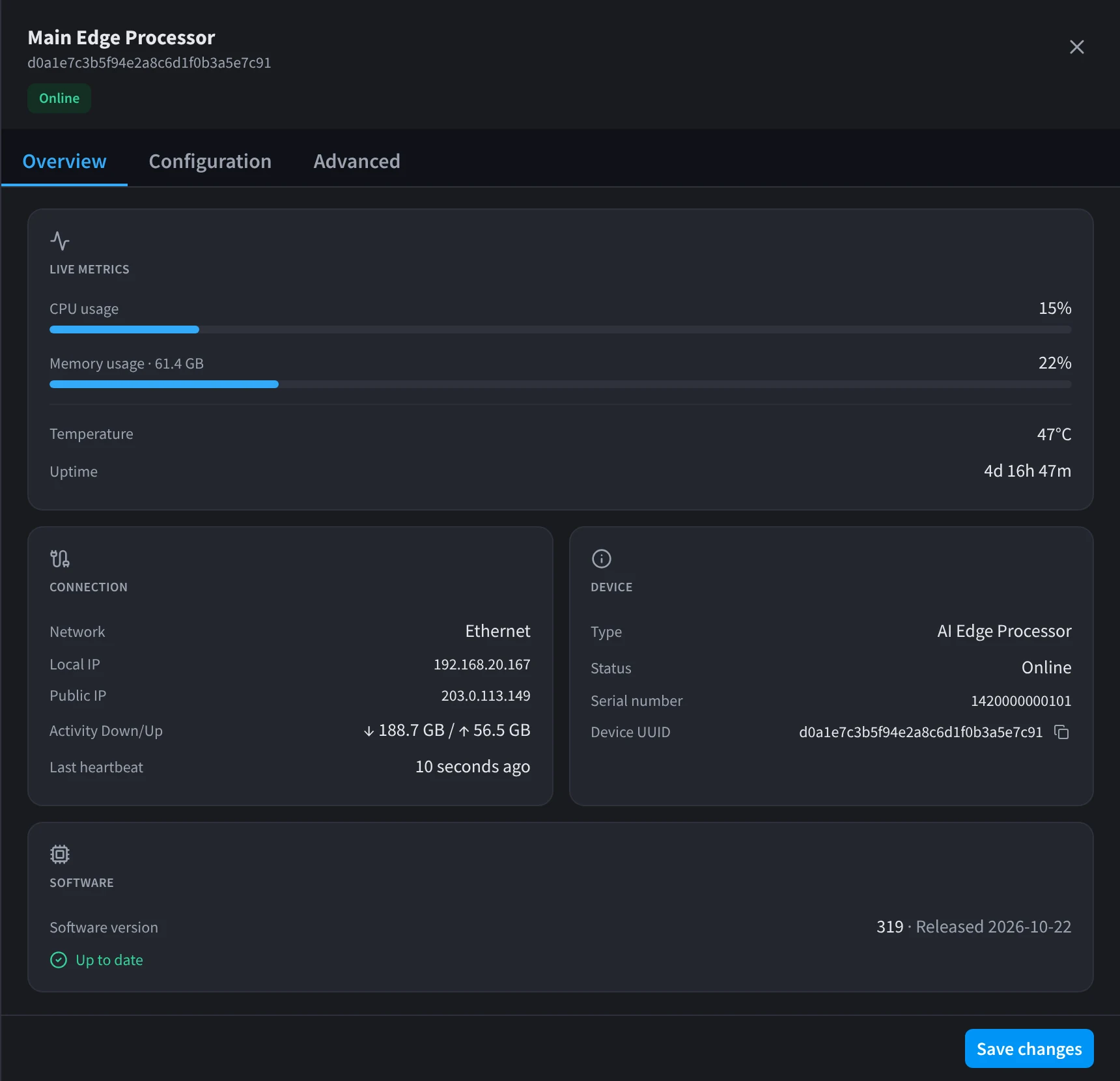
Device Management · Edge Processor Live Telemetry & Software Status
CPU · Memory · Uptime · Version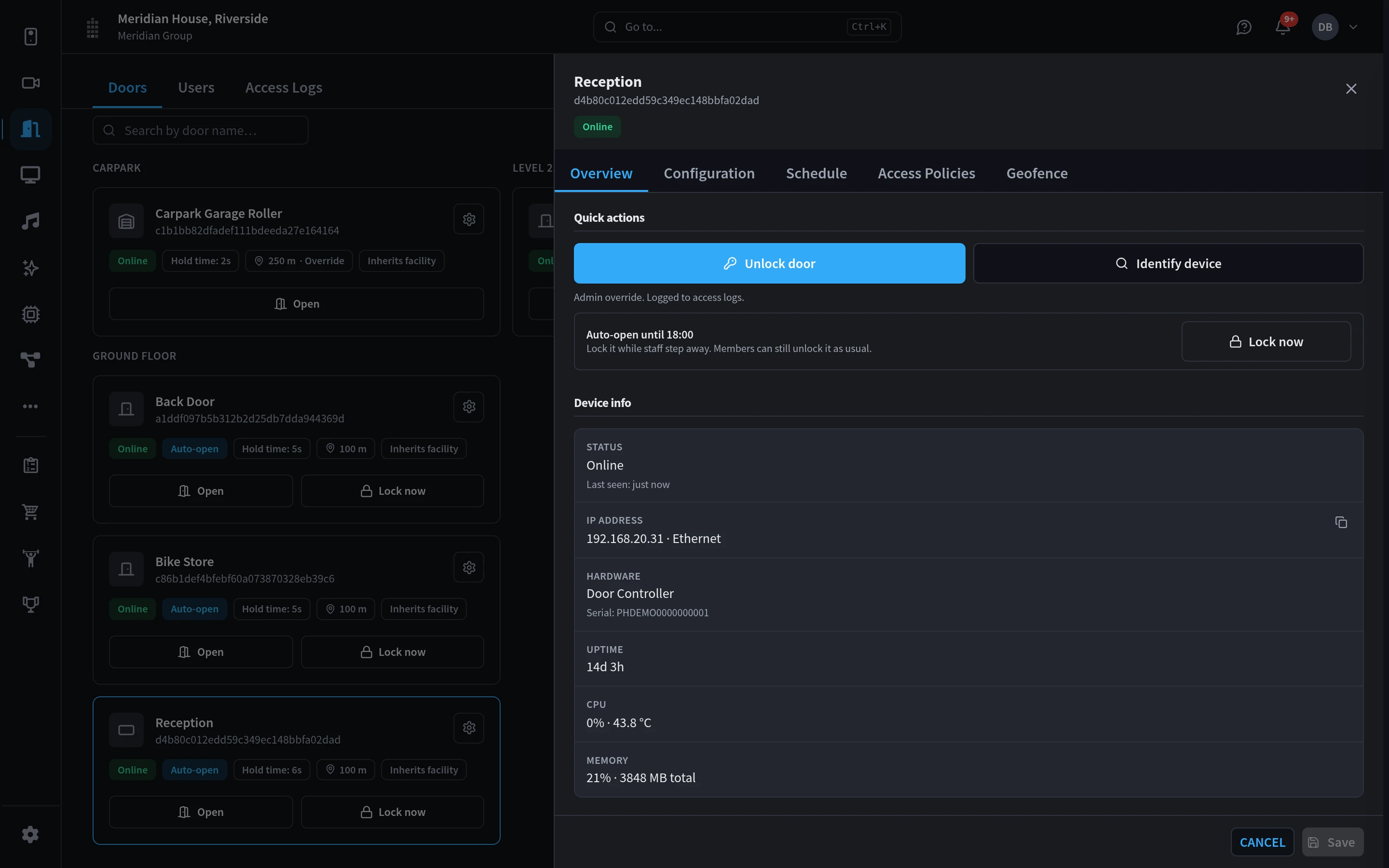
Device Management · Live Controller Health & Remote Controls
Online · Uptime · LocateClaim appliances and camera fleets at scale.
Fast RolloutsStand up a new site without sending a specialist engineer. Local staff or installers plug each appliance in and scan its QR code or enter its serial or pairing code. When adopting existing IP cameras onto an Edge Processor, import an entire site's camera list by CSV or Paste URLs and test every stream in one batch.
Separate building internet issues from device issues instantly.
Site Speed StripOn-site appliances automatically measure each facility's download speed, upload bandwidth, and latency and display the latest result above the device list. Support teams know immediately whether an offline alert is a building ISP outage or a single cable on the floor.
Monitor live health, connectivity, and room placement remotely.
Live TelemetryFilter your inventory by status, hardware type, room location, or network link (Ethernet, Wi-Fi signal %, or Bluetooth / LoRa), and toggle columns for CPU %, Memory %, Storage / Disk, Temperature, Local IP, Public IP, and Uptime. Network cameras appear cleanly indented beneath the Edge Processor that runs them.
Outbound-only security with zero firewall rules to maintain.
Zero Inbound PortsEvery appliance opens an encrypted outbound connection to Performance Hub using short-lived tokens derived from a per-device identity issued at pairing. You never configure port forwarding, dynamic DNS, or inbound firewall holes across your sites.
Fleet Operations at ScaleBulk SelectRemote UpdatesCross-Facility Transfers
Claim in batches, push updates overnight, and move hardware between sites in clicks.
Eliminate routine truck rolls and manual site visits. Run facility-wide operations from the Actions menu, use Bulk select across dozens of devices at once, or move paired hardware between locations in your organisation without re-imaging.
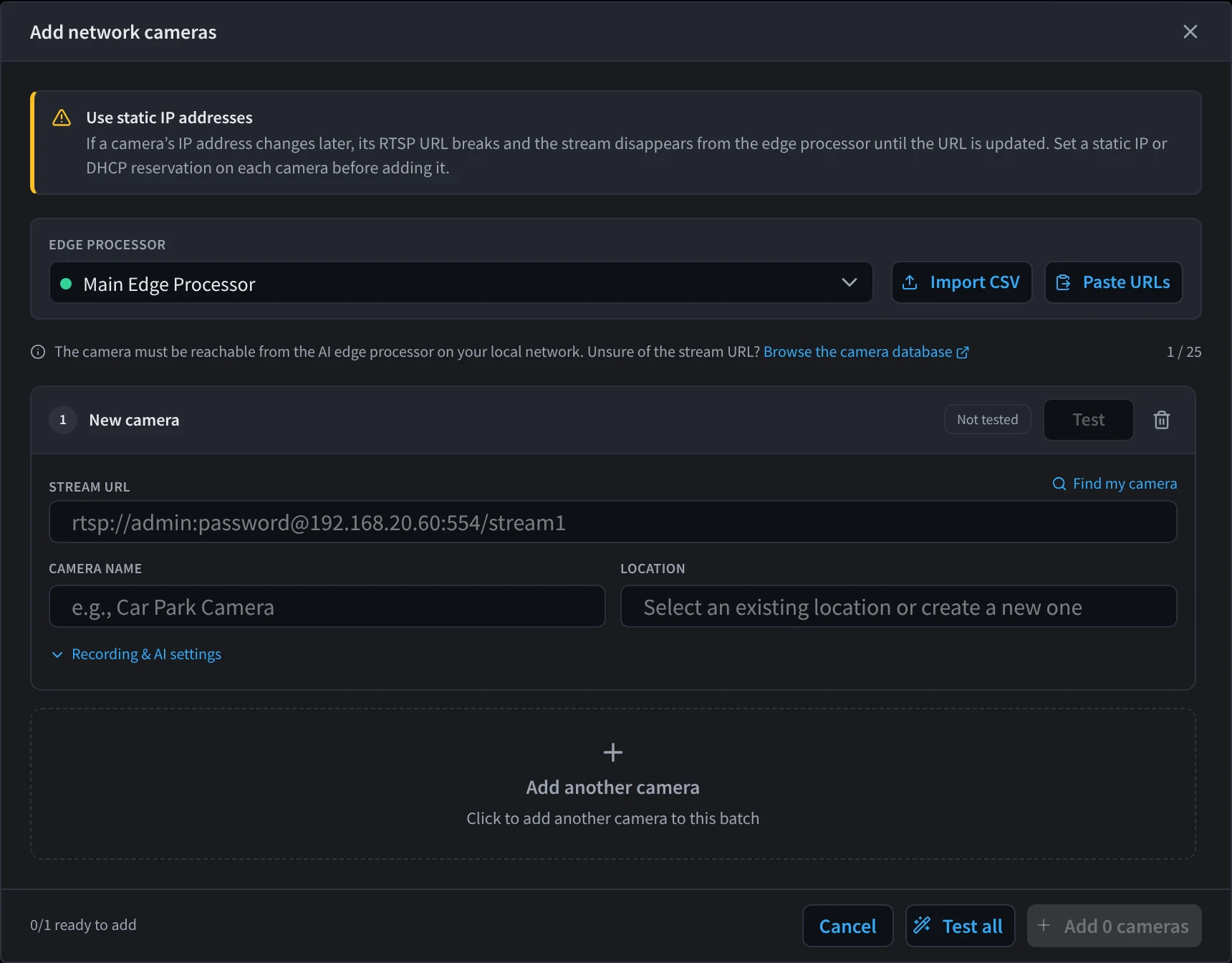
Device Management · Batch Camera Onboarding
Import CSV · Paste URLs · Test All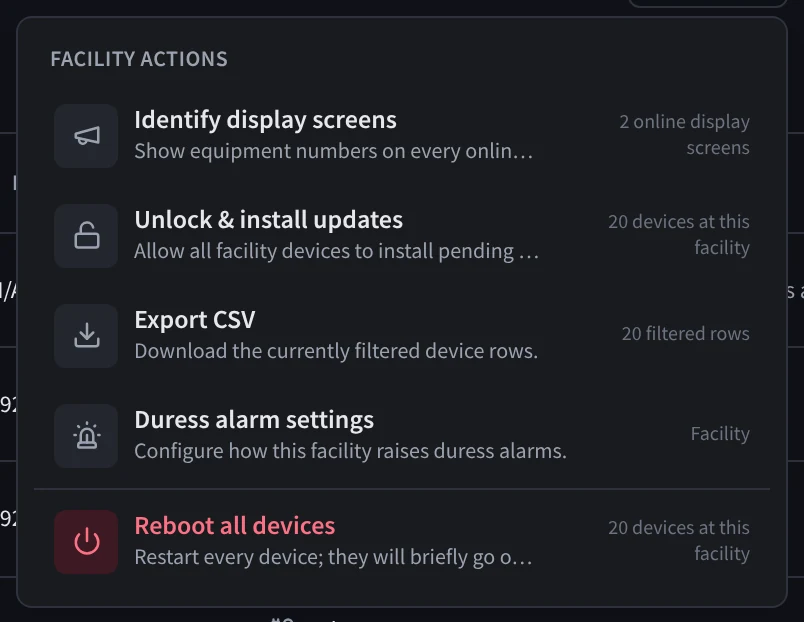
Device Management · Facility-Wide Actions
Updates · CSV · Reboot All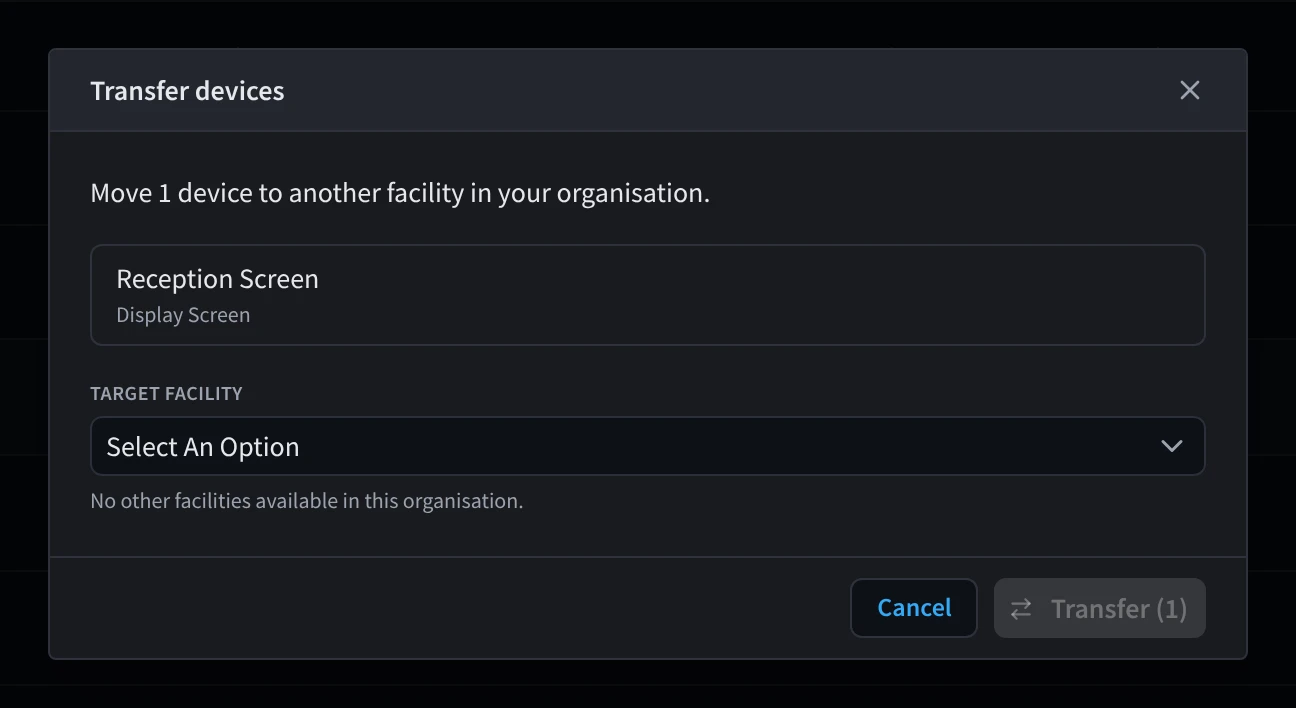
Device Management · Cross-Facility Transfer
Move Without Re-ImagingOvernight software updates that never disrupt trading.
Zero-Downtime UpdatesAppliances download software updates in the background and install them automatically overnight outside operating hours. When an update needs to go live immediately, click Unlock & install updates for a single device, a bulk selection, or every device at the facility.
Bulk actions with live progress and one-click retry.
Bulk SelectTick rows across your filtered list to Install updates, Reboot, Transfer, or Delete in bulk. If any selected device does not support an action, Device Management lists the exact skip reason, tracks completion in real time, and offers one-click Retry failed or Continue in background.
Remote troubleshooting from head office.
Facility & Advanced ActionsFlash on-screen equipment numbers across every online TV at a site with Identify display screens, manage stored Wi-Fi networks remotely, export your filtered device inventory to CSV for asset audits, or reboot a single device or an entire facility outside opening hours.
Cross-facility transfers and safe factory resets.
Transfers & DecommissioningTransfer moves devices to another facility in your organisation without re-imaging, carrying attached network cameras along with their Edge Processor automatically. Remove and factory reset revokes credentials immediately, wipes local data and saved Wi-Fi networks, offers a final backup for Agents, and requires typed confirmation.
IP Cameras · Commercial Displays · Sonos · Mobile & CarPlay
Pre-configured appliances that bridge the hardware already in your building.
Our five appliances connect outbound over Ethernet and talk locally to your existing RTSP/ONVIF cameras, HDMI commercial displays, Sonos speakers, and electric lock relays.
 Hikvision
 Dahua
 Axis
 Hanwha Vision
 Bosch
 Uniview
 Reolink
 Panasonic
 Vivotek
 TP-Link
 Pelco
 Honeywell
 Samsung
 LG
 Sony
 Pulse-Eight
 Sonos
 AirPlay (Apple)
 Apple CarPlayApple Watch
 Wear OS
Online ConfiguratorTransparent USD PricingGuided Scoping
Order standard site hardware online, or scope custom deployments with sales.
Configure Door & Gate Controllers and Edge Processors with regional power plugs and shipping in USD on the Order Hardware page, or talk to our team for Agent Processors, Display Screen Players, Duress hardware, and On-Premise Inference.
Self-serve on the Order Hardware configurator
Published USD Hardware PricesOrder Door & Gate Controllers (US$250 Standard Ethernet or US$390 Ethernet + Wi-Fi + 4G, plus optional US$7 PoE splitter) and Edge Processors (US$1,704 for 16, US$3,488.50 for 32, US$5,323.50 for 64) with US, UK, or AU/NZ power adapters. Monthly subscriptions start only when a device is activated on site.
Scoped with our team (Contact sales)
Guided SpecificationSelect Contact sales on the Order Hardware page or book a walkthrough to scope Agent Processors, Display Screen Players, Wireless/Wearable Duress Buttons & LoRaWAN IoT Gateways, Edge Processor Custom rack tiers, and On-Premise Inference nodes.
Common QuestionsHardware & Fleet Device Management
Common questions.
Answers on claiming hardware at scale, network requirements, bulk actions and software updates, moving devices between facilities, and when billing starts.
How do we claim and roll out hardware across many facilities?
Every appliance ships pre-configured. On site, local staff or installers simply connect power and network, select the location in the facility switcher, and open Device Management to scan the QR code or enter the serial or pairing code. For IP camera fleets, administrators can bulk-import cameras onto an Edge Processor via CSV or pasted URLs and test every stream in one batch.
Can we run updates, reboots, or exports across a whole facility at once?
Yes. Appliances install software updates automatically overnight so daytime operations are never interrupted. From Device Management, you can also open Actions or use Bulk select to unlock and install pending updates immediately, reboot selected devices or an entire facility, identify all display screens on site, or export your filtered inventory to CSV.
Do we need static public IP addresses or port forwarding at our sites?
No. Every Performance Hub appliance initiates an encrypted outbound-only connection to the cloud using short-lived device credentials. You never need inbound firewall rules, port forwarding, dynamic DNS, or public static IPs.
Can we move paired hardware from one facility to another?
Yes. Open the device's Advanced tab and click Move to another facility (or select multiple devices in Actions under Bulk select and choose Transfer) and select the target facility in your organisation. Network cameras attached to an Edge Processor move with it automatically.
When do monthly device subscriptions start billing?
Monthly software subscriptions begin when your device is activated during installation at your facility, not when you place the hardware order on the Order Hardware page.