An AI employee that lives in your facility.
A physical appliance on site that holds its own memory, keeps its own files, runs its own schedule, and plugs straight into your Performance Hub data. It knows your operation, remembers what matters, and works while you sleep.
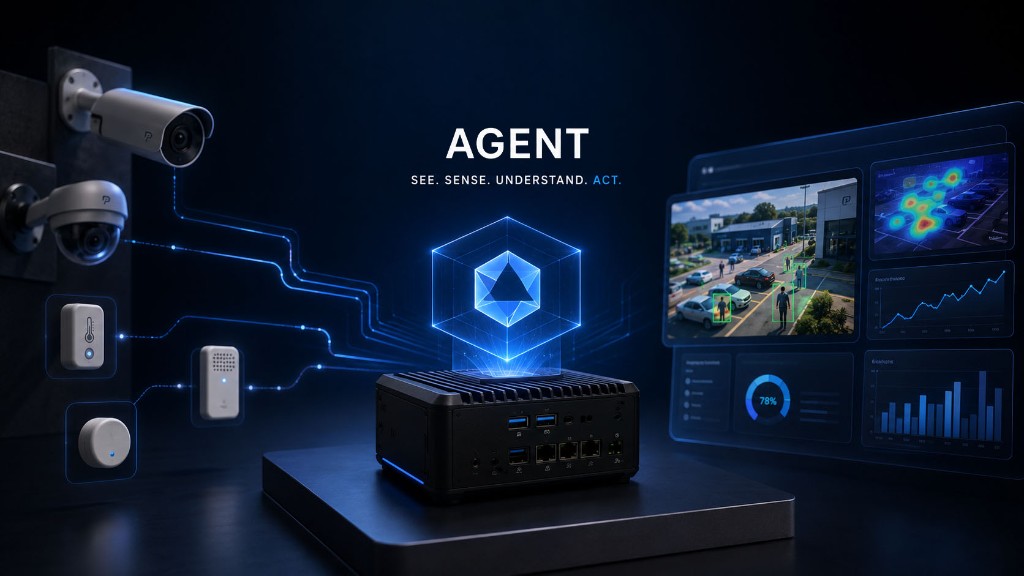
Knows your operation
Direct access to core software systems and hardware, scoped to exactly what you grant it, to give you full access control.
Remembers what matters
Builds long-term memory of you and your business that isn’t limited to your conversation, project or model provider.
Works unattended
Scheduled tasks prepare your morning briefing overnight, and watchdogs notify you only when something is wrong.
Working with your agent.
Brief it like a colleague
Ask it for insights, patterns, device health or status updates and get answers from live data. If there’s an issue, tell it to take action and report back when it’s done.
It asks before it acts
Reading your data is one thing. Unlocking a door is another, so the agent checks with you first unless you asked for that exact one. Every unlock it makes lands in the access log beside the human ones, with a reason and the person it acted for.
Teach it once
Walk the agent through a workflow and it saves it as a skill it can run again. Where it notices itself repeating work, it writes the skill without being asked. Over months that becomes a library of how your site is actually run.
It splits the work up
For larger jobs the agent spawns subagents, each taking one part and working in parallel. Their results come back to it, not to you, so you brief it once and get one answer.
Nothing is throwaway
Come back a week later and the full history is waiting. The agent picks up where you left off instead of starting from nothing, and every message stays attributed to a Performance Hub identity.
Integrated on day one
The agent arrives already able to work with hundreds of platforms: email, calendars, accounting, messaging, CRMs. There is nothing to install, no API keys to obtain, and no integration project. The first time it needs one of your apps, you approve access with a single sign-in, and it never asks again.
You grant access, not passwords
Connecting an app is one click on that app's own sign-in page. The agent never sees a credential, only a permission scoped to exactly what you allowed. Revoke any connection in one click, and one person's accounts are never visible to another.
You set the boundaries
Decide who can use the agent and which facilities and modules it can see. Access, budgets, and limits live in the Agent module, not in a second admin panel.
The agent handles the routine. You handle the judgement.
Works with the tools you already run.
Over 700 connectors, ready before the box is opened. There is nothing to install, no API keys to obtain, and no integration project to run. The first time the agent needs one of your apps, you approve access with a single sign-in on that app's own page, and it never asks again.
 Gmail
Gmail Outlook
 Google Calendar
 Google Sheets
 Google Drive
 Slack
Slack Microsoft Teams
 WhatsApp
 Xero
Xero QuickBooks
 Stripe
 Shopify
 HubSpot
 Salesforce
 Mailchimp
 Notion
 Trello
 Asana
Asana Zendesk
 Intercom
 Zoom
Zoom Dropbox
 Canva
Canva Calendly
A small sample of the catalogue. If something you rely on is missing, your agent can build the connection itself.
Software agents stop at the screen. Yours does not.
Every other agent platform connects to your apps. Performance Hub connects your agent to the physical environment: the cameras, doors, gates, and sensors that already run your site. It sees what happens in the room, and it can do something about it.
What it can see
- People counting, dwell time, and zone activity from Computer Vision, live.
- Every door and gate event: who entered, when, and whether they were allowed.
- Camera feeds and recordings through the CCTV module.
- Environmental and IoT sensor signals from the devices on site.
- Controller and device health across every location.
What it can do
- Unlock, lock, or identify a door or gate.
- Push a message to the displays and audio in the space.
- Raise an incident, notify a human, and log the evidence behind it.
- Build the report or the dashboard, and serve it from the appliance.
- Run any of it on a schedule, or the moment a sensor trips.
Three ways to get AI agents into your business.
It's the same agent in every deployment - the only decisions are where the agent lives and where its models run. Every path goes through the Model Router, so switching later doesn't mean starting again.
01
On-premise agent, cloud models
The appliance in your building, routing through the Model Router to hundreds of models from the leading providers on one prepaid balance. The agent, its memory, and your operational data stay on site - the way most businesses start.
Explore the Model Router02
On-premise agent, on-premise inference
The agent and the models both inside your four walls: it routes through the Model Router to your own Station-class node or rack, and prompts never leave the building. The deployment for work that can't go to the cloud.
Explore On-Premise Inference03
Cloud agents, on demand
The same agent hosted by us - scale from one agent to many on demand, with nothing to install. Pair them with the cloud catalog or with your own on-premise inference; either way, routing stays with the Model Router.
A turnkey product, not an integration project.
01
It arrives ready
A compact, fanless appliance, set up before it ships. There is no software to install.
02
Pair in minutes
Scan the pairing sticker and the agent appears in Performance Hub.
03
Grant its scopes
Choose which facilities and which modules the agent is allowed to read.
04
Put it to work
The onboarding wizard walks you through models, spend, notifications, and scheduled tasks.
What arrives in the box
Agent Processor
A compact, fanless appliance that ships ready to go, with power supply and pairing QR included. Ethernet recommended, Wi-Fi setup via temporary hotspot, optional HDMI status display.
Models included
Pre-wired to our router so you get access to hundreds of models out of the box. Requests can be auto-routed to the best suited model or manually selected. There are no API keys to obtain, rotate, or pay for separately. Spend is metered per-agent with daily, weekly and monthly caps. Credits can be topped up automatically or manually, giving you complete control over costs.
Active memory
Some agents have passive memory systems. They recall what you have discussed and what you have uploaded and curated for it. Our Agent has an active knowledge system: it writes to a file system, builds a searchable wiki, and uses a semantic memory engine based on neuroscience that indexes everything it learns across every session for concept-level recall months later.
Connected on arrival
Over 700 connectors to the platforms you already use: email, calendars, accounting, messaging, CRMs. Ask the agent to work with an app and it finds the right action itself, and connectors are maintained centrally so they keep working as vendors change their systems. If something is missing, your agent can build it for you.
Backups and updates
Automatic, encrypted, hourly backups to the cloud regions you choose. Device health, metrics, and updates are managed from Performance Hub alongside your other modules.